Two monitor RDP to host with two monitors, NOT one gigantic desktop
Two monitor RDP to host with two monitors, NOT one gigantic desktop

I have some software installed on my client and other software installed on my host.
I need to use both environments at the same time, actively working in and switching between apps on both the client and host.
Is it possible to somehow maximize RDM across two client monitors and RDP to a host that then recognizes two monitors instead of one gigantic desktop?
If not with RDM alone, then RDM supplemented with addons and/or extra software on your client and/or host?
Like this:
1) Start RDM on your client and maximize across two monitors (blue color)
2) This leaves your client taskbar fully visible and functional (red color)
3) RDP to your host
4) Your host is now using a two monitor setup, *NOT* a single gigantic desktop (purple color)
5) Your host taskbar is fully visible and functional (green color)
Seeing both taskbars at the same time will enable you to see client notifications immediately, even though you are working actively on the host.
Having the host thinking that there are two monitors, with desktop dimensions adjusted to fit within RDM, alternatively scaled, will allow you to work with two monitors on the host as you normally do.
You can use Windows' normal hotspots, e.g. drag a window to monitor two and then to the top of the desktop will maximize the window on monitor two.
Not what I want:
I can almost get this setup, except that the host thinks that there is one gigantic desktop.
Maximizing a window on the host will therefore maximize it across both monitors, and that is not what I want.
Not what I want either:
Alternatively, I can run RDM in full-screen on the client, filling both monitors completely, but hiding the client taskbar at the same time.
That will get the host to recognize a two monitor setup, but I am no longer able to fully utilize the client, as RDM hides everything.
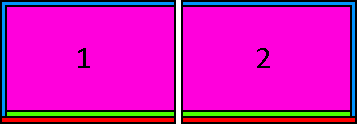
two-monitor-rdp-to-two-monitor-host.png
All Comments (3)
I need to check this out next week.
In Windows 7, if you want to do a true multi-monitor remote desktop session, both the local and remote machine need to be running Windows 7 Enterprise or Ultimate. If you're using a different version, you can still span the remote desktop session across all of your monitors, but it will be treated as one large display. Using DisplayFusion, you can split that spanned session into smaller virtual monitors.
http://www.displayfusion.com/KB/RDPWithSplits/
Hi,
I have verified and their is nothing in the UI Framework we use to help you. I will enter a feature request and keep an eye on it.
Regards
David Hervieux
Thanks, it will make working on both machines at the same time viable.
I will post back my experience with DisplayFusion when I get the time to test it.