RDP Redirect Drive

Hello,
The redirect hard drive doesn't work with RDP, I use the lastest version of RDM for MAC.
I have tested all options but without success.
Do you have an idea?
Thanks a lot,
Christian
All Comments (7)
PS : I use the free version
edited by csc@esi-informatique.com on 8/7/2015
Hello Christian,
Have you tried to use the RDP Engine 2.0? Benoit is currently on vacation but he should be back in 1 week. He is the developer that could help you debug this. By the way it should work fine even in with the free edition.
Regards
David Hervieux
Hi Christian,
I've just tested with our latest release and it worked for me. Could you try it? http://mac.remotedesktopmanager.com/Home/Download
If it doesn't work could your tell me what version fo Windows are you trying to connect to?
Do you use a Gateway?
Best regards,
Benoît Sansregret
Hi,
Sorry but doesn't work for me.
I use Microsoft Remote Desktop 8.0.20 (Build 26704)
I'm not using gateway only redirect folder Desktop to Computer on Windows Server 2008 or 2012.
Hi,
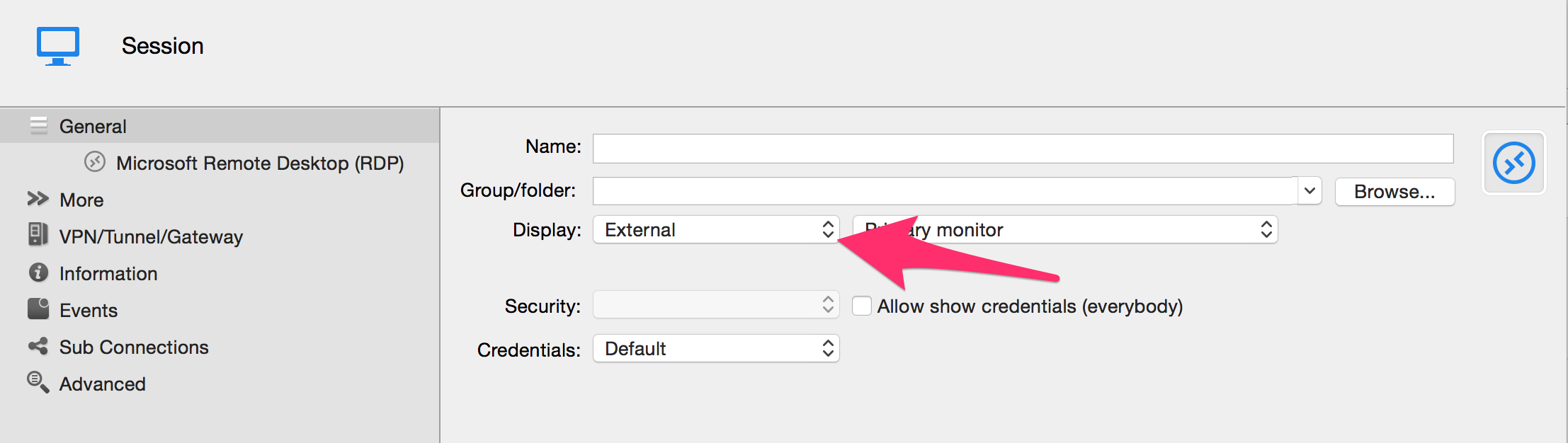
From what you are mentioning you are using the External Display mode.
Am i right?
If this is the case we found a bug preventing the drive redirection to work. It will be fixed in the next version.
Best Regards
Benoît Sansregret
External.png
Ok, I understand Now.
If I use embedded mode, that's work!
Thanks for your jobs :)
Christian
If anyone stumble to this thread I wanted to add that we found a limitation with Microsoft Remote Desktop.
Currently, the drive redirection is limited to the home folder and we can't select the folder specifically.
Benoît Sansregret