Barracuda NG Firewall Add-on

Good Evening,
I am trying to use the RDM add-on for Barracuda NG firewall.
If I understand the article about it correctly it should fire up the Barracuda NG Admin client on my PC as an external application.
I downloaded the latest version (6.1.1.82) and pointed the NG Firewall add-on at the folder the .exe is located in; however instead of loging me in I receive an RDM error to the effect of "Unable to find Barracuda NG Firewall executable!!!".
I'm guessing I have to name the .exe a certain way for this to work. So my question is......what do I need to name the .exe. file?
I couldn't find anything in the online help and a forum search for "barracuda" also left me non the wiser.
Any guidance will be greatly appreciated.
Regards,
Byron Edmonds
All Comments (15)
Hi,
We are looking for ngadmin_*.exe
Could you verify what you have in your Barracuda install directory?
David Hervieux
Could you post a print screen of the path configuration for Barracuda in File->Options -- Path
Regards
David Hervieux
Certainly.
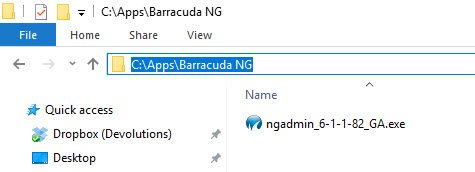
Here is the path where the .exe resides:
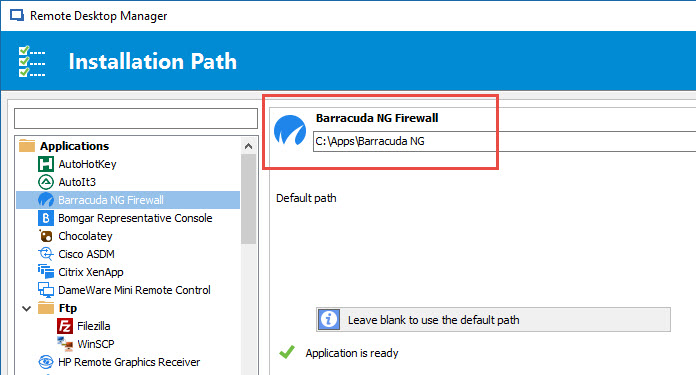
And here is the path configured in RDM:
Regards,
Byron
Looks like the configuration is good. Could you try to restart the application?
What RDM version do you use?
David Hervieux
This addon does not work. I get the same error as above. Its looking for something other than Ngadmin_*.exe.
Could you post a print screen of what you have in the installation folder?
Regards
David Hervieux
Hi
The very same problem here
I tried lots of option, at this moment for eample, I have in
C:\Program Files\barracuda>dir
Volume in drive C has no label.
Volume Serial Number is 9A25-8B6C
Directory of C:\Program Files\barracuda
06.04.2017 11:24 <DIR> .
06.04.2017 11:24 <DIR> ..
22.03.2017 22:49 21 526 000 NGAdmin.exe
1 File(s) 21 526 000 bytes
2 Dir(s) 92 870 914 048 bytes free
but still:
unable to fin Barracuda NG FIrewall executable!!!
to be honest, I set even empty folder, and addons showed that everything is ok.
kw
Hello,
Does your executable of Barracuda looks like mine?
Did you also specify the installation path for Barracuda in File -> Options -> Path?
Best regards,
Jeff Dagenais
2017-04-06_11-02-13.jpg
2017-04-06_10-55-48.jpg
I have the path set to a folder under the C drive. Its just a folder we create for every machine and it holds IT tools. The NGAdmin_version_.exe is one of them.
If the addon could be changed to point directly to the EXE that would probably fix it.
I have the path set for the barracuda addon to
C:\Tools
In that Folder I have the executable
NGAdmin_7.0.1-101.exe
I am running 12.0.8.0 RDM Enterprise.
HI
I did
1. the same folders strucures like You, but It didnt help
2. changed file name from ngadmin.exe to NGAdmin_6-1-1-82_GA.exe (my version is 7.0.2, but I changed to Yours any way)
and point 2 fix the problem, but this means, its looking some specyfic file name for ngadmin.exe
kw
We will try to improve the add-on
Regards
David Hervieux
Just have it point to the executable. It changes with each version of the firmware you are on. So instead of a path we just point to the exact EXE we want to use.
Hello,
For people having issues with the executable not being found, you should be able to override the executable file name by going in the advanced tab of your Barracuda NG Firewall entry and selecting the "global options" button, then setting the executable to whatever is appropriate.
Regards,
Hubert Mireault
2017-04-11 11-37-10 AM.jpg
Hello,
thank you for this.
It works for me. I had this Problem since I used this program.