Can I hide a tab but still view the info if needed?

Hi,
We use some SSH connections to access some of our servers. I'd like to not have the SSH connection open a tab across the top of the page but only be accessed from he tree view on the side.
I found that I can go into the SSH properties and under User Interface I can set the Visibility to False. This successfully removes the tab and shows the connection as Green when it's connected. However, I can't seem to find any way of manually viewing the information for that connection. Is there some way to view it when Visibility is set to False? Is there some other way to hide it from the tab bar?
If everything is working, I should ever have to see what's in the SSH tab but if we have a problem, I'd like to be able to go find it in the tree and manually view the information so I can see what's going on.
Thanks.
All Comments (4)
Hello,
If you set a "tab page category" in the more tab of the session, it will create buttons above the tabs to filter sessions by that category. Maybe you could give this a try to see if it works for you.
Maurice
That's what we are doing currently but we have an annoyance that when you disconnect from a server it flickers to the SSH tab momentarily as that disconnects and then redisplays all the tabs every time.
Hi,
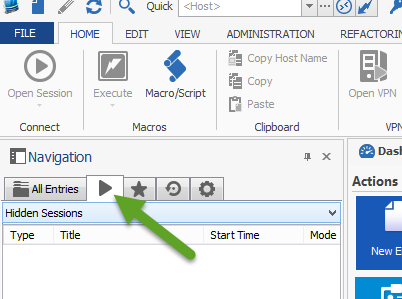
You can see the hidden tabs in the Opened Session section if you select Hidden Sessions.
David Hervieux
HiddenSessions.png
Oh cool. I'll take a look at that tomorrow.
Thanks.