How remove/ hide Details from UI

Dear All,
Please could you indicate how to remove the Details and other options at bottom of UI?
Maybe just me being frustrated by this setting not being present in "View" with other layout settings.
Thank you,
All Comments (6)
Hi,
Just click the X to remove each panel. Sometime we see some ghost panel in this case just click on Reset Layout in the Windows ribbon and remove each panel with the X.
Unfortunately we don't have a way to delete the bottom panel automatically since it's a group of panel that can change depending on how you organize them.
Sorry about that.
David Hervieux
Thank you for your reply.
Sorry, the answer is not clear to me.
You mean, we cannot remove the bottom toolbar as indicated below?
https://goo.gl/Y1H9Pd
The objective is to have as large a screen possible for the remote system one work on. No bottom or funky bars.
It use to be perfectly fine in older versions. I believe +- 1-2 years past. It only became an issue at some point due to complete layout rebuild. I dread installing Devolutions on fresh machine since the UI was rebuild. A real quest to try remove all extras from UI.
Your help is appreciated.
Hi,
Have you tried to click on the Footer
Just press once to make it visible when it's set to auto hide and press again to remove it completely
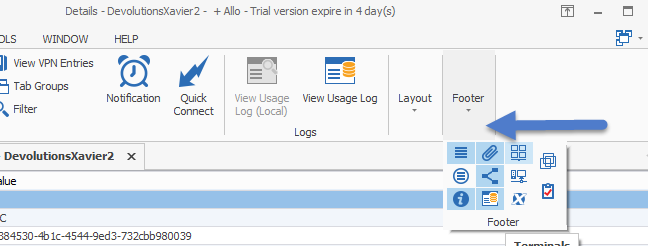
David Hervieux
Footer.png
I forgot to mention that the footer is in the View ribbon
David Hervieux
You can change it the classic UI in File->Options
http://help.remotedesktopmanager.com/view_uistyle.htm?zoom_highlightsub=classic
This UI is not customizable.
David Hervieux
Thank you very much. This solved the issue.
Using the old/ classic UI as per your instructions.