Help needed with auto login

Hi ,
We currently have 2 pages which are giving us lots of issues to perform the autologin. Username is populated just fine, but it doesnt seem to be populating password and its not doing automatic login either.
Here's the code snippet:
<form action="/hloginPost" method="post" name="login_form" id="login_form">
<div class="clearfix">
<input type="hidden" name="autoLogin">
<input type="hidden" name="checkFlag">
<input class="user" type="text" placeholder="Username" name="username" />
<script language="JavaScript">
if(usernameEx == null || passwordEX == null || delStatus == "D"){
document.write("<input class='pass' type='password' name='password' placeholder='Password'/>")
}else{
document.write("<input class='pass' type='password' name='password' />")
}
</script>
<input class="accept" type="submit" value="Login" onclick="javascript:validateLoginForm()"/>
<script>
$('input[placeholder], textarea[placeholder]').placeholder();
</script>
</div>
</form>
Any help is appreciated
edited by nkosec@thehackettgroup.com on 7/27/2015
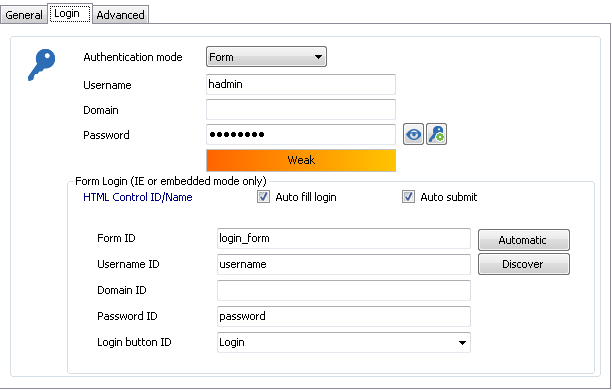
Devolutions.PNG
All Comments (7)
Hello,
What browser is being used?
How did you get the names filled out, did you use the discover button?
Maurice
Hello,
We are using embedded IE, discover option was used.
perfect, the topic has been assigned to our king of browsers ;)
Maurice
Hi Nicolas,
It seems that something wrong is happening when embedded IE is parsing the website to find the password field. Unfortunately, we can't modify the parser in embedded IE.
The website should work in Embedded Chrome or with the browser extensions. ( http://remotedesktopmanager.com/Home/ExternalAddOns )
Best regards,
Olivier Désalliers
Hi Olivier,
Thanks for your reply. I have tried embedded chrome however Auto-fill in and login is not working. If I manually click the "Fill in credentials" button it will populate the fields. But it isnt happening automatically. Is there anything I am missing here?
Thanks,
Nicolas
Hi Nicolas,
Could you try to send your credential using a typing macro.
Please have a look at this help topic
http://help.remotedesktopmanager.com/howto_typingmacro.htm
Best regards,
Jeff Dagenais
Hello,
The username and password are grabbed from the Login tab. See the print screen at the top of the topic.
Best regards,
Jeff Dagenais