Locked out

Hi all
Our RDM is linked to the AD to control the user permissions. In the administrations tab we tried to assign and remove priviledges on some Security Groups without success. Everytime the permissions reverted back (after close and reopen of the window).
After this we sadly removed the "Administrator" tick on the Admin Role (this is a group in our AD). Now we are locked out. My admin user doesn't have eaugh rights to change the Roles/Users/SGs. Is there any way to get back in?
Regards
Jake
edited by matthias.jeker@gmail.com on 7/20/2015
All Comments (5)
Hi Jake,
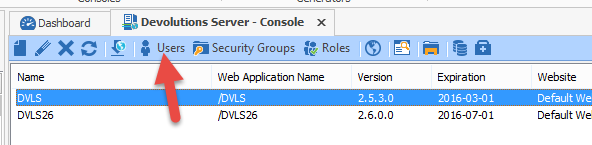
Could you start RDM as an administrator and click on Tools -> Devolutions Server Console. Select your Devolutions Server instance and click on Users.
You should be able to setup the Admin role to your user.
Best regards,
Jeff Dagenais
2015-07-20_13-56-33.png
Hi
Thanks a lot for your fast feedback on this! With which kind of administrator I have to start RDM? Windows Domain Admin?
There was a group with five users which had admin privs. There is no other group. So I can't use another RDM admin account.
Regards
Jake
Hi Jake,
You would need to create a new SQL Server data source in RDM (File -> Data Sources) and connect on your Devolutions Server SQL database using the SA account.
Now, you should be able to tick the Administrator box in your user profile.
Best regards,
Jeff Dagenais
Okay, thanks! What happens if we create a new data source file? Will we loose all of our current data (about 4000 entries)?
The SA account is a Windows Account which is not controlled by RDM, right? I should be able to find it in our AD.
Sorry for my stupid questions. I'm from the network team and sadly not familiar with this server stuff.
Hi Jake,
Devolutions Server use a SQL database in backend to store the data, so by creating a new SQL Server database link to the database of your Devolutions Server will connect you to the database directly.
SA is the system administrator account of the SQL Server.
Best regards,
Jeff Dagenais
