Data Source Empties When Choosing to Edit Session Properties
Data Source Empties When Choosing to Edit Session Properties

Hey Guys -
Thanks for the great app - I love it! I try to stay on the newest release if possible and for the past month or so, I've been having an issue which hasn't been resolved in the past couple of updates. I saw a similar issue in forums today, but as it wasn't the same as mine, created this new post:
The Issue
When going to edit the properties of a session, I right click on it, choose Properties, and instead of the Properties dialog box appearing after a couple of seconds; the entire session list empties / is blank. (Below after issue occurs)
I don't often edit sessions, but the issue doesn't occur every time I follow the steps. In the past month, it's probably occurred about 10 times. To resolve, i simply have to exit out of RDM completely and reopen it. Also, it's happened in two separate environments so know it isn't machine-specific. Below are the specs for the main environment I'm using:
- Windows 8.1 x64 (Fully Patched)
- RDM Enterprise 10.6.7.0
- Devolutions Online Drive DataSource
- Had 3 RDP sessions open at the time in embedded tabs
I looked through the "Devolutions" folder in both AppData folders, but only found a single log file - Connections.log - which didn't list anything abnormal. It only showed past connections which none were taking place at the time of the last event.
That's about it. If there's anything you'd like for me to try or files to submit, please let me know.
Thanks!
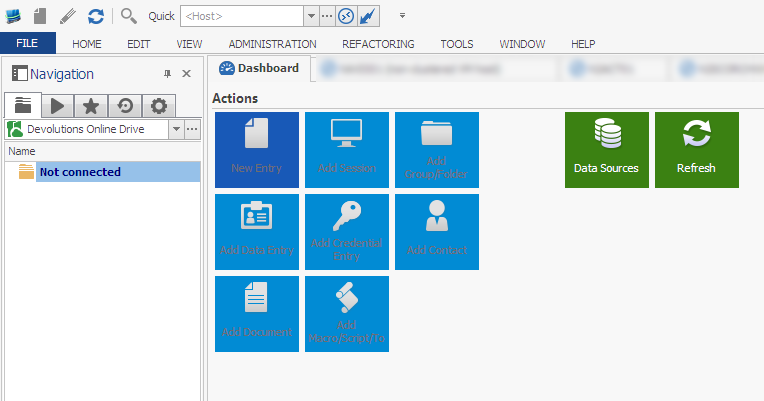
RDM.png
All Comments (7)
Hi bzowk,
The next time the issue occurred, could you try to do a CTRL+Refresh to see if the sessions reappear.
Best regards,
Jeff Dagenais
Good Morning -
Thanks for the reply. It just occurred again about a minute ago. I tried clicking the "Refresh" icon as well as "Ctrl" + "Refresh" which caused the window to flicker for a split second, but nothing changed and my data did not come back. I'm moving to another session for a while and leaving this as is in case you can reply soon with another suggestion.
Thanks
Hello,
Do you have the Allow offline mode checked in your Devolutions Online Drive data source configuration?
If yes, could you try to uncheck this option.
Best regards,
edited by jfdagenais on 7/16/2015
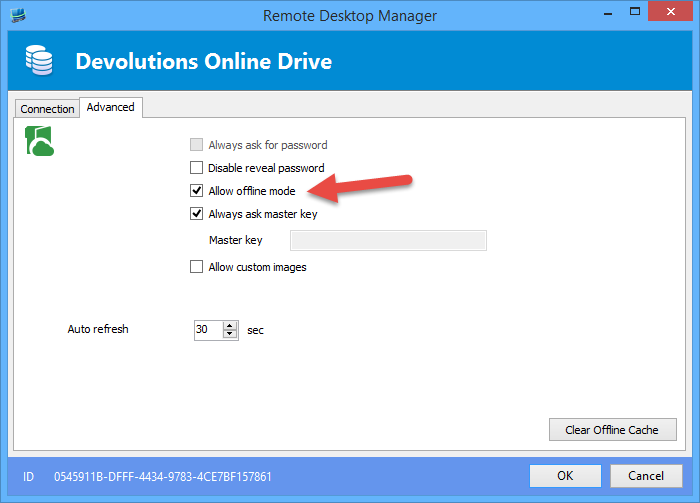
Jeff Dagenais
2015-07-16_12-34-50.png
No, but it is now. Actually, after editing the data source, enabling it, saving, and exiting the menu; the data source was again empty. i closed out of RDM, reopened it, and it was again back to normal...
Hello,
Have you tried to create a new Devolutions Online Drive data source with a different filename?
ex: connections2.dod
Best regards,
Jeff Dagenais
Just reread what you wrote. It wasn't checked before and I recently checked it. Don't know if related, but about 5 minutes after doing so, I was remoted (RDP) into a server and RDM locked up completely. I'll disable the option now. As for rebuilding it, you mean the entire store? As mentioned before, I experience this on 3 different computers which use the same data source.
Thanks
Hello,
Yes, I want you to create a new Devolutions Online Drive data source to see if the problem is not related to the first one that has been created.
To transfer your data, please have a look at this topic - http://help.remotedesktopmanager.com/tipsandtricks_data_migration.htm
After the creation and the configuration of this new data source on your computer, just make sure that your 2 other computer are properly connected to this new data source.
Best regards,
Jeff Dagenais