Form Auto submit

Hi,
unfortunately the auto submit function doesn't work with my configuration.
Auto fill works, but no automatic login, although I already put "[submit]" in the login button ID.
Of course I use IE with embedded mode.
Any idea? I don't find anything in the documentation.
Here's my configuration... Did I forget anything?
Thanks for your help.
Regards
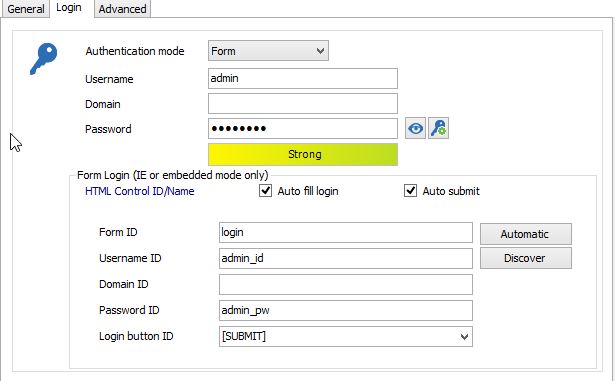
auto_submit_rdm.jpg
All Comments (10)
Hello,
The [SUBMIT] command is just a macro that tells us to do our best to find the submit control and to trigger it. Depending on the HTML constructs of the login page we may not be able to achieve this.
If the site is public, send the url to us and we'll have a look.
Alternatively send us the source of the login page.
Best regards,
Maurice
Hi,
the site isn't public, but here is the important source part of the login page (imho):
<table bgcolor='' background='' border='0'> <tr align="center" valign="middle"> <th align="right" style="color:white;font-size:10pt;">Admin Name: </th> <td align="left" style="color:white;font-size:10pt;"><INPUT type=text name="admin_id" tabindex="1" SIZE="21" MAXLENGTH="31" VALUE=""> </td> </tr> <tr align="center" valign="middle"> <th align="right" style="color:white;font-size:10pt;">Password: </th> <td align="left" style="color:white;font-size:10pt;"><INPUT type="password" name="admin_pw" tabindex="2" onFocus="testSelect();" onChange="checkPassword();" SIZE="21" MAXLENGTH="31" VALUE=""> </td> </tr> <script language="javascript"> write_one_check_box("save_username_info"); </script> <tr align="center" valign="middle"> <td> </td> <td align="left"> <INPUT type="button" value=" Login " onClick="checkIt();" tabindex=\ "4\"> </td> </tr> </table>
Regards
edited by j.worobij@goetz-fm.com on 6/16/2015
hmmpf,
The input button has no class nor ID. The button's caption has blank spaces before and after the "Login" label.
We'll ask Olivier to have a look at this.
edited by mcote on 6/16/2015
Maurice
Hi,
You need to put the value of the input button login because the button doesn't an ID and/or Name. In your case, it's Login and according to your sample there is one space at the beginning and one at the end of the value, don't forget them.
Best regards,
Olivier Désalliers
Hi,
ah I understand and now it works fine.
But I'm sorry .. with the next login, there is the next problem.
Source code:
<td>
<input name="password_work" type="password" size="50">
<input name="password" type="hidden" value="">
</td>
</tr>
<tr height="3">
<td colspan="2"><img src="/images/spacer.gif" height="3"></td>
</tr>
<tr>
<td></td>
<td>
<input type="submit" value="Login">
</td>
</tr>
</table>
In this case the value is "Login" (without spaces), but it doesn't work.
Any idea?
And a problem with HP iLO 3 Login. In this case rdm put "ID_SPNEGO" as login button id.
Instead of the automatic login, there is a windows prompt, where i have to put in user and password again.
Source Code:
<!DOCTYPE HTML>
<html style="overflow:hidden;">
<head>
<meta http-equiv="X-UA-Compatible" content="IE=edge" />
<meta http-equiv="Content-Type" content="text/html; charset=utf-8" />
<meta name="copyright" content="Copyright © 2006-2012 Hewlett-Packard Development Company, L.P." />
<title>Login</title>
<link href="../css/jquery-ui.css" rel="stylesheet" type="text/css" media="all" />
<link href="../css/eov.css" rel="stylesheet" type="text/css" media="all" />
<!--[if lte IE 9]><link href="../css/eov_lteIE9.css" rel="stylesheet" type="text/css" media="all" /><![endif]-->
<!--[if lte IE 6]><script type="text/javascript" src="../js/supersleight-min.js"></script>
<![endif]-->
<script type="text/javascript" src="../js/json2.js"></script>
<script type="text/javascript" src="../js/jquery.js"></script>
<script type="text/javascript" src="../js/jquery-ui.js"></script>
<script type="text/javascript" src="../js/iLO.js"></script>
<script type="text/javascript">
var me=this;
var isConnected=iLO.init({"helpUrl": "scr-webui.html"});
$("#help_button").live('click', function () {
iLO.openContextHelp("scr-webui.html");this.blur();return false;
});
$(".login-link").live('click', function () {
var elem = $(this).attr("toggle");
$("#" + elem).toggle("slow");
return false;
});
$(document).ready(function () {
$("#login_box").load("login_box.html");
$("#effect").hide();
iLO.translatePage();
});
</script>
</head>
<body class="bodyContent login-body">
<table class="login-banner-table" border="0" cellspacing="0">
<tr>
<td class="login-banner-left">
<img class="login-logo" id="login-logo" src="../images/signin_logo.png" alt="hp" />
<div class="login-banner-title">
<h1 rel="localize[appName.titleHeading]" id="titleHeading">Integrated Lights-Out 3</h1>
<h2 rel="localize[appName.hpBrand]" id="hpBrand">HP ProLiant</h2>
<br /><br />
<span id="fwver_span" style="display:none; white-space:nowrap;"><span rel="localize[login.fwver]" id="titleFwver">Firmware Version</span> <span id="fwver"></span></span><br />
<span id="cn"></span>
<br /><br /><br />
</div>
</td>
<td class="login-banner-right"></td>
</tr>
</table>
<div class="login-middle">
<div style="width:20px;float:right;margin-right:20px;margin-top:10px;">
<img id="help_button" src="../images/help.png" title="help"
langKey="help" langAttr="title" border="0" style="cursor:pointer;" />
</div>
<table style="height:100%;width:90%;float:right;border:0;margin:0;padding:0;" cellspacing="0">
<tr>
<td style="width:45%;padding-top:40px;padding-left:10px;padding-right:60px;vertical-align:top;">
<div id="loginSecurityBanner" style="display:none;padding:10px;background:none;">
<h5 style="border-bottom: 1px solid;" rel="localize[login.secNotice]">Security Notice</h5>
<p id="securityMessage" style="text-align:justify;margin:0;padding-left:0px;padding-right:3px;white-space:pre-wrap;overflow:auto;max-height:25em;"></p>
</div>
</td>
<td valign=top id="login_box" style="width:50%;"></td>
</tr>
<tr height="26px;">
<td> </td>
<td style="padding-left:5%"><span id="login-copyright">© Copyright 2002-2013 Hewlett-Packard Development Company, L.P.</span></td>
</tr>
</table>
</div>
</body>
</html>
Thank you very much..
Regards
Hi,
In your first website, does it only contain a password and no username?
In the second website, I can't see any username, password fields and login button because the login fields are, I guess, in Login_box.html which is loaded by a javascript. If so, I need the html of the Login_box.html.
Best regards,
Olivier Désalliers
Hi,
the other way.. the first website contains an username but no password.
For the second website, I will search the correct html File.
Regards
Hi,
The username is in a password field? If you put "password_work" in the Username ID it won't work because it is looking for a text or email input. If you put it in Password ID it won't submit because you need an username to auto submit a form. I will add an option named "Auto submit without username" in the Advanced tab of the Web Browser Connection settings to be able to submit a form with only a password. It will be available in the next version.
Best regards,
Olivier Désalliers
Hi,
no, I think you misunderstood me.
We only type in an username, but it has no password.
Regards
Hi,
But the first HTML you sent only contain a input for password. You need to put password input Name in the Password ID field.
Best regards,
Olivier Désalliers