SQL Local User versus Integrated User help/question

Hi,
I created a SQL Data Source and am able to create Integrated Users and they can login without issue. I have also created a test user that is not integrated. For my testing purposes, RDM and SQL live on the same server
example:
Username: Test
Password 12345678!!
When I try to login with that user, I get an "invalid password entered" error, even though I know I am using the correct. Is there something I am missing when I am creating this user?
General Tab
Login with Admin account->Users->Add User
login: test3
integrated Security (Active Directory) unchecked
password: <password>
Create SQL Server Login and User checked
administrator unchecked
Roles Tab
Roles->ServerSet2->Is Member checked
Save
Privileges Tab
View Details, View Information, View Shared Logs checked
Allow Drag and Drop - Grayed out and checked
Permissions
ServerSet1-> all unchecked
ServerSet2-> View checked
Settings
Offline mode-> Read Only
Click OK
User shows up in "User and Security Management"
Close RDM
Open RDM
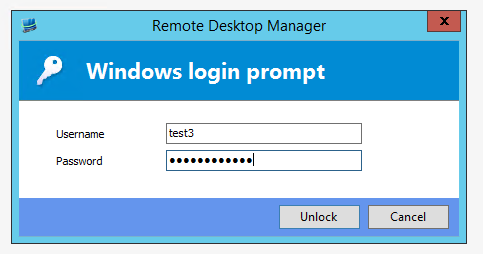
Login Window
Enter new username and password
Click Unlock
I am not sure why I would be getting an invalid password error on the local user I created. The local user is not a machine local user, just a test purely for some things I am writing up regarding the product and the potential use of it in our environment. If I can get this solved, I would be ecstatic.
Regards,
Greg
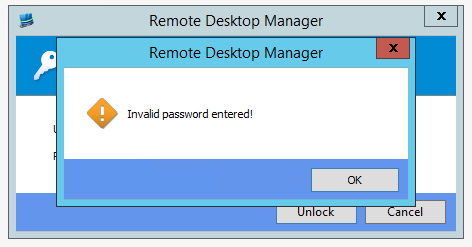
Invalid Password.PNG
Login Window.PNG
All Comments (1)
What you are seeing here is the Application Security lock screen, enabled via File -> Options -> Security -> Application Security (local).
In this case you need to supply your Windows credentials to unlock the application.
The "Test" user credentials will be set in the data source settings.
http://help.remotedesktopmanager.com/index.html?installation_configuresqlserver.htm
Best regards,
Stéfane Lavergne