Any documentation on the new Port Forward option?

So I'm trying to get this feature to work since we've been waiting for it for a while. I put in the various IPs and ports but when I double click the connection to run it I don't get the normal black screen where I can watch it try to connect and see what's going on. I just ge ta screen that shows the various IPs and it sits there until I get an error that it couldn't connect.
How do I tell what's going on so I can figure out what's not working?
Also, normally for my SSH connections, I can do an Edit User Settings and under the 2nd tab is where I can Override the Private key. I don't see that tab when I Edit User Settings on the Port Forward item. I tried to put my Key in as a Credential but I don't know that that normally works.
Thanks!
All Comments (33)
Oh, and once we get this working I'll need to know how to format a CSV file to do an import of a ton of IPs and Ports into the connection. :)
Hello Kelemvor,
I will work on the private key support for portforward type.
Sadly, for the logging, we don't have an option right now for this, but it'd be a good thing to add.
As for the CSV import, we will make a special import for this type. It will require the source port, the destination, the destination port and the mode (local or remote). The column names will be "SourcePort", "Destination", "DestinationPort" and "Mode". "Mode" will take "local" or "remote" for the type.
I will get back to you when those changes will have been done.
Regards,
Hubert Mireault
The private key support should be available for the portforward type in the next beta version.
Regards,
Hubert Mireault
Great! I'll watch for an upgrade prompt.
Hello,
There will also be a new import type for portforwards. I linked a file that illustrates how the CSV file should be structured.
This should be available in the next version alongside the private key support. When it is, could you test it out and give us some feedback?
Regards,
edited by Hubert Mireault on 6/25/2015
Hubert Mireault
portForwardList.csv
Definitely. Only thing I'm not sure on is how to import a ton of Tunnel IPs into one SSH Port Forward item so it looks like the attached file. But we'll have 50+ in out final list.
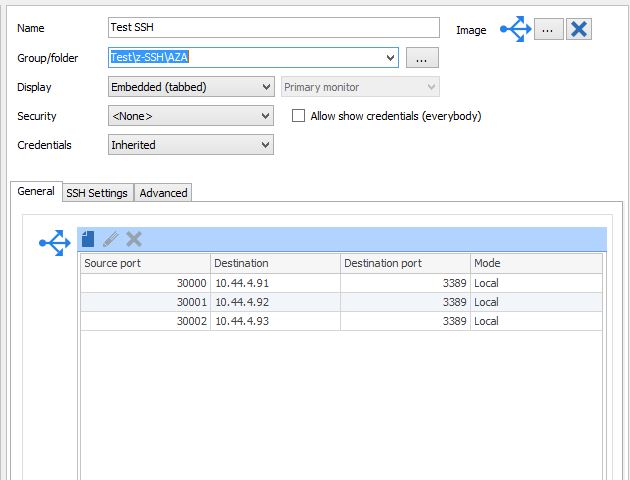
RDM SSH.jpg
The new import type that uses a structure like the file I linked is for filling out multiple tunnelings for one portforward entry (so one entry, multiple tunnels), as you showed. Or did you mean something else?
Regards,
edited by Hubert Mireault on 6/25/2015
Hubert Mireault
How do I associate them with the main entry? If I have an existing Port Forward entry can I import new entries into it by just having a Name to specify where they should go?
When I did an import for the standard SSH type I had to prefix my fields with things like:
Putty\SshLocalPort, Putty\SshRemoteHost
So based on the Port Forward info, do I just need to do something like:
Name, SourcePort, Destination, DestinationPort, Mode
Test-SSH,30000, 10.44.4.91, 3389, local
Test-SSH,30001, 10.44.4.92, 3389, local
Test-SSH,30002, 10.44.4.93, 3389, local
And will it just add all of those into the Port Forward item called Test-SSH as in my screenshot?
Or does my import need to be like:
Name
Terminal\PortForwards\PortForward\Destination
Terminal\PortForwards\PortForward\DestinationPort
Terminal\PortForwards\PortForward\SourcePort
Terminal\PortForwards\PortForward\Mode
Also, would I just need to create the Port Forward item first and then do the import to populate the data inside it? And I could import more at a later time if needed?
Sadly, it wouldn't work with our general CSV importing because the portforward entries are saved as a complex object in an array rather than a simple field, which isn't supported.
What you're bringing up is interesting, though. What I integrated (the one that will be available in the next version) only imports the tunnels into a brand new connection which you'd then edit to add the rest of the information. If I added an ID column, I think it would be possible to add to an already existing session. The ID of an entry can be seen in its "advanced" tab.
Do you think this would work better for your scenario?
Hubert Mireault
If I have to import all the tunnels at once and have it create the port forward at the same time, that'd be fine.
I've only done the CSV type imports before. Can you give me the steps I'd need to do to have it create the Port Forward item and import all the tunnels at once? That's no problem for me to have it work that way.
Once it's created we'd just be adding things 1 at a time so I probably wouldn't need to do an actual Import once the initial one was created.
Thanks!
Then the new import should work fine I think. As I said though, this new import for the portforward type will only be available in the next beta version of RDM.
The steps are simple:
- Create your csv file with the correct format (like in my example)
- In RDM, right click in the tree view and select Import PortForward
- Find the csv file you created and import it
- You will be able to edit the connection before importing it into your datasource
I hope this will help once the feature is out.
Regards,
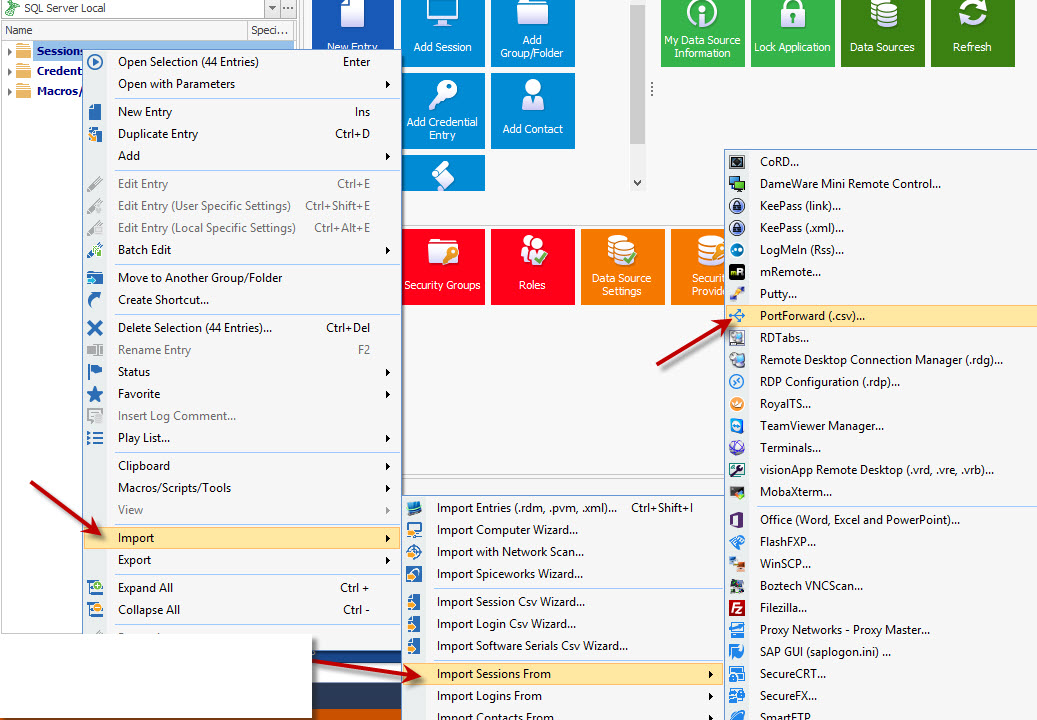
Hubert Mireault
PortForward.jpg
OK, thanks. Is there an ETA on the Beta so I know when to watch for it?
We will try to make a build next week when David is back.
Regards,
Hubert Mireault
OK. I got the new updates and was able to do the import so that's great. Now I think I saw something about VPN Groups that I need to use so that it doesn't close the main connection if any sessions are open that use the same group or something like that?
Can you let me know how that works?
We have our RDP connections set to launch the SSH session automatically and close it when they're done and we just don't want it to close if other RDP connections are open using the same SSH connection.
Oh, also, I don't seem to be able to right click on my new Port Forward connection and do Edit User Settings and then set my Private Key anywhere. Usually that's under the Settings tab but the settings tab doesn't show u and I don't see a Key option under any of the other tabs.
If I edit the actual connection I see the Private Key as a tab within the General section but don't know how each user can edit it for their own info.
Hello,
For the VPN groups, here is how your RDP connections need to be setup to have the expected behavior:
So as long as each RDP session opens the PortForward connection using the same VPN group, the portforward connection should only close when the last RDP connection is closed. I hope this helps.
As for the private key with user settings, I will take a look at this, thank you.
Regards,
edited by Hubert Mireault on 6/30/2015
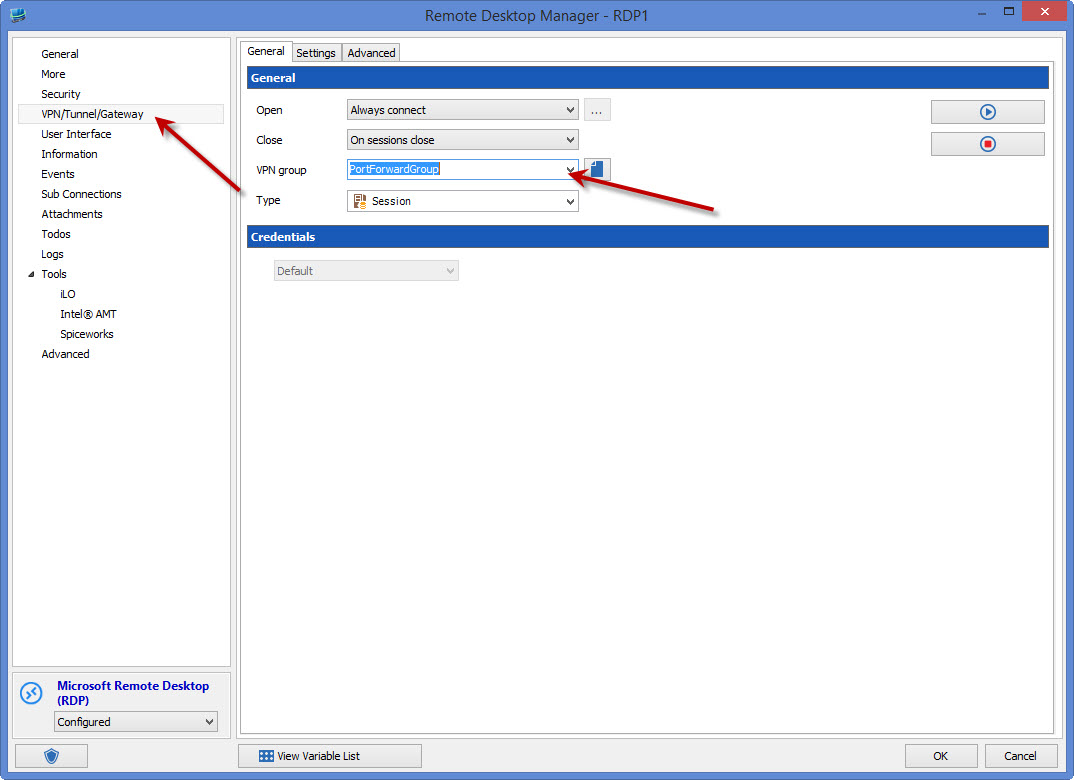
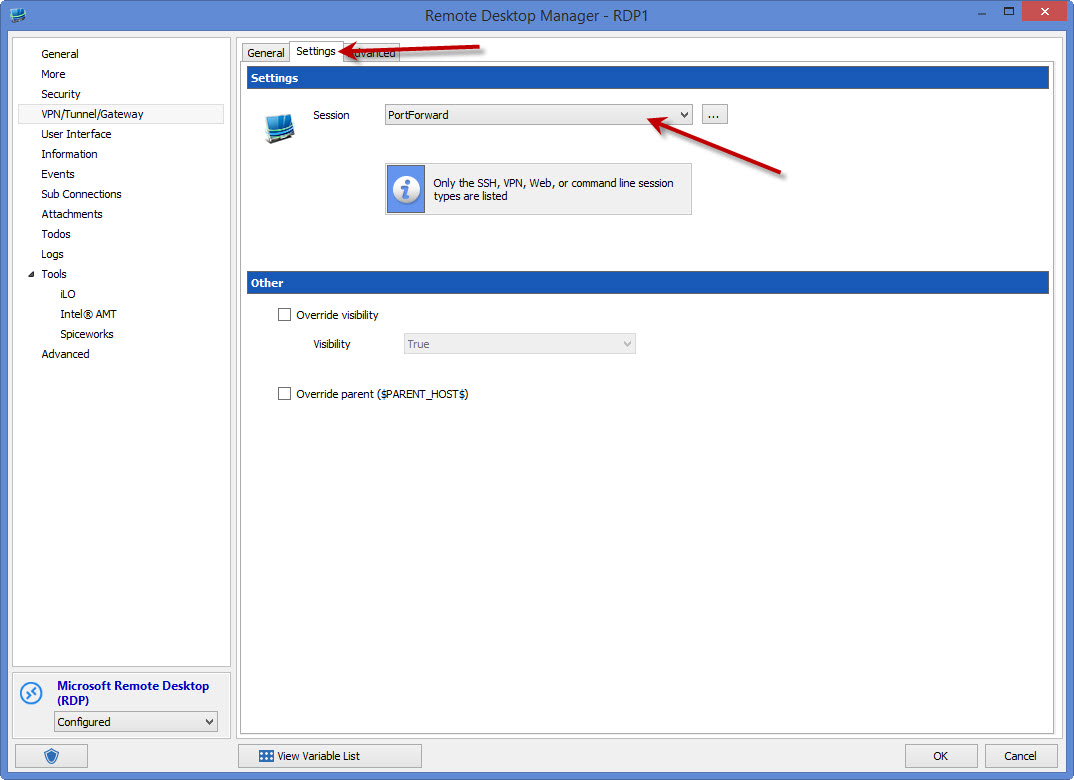
Hubert Mireault
2[1].jpg
1[1].jpg
The override for private keys should be available in the next version of RDM.
Regards,
Hubert Mireault
Great. I'll keep my eyes open...
Just got the new Beta version but the Port Forward seems to not be working. I have an old SSH connection and a new Port Forward connection that both use the exact same settings. Same IP, Same Port, Same Key, etc.
The old stye session connects just fine. The new Port Forward session does not.
For each of them I did the Edit User Settings and did an override on the Private Key and chose it from my vault.
Attaching a screenshot of the settings for each of them.
ssh connect success.jpg
port forward error.jpg
Thank you for testing it out, I've found the issue and it should be resolved in the next version.
Regards,
Hubert Mireault
Good to hear.
Is there any way to set the program to check for new updates more often than only when I open it? Lots of times I open RDM and leave it open for days so I don't always see the new versions right away. ;)
In RDM, in the Help section of the ribbon, there is a button "check version" which does this.
Regards,
Hubert Mireault
Got the latest Beta this morning and it's working much better. I did see the attached error a couple times when trying to connect to various machines. I ran the connection, got the error, but then it seemed to go through the second time so not sure what it was. I only have 3 connections inside the Port Forward right now so I'll add more as I have time and see how it works.
Thanks
port forward error2.jpg
Hello,
After checking out MSDN (https://msdn.microsoft.com/en-us/library/windows/desktop/ms681382(v=vs.85).aspx) it seems "Windows Error Code 0" is not an error, but rather a success. This wasn't taken into consideration in the logging but it seems this error case is the one exception. We'll work on fixing that so the "error" is more comprehensible. Thanks for reporting this.
Regards,
Hubert Mireault
Well it didn't actually connect when it had the "error" so not sure what that means then... I'll keep an eye on things as we find time to do more testing.
Thanks
That's odd...we'll be sure to see if we can reproduce it too on our end.
Regards,
Hubert Mireault
We've been able to fix what we think is the issue. This fix should be available in the next version of RDM. When it is out, it'd be appreciated if you could test it and give us some feedback.
If the bug is still there, we'll ask you a few more questions on your setup and the type of established connections.
Regards,
Hubert Mireault
Finally getting around to doing some more testing on this.
Once I have a Port Forward session created, is there any way to import additional connections into the exist item? When I do the main Import it creates a new entry and I don't see s way to add entries to an existing session. Not a huge deal but just thought I'd ask.
Also, I had another server today that gave me the Windows error code thing 3 times before it finally connected. I thought something was wrong but then eventually it worked. I don't think I've gotten a prompt for a new version since your post 12 days ago. Has a new version come out since then? I'm currently on 10.9.7.0
rdm1.jpg
One other feature I'd love is to have the ability to have the Wait setting only take effect when it had to actually launch the port forward connection.
In the RDP session under the VPN/Tunnel/Gateway section on the Advanced tab we have the After Execute Wait setting set to 2 seconds so the SSH connection has time to connect up before we try to RDP to it. If it could only do that wait when it was connecting the first one to actually launch the Port Forward but not wait when it sees it's already running, that'd be great.
I'm evaluating 10.9.7.0 and am also getting a number of these errors:
"Forwarded port closed due to local error: Network error: Windows error code 0 (and FormatMessage returned 122)"
Sometimes they cause failure sometimes not.
Also of note, when I tried setting up the new SSH Tunnel option I attempted to authorize the connection using a private key in my credential repository. Although this key worked for the built in SSH connections it would not work for the SSH Tunnel. The key was originally from a pri file. When I opened this and re-saved it as a ppk file and then loaded it as a new credential in the credential repository, the new credential worked.
Howdy,
Not sure if I should keep posting in this thread or make a new one but we've been seeing a number of errors lately that say: Fatal Error: Please make sure your connection settings are valid. When we click OK it removes the Port Forward connection tab but the active sessions seem to stay open. Not sure what this error means or does but it's happening on a daily basis.
@John: The discussion for the error with the forwarded port closing will be held here https://forum.devolutions.net/messages.aspx?TopicID=23845 As for the private keys, the only currently supported format is .ppk, but I'll see what we can do to support the .pri format too.
Hubert Mireault