How do I restore from backup

I recently started using Remote Desktop Manager, and paid for the Online backup service. It was configured - I could see the Backup icon in the bottom right.
My computer recently died and I hope to be able to recover my information, but am having trouble figuring out how to do this.
Online help says I need to select a data source, then click on "File - Backup -Restore" to display the list of my backups.
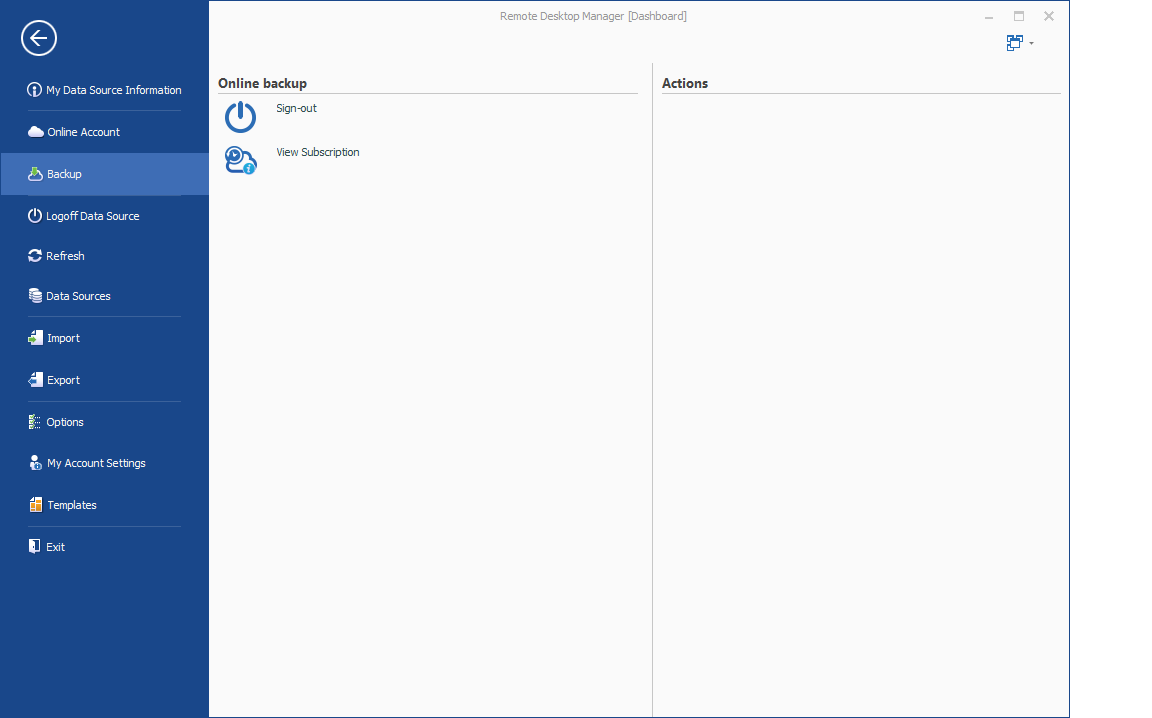
However, when I click on Backup, I only see two options: "Sign-out" and "View Subscription". It does NOT look like the picture online, it looks like this:
Under View Subscription is shows my Devolutions Cloud login,my Subscription Serial # (valid until 2018), and a dropdown list with only one entry in it called "Backup".
However, selecting this "Backup" does not then give me the option to restore.
What do I do ?
thanks !
terry
Untitled.png
All Comments (2)
We have a refresh issue, please close RDM and relaunch it.
You should see the actions in the right hand column that will allow you to view the backup history.
Please confirm that it works
Thank you
Maurice
Thank you Maurice ! For me I needed to restart RDM twice, but after that, the right hand column populated and I was able to restore my data.
Thanks again !
terry