Saved Credentials don't work when using an RD Gateway

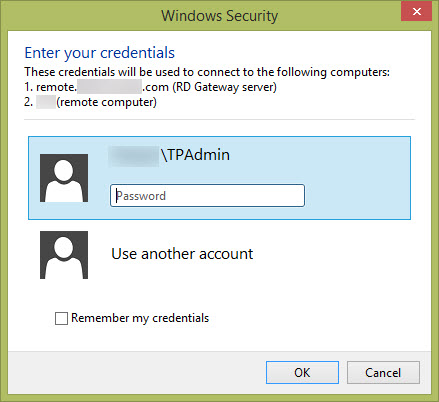
Whenever I use a RD Gateway I can't seem to be able to get logged in without manually typing in credentials even though I am specifying credentials from the Credential repository. If I am going a standard RDP connection without a gateway then it works fine.
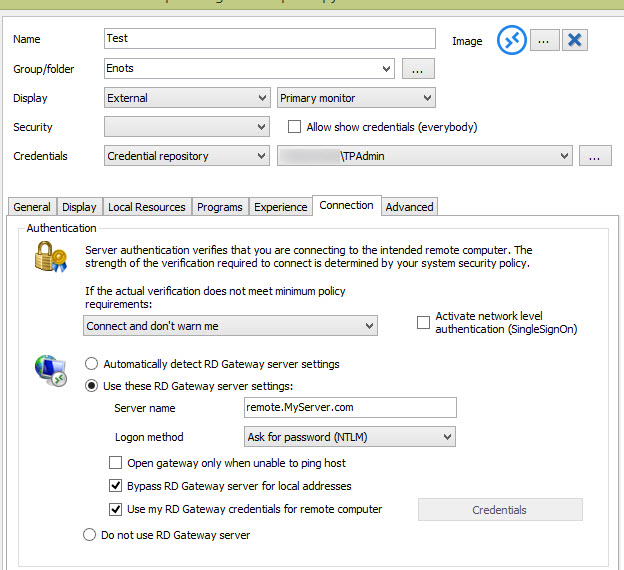
My Settings
Standard RDP Gateway login that pops up
I have tried turning off the option "Use my RD Gateway credentials for remote computer" and then specifying credentials using the repository, but then I just end up with two login boxes when I try to connect.
Using this on Windows 8.1 if that makes any difference.
Any help would be greatly appreciated.
- Nathan
example2.jpg
example.jpg
All Comments (6)
Could you activate the Network Level Authentication: it's next Connect and don't warn me.
Regards
David Hervieux
I turned that on and tried again and get the same behavior.
Could you try the embedded mode instead?
David Hervieux
Embedded Mode works, both tabbed and Undocked.
This is where we have more control. I suspect that we are unable to set the credentials for the Gateway in the Windows Credential vault.
David Hervieux
Thanks for your help!
- Nathan