Not able to connect to server. 131084 error

I have been using the app on windows for a couple of years now. I am switching to a mac, so I installed the mac version. I can get the RDC to work if I use external as the Display mode. But it does not work in Embedded. I have set the default to Embedded in preferences and I have tried unchecking the "Activate network level authentication". Below is my level 1 logs. I have changed the server names for privacy.
[6/5/2015 11:41:45 AM]DEBUG SecurityDataSource.IsSupported is False, exiting A.cc86f0563c4da2f0398d320f2c4d69007
[6/5/2015 11:41:45 AM]DEBUG Loading connection SRQMSC01DV
[6/5/2015 11:49:18 AM]DEBUG SecurityDataSource.IsSupported is False, exiting A.cc86f0563c4da2f0398d320f2c4d69007
[6/5/2015 11:50:00 AM]DEBUG SecurityDataSource.IsSupported is False, exiting A.cc86f0563c4da2f0398d320f2c4d69007
[6/5/2015 11:50:00 AM]DEBUG Loading connection Server123.company.lcl
[6/5/2015 11:50:02 AM]DEBUG Opening in Console / Admin mode
[6/5/2015 11:50:03 AM]INFO RDP - OnConnected:131084 / Failed to connect to the host (131084).
[6/5/2015 11:50:09 AM]DEBUG SecurityDataSource.IsSupported is False, exiting A.cc86f0563c4da2f0398d320f2c4d69007
[6/5/2015 11:50:09 AM]DEBUG Loading connection Server123.company.lcl
[6/5/2015 11:50:23 AM]DEBUG SecurityDataSource.IsSupported is False, exiting A.cc86f0563c4da2f0398d320f2c4d69007
[6/5/2015 11:50:23 AM]DEBUG Loading connection Server123.company.lcl
[6/5/2015 11:50:23 AM]DEBUG SecurityDataSource.IsSupported is False, exiting A.cc86f0563c4da2f0398d320f2c4d69007
[6/5/2015 11:50:23 AM]DEBUG Loading connection Server123.company.lcl
[6/5/2015 11:50:24 AM]DEBUG Opening in Console / Admin mode
[6/5/2015 11:50:24 AM]INFO RDP - OnConnected:131084 / Failed to connect to the host (131084).
[6/5/2015 11:50:47 AM]DEBUG SecurityDataSource.IsSupported is False, exiting A.cc86f0563c4da2f0398d320f2c4d69007
[6/5/2015 11:50:47 AM]DEBUG Loading connection Server123.company.lcl
[6/5/2015 11:51:28 AM]DEBUG SecurityDataSource.IsSupported is False, exiting A.cc86f0563c4da2f0398d320f2c4d69007
[6/5/2015 11:51:28 AM]DEBUG Loading connection Server123.company.lcl
[6/5/2015 11:51:28 AM]DEBUG SecurityDataSource.IsSupported is False, exiting A.cc86f0563c4da2f0398d320f2c4d69007
[6/5/2015 11:51:28 AM]DEBUG Loading connection Server123.company.lcl
[6/5/2015 11:51:29 AM]DEBUG Opening in Console / Admin mode
[6/5/2015 11:51:29 AM]INFO RDP - OnConnected:131084 / Failed to connect to the host (131084).
[6/5/2015 11:56:28 AM]DEBUG Opening in Console / Admin mode
[6/5/2015 11:56:28 AM]INFO RDP - OnConnected:131084 / Failed to connect to the host (131084).
All Comments (20)
Just for info I am on 10.10.3 OSx
Hi Chris,
Thank you for your info. We will look into that as soon as possible
Benoît Sansregret
Same issue thanks for posting the work around to open externally.
Been using for Windows for years no issues, downloaded mac version last week and hit this.
Hi,
The error code 131084 means that the security negotiation between your Mac and the remote computer has failed.
I need you to describe to me your remote computer setup.
Do you use a gateway?
Do you use certificate ?
What kind of certificate ?
Is there any VPN ?
Chris I know you tried to uncheck Activate network level authentication, Dustin did you try checking of unchecking it?
Regards,
Benoît Sansregret
No gateway
No cert other than the normal out of the box certificate
No VPN, I am on the same network as all the virtuals.
The setup is pretty simple and out of the box. I built a 2012 R2 server, added it to my domain, turned on RDC and connect to it via RDC. No special hardware here, no special security (other than normal AD).
I hope that helps.
Benoit, I would be happy to do a goto meeting or something like that if it helps you solve it.
I am also having this issue on 10.10.3.
Hi Luke,
As I explained earlier, this error happens because the security negotiation fails between your Mac and the remote computer.
Can you describe your setup a little bit:
What kind of windows are you trying to connect to?
Is there a Gateway, VPN or connection broker?
What kind of certificate do you use?
Regards,
Benoît Sansregret
Hi Benoit ,
I have the same problem .
With the software VPN Tracker I start an IPSec VPN tunnel.
I try to connect a Windows Server 2012R2 Std. , Windows Server 2008R2 Std......
All Microsoft RDP connections can not be opened .
The certificate is automatically from the Microsoft Windows Servers.
Regards David.
edited by d.metz on 6/10/2015
edited by d.metz on 6/10/2015
Bildschirmfoto 2015-06-10 um 15.45.11.png
Hi Benoît,
The connection I am using to test is connecting to a Windows Server 2012 server, but I am unable to connect to any RDP servers whatsoever.
All of my connections do NOT require a certificate, gateway, or VPN. They are all servers on the local LAN.
I should note that my connections are synced between my Mac and PC. The same synced connections work on Windows, but not my version of OS X.
Thank you for your update Luke I will update you as soon as I have updates on this.
Benoît Sansregret
Hi Benoit,
it is possible to make a downgrade to the previous software version?
At the moment I can not work.
Hi d.metz,
Yes it is possible. Just download the previous version here http://cdn.devolutions.net/download/Mac/Devolutions.RemoteDesktopManager.Mac.2.0.4.0.dmg
Open the package and replace your current Remote Desktop Manager.app in your Applications folder with the one you just downloaded.
That should do the trick
Benoît Sansregret
This works for me.
This works for me, but I can't copy/paste text or files.
Hi Chris,
Version 2.0.4.0 had an issue with the clipboard that 2.5.0.0 was supposed to fix.
Just to make sure the next release contain the correct fix are you trying to copy text from your Mac to the remote computer or the other way around?
Thank you
Benoît Sansregret
Both Mac to PC and PC to mac do not allow copy/paste.
Hi,
We just released a new version that might help you with the sessions issues but it also contain 2 new really nice features.
You can download it here http://mac.remotedesktopmanager.com/Home/Download.
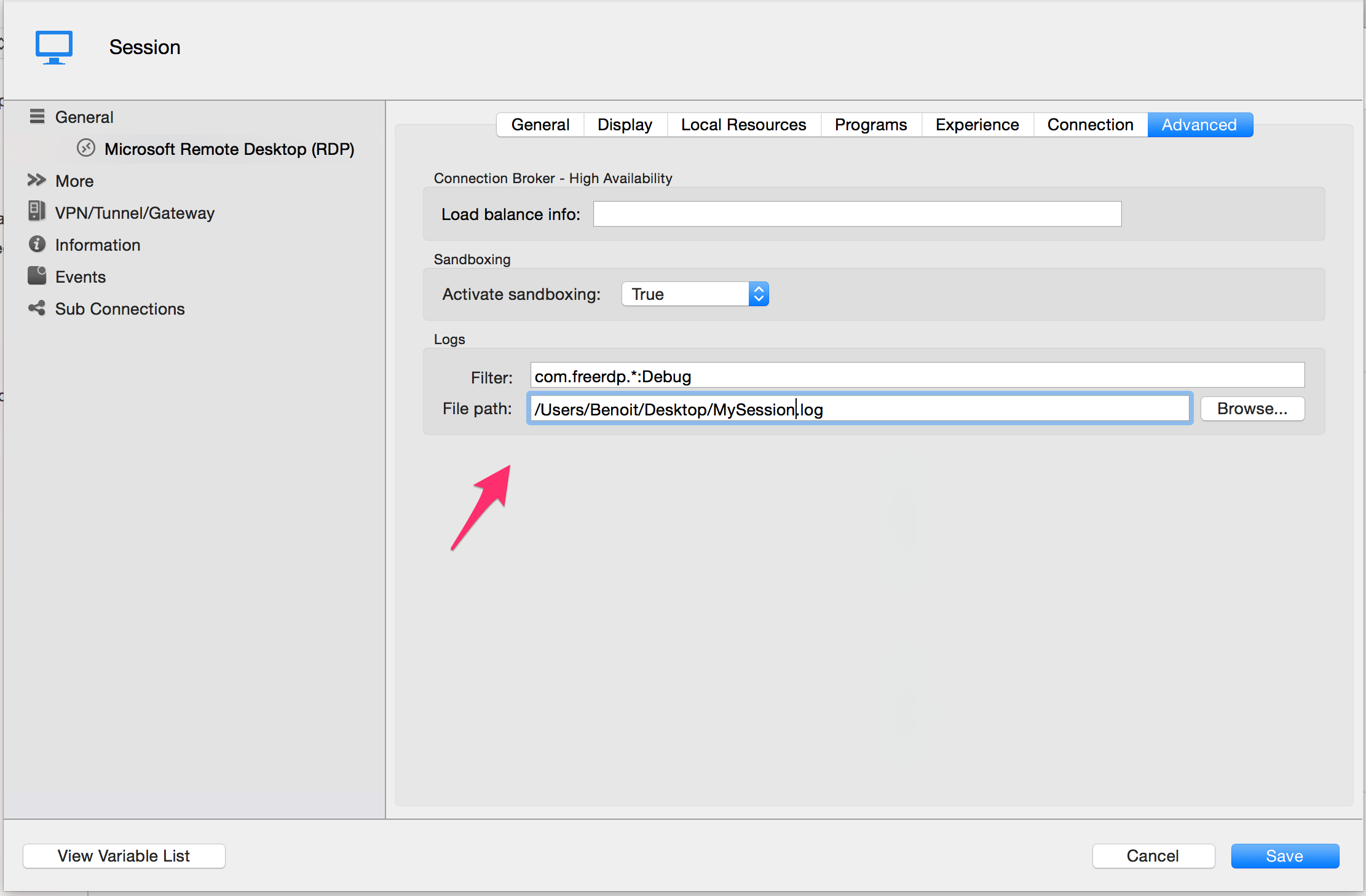
The first feature is RDP session logging. This will allow your Embedded RDP session to log everything it does behind the scene in a file.
Just set the filter like the screen shot and set the file to a unique file for your session like this:
You can then send the file to us so we can analyse what is going on. Careful this file will contain sensitive data so you might want to check it first and you certainly don't want to post it on the forum.
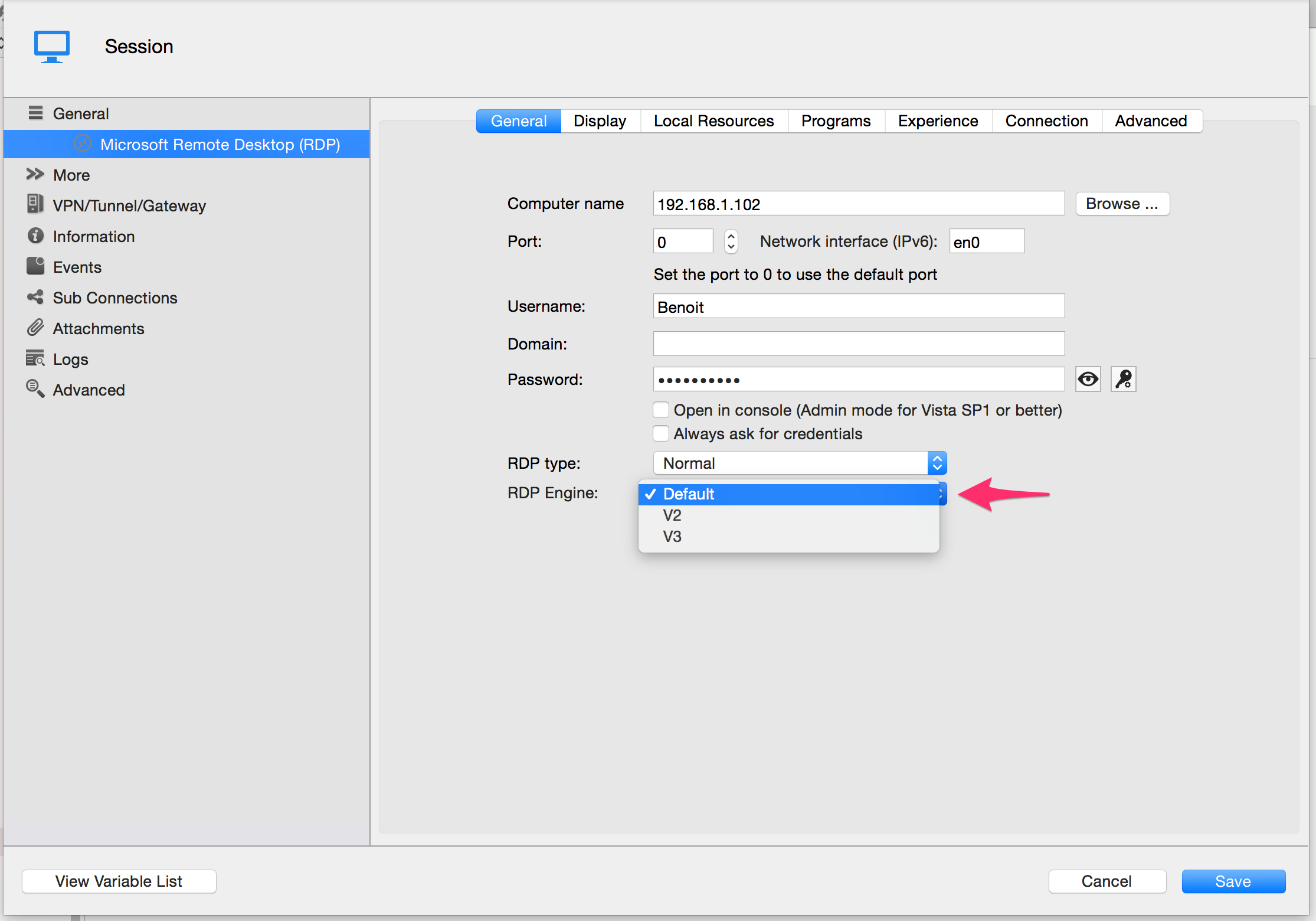
The second feature is the option to rollback to previous version of the RDP Engine without having to download the previous version entirely.
You can do this for an individual entry in the session configuration:
Default means it will take the value from the preferences (see below).
V2 is the stable version from previous version
V3 is the latest version with fixes and instability
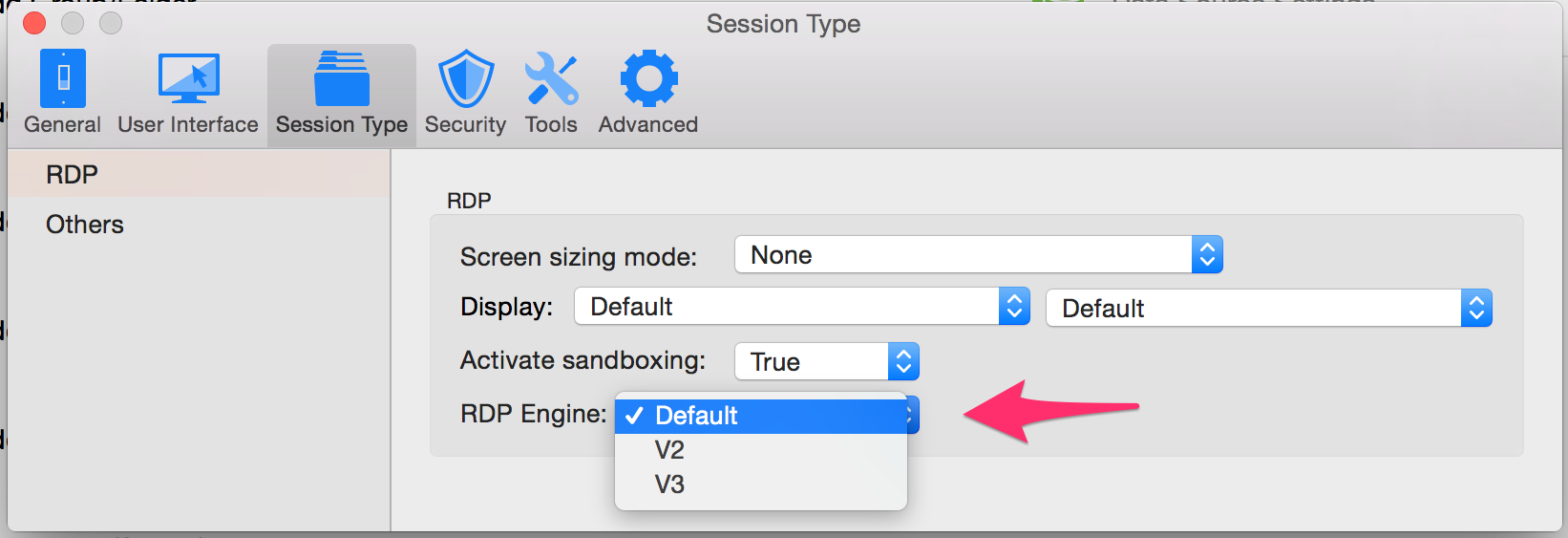
Or you can change it for all session with the preferences:
Default is the Latest version (V3 right now)
V2 is the stable version from previous version
V3 is the latest version with fixes and instability
Try it and tell us what you get.
edited by Benoit Sansregret on 7/29/2015
Benoît Sansregret
Session FreeRDPLogging[1].png
RDPEngineMac-Pref[1].png
RDPEngine - Session[1].png
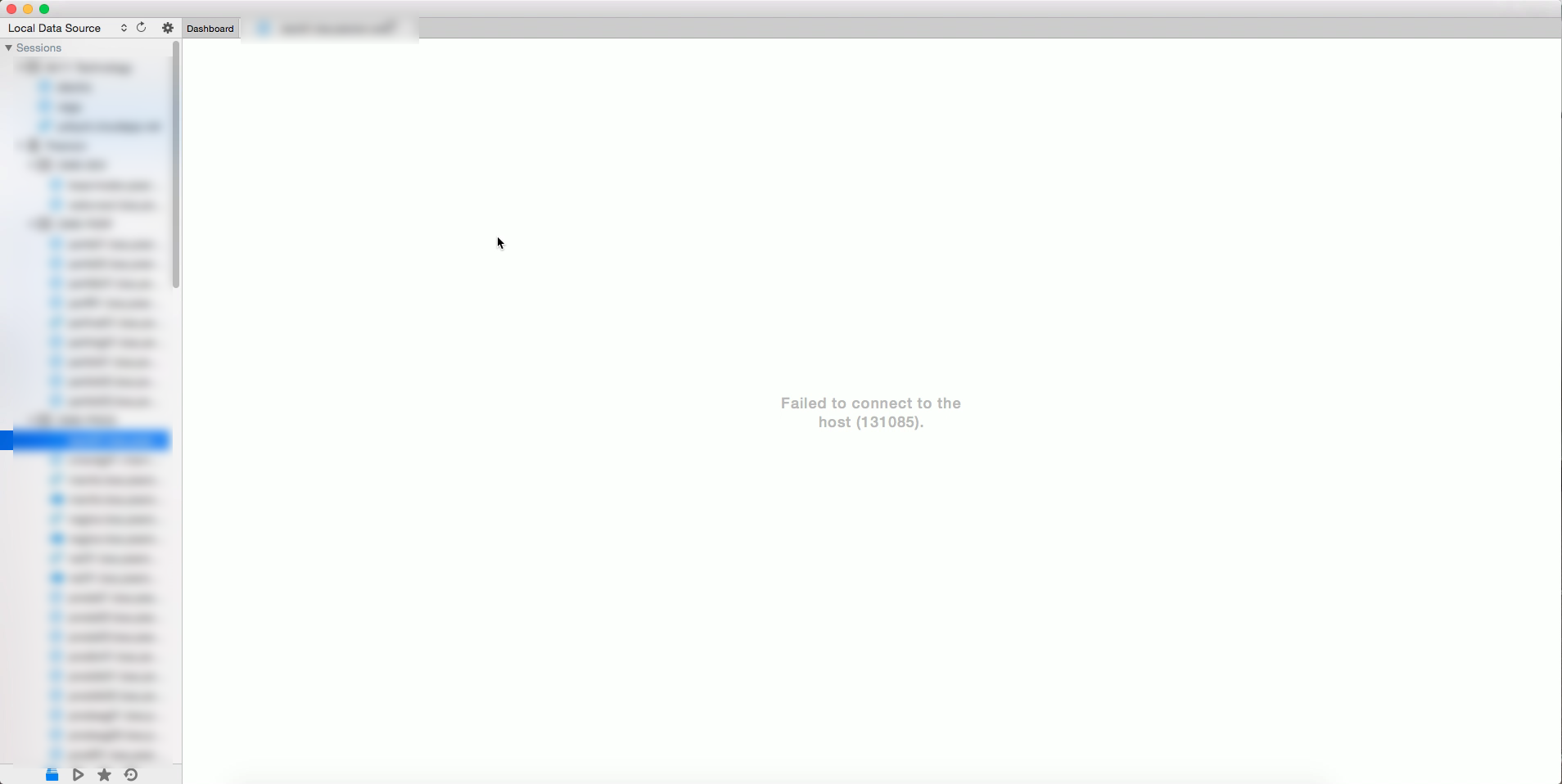
Well, the V3 version broke every connection I have. Good thing you can revert to V2, though how would anyone know since the product doesn't have a help or release notes file. See screenshot for the error.
I really wish you guys would stop breaking stuff with every release.
2015-07-29_10-42-58.png
Hi yobyot,
We released this version because we needed to get the tools for debugging available for our users.
We need help from you guys to helps us investigate the issues we cannot reproduce here.
There are two things you can do to helps us help you:
1 - You can send us a log file generated by the new feature described in my earlier post.
2 - If it's possible for you, you can make available for us a session that doesn't work so we can investigate hands on with your situation.
If you want to help us you can send the log or the information directly to me at bsansregret@devolutions.net
Best regards,
Benoît Sansregret