Cant save pleasant password sever credentials

Hello,
when i try to save my Pleasant Password Server credentials i get an Error.
Can anyone tell me how to fix? I am not firm in SQL.
Thanks
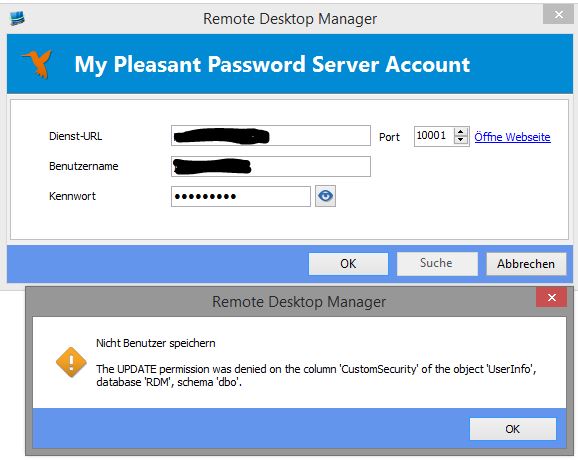
PPS-Error.JPG
All Comments (8)
Hello,
What version of RDM are you running?
What are the rights/permissions that you have in RDM?
Best regards,
Maurice
Hello,
I am running version 10.1.3.
What do you mean with rights / permissions?
I am working as a standard User, but i have the SA password for SQL-Database
Greetings
Jens Hoeppner
Hello,
Please run File - My Data Source Information and use the button to send us the report.
Please ensure you include your forum user name so I can cross reference it.
Thank you,
Maurice
Hi Jens,
If you don't have any User Specific Settings and My Personal Credentials setup in RDM, could you try to recreate your user in RDM please.
Let us know of the results.
Best regards,
Jeff Dagenais
Hi,
here is what i´ve done:
* change the database-login to SA
* delete my user in RDM
* create a new User in RDM from active directory (the new User is not an administrator)
* change the database-login to integratet login
* try to enter my pleasant password credentials
-> same error as before.
then i tried:
* change the database-login to SA
* add administrative rights to my account
* enter the pleasant password server credentials -> now it works
* change the database-login back to integrated login
This "solution" worked for me, but i have no idea why I need administrative Rights to change my personal settings
Greetings from Bochum, Germany
Hello,
This worked because as an admin you had update permissions on all columns.
We would have liked to understand why your user did not have these permissions.
As least you are up and running.
Best regards,
Maurice
Hi,
i have asked my college, if he has the same problem.
Yes, he has. We solved it the same way as I did on my PC.
We would like to know why the permissions are missing, too.
So how can we investigate further?
Is there a way to set the default permissions in SQL-Database or from DRM?
The system should do everything by itself. No way to investigate since you have resolved the issue.
If ever you run across it again, I would like to see the "effective" permissions that you user has (In SQL Mgmt studio)
Thank you
Maurice