After fresh installation - It's not possible to open Options Tab
After fresh installation - It's not possible to open Options Tab

I have installed 4 Computers with no problems.
The 5th installation is fresh.
I can open every tab, but not the > File > Options.
Dekstop Manager Free was installed before.
I have deinstalled it an installed the full version normally.
After that, i deinstalled Dekstop Manager Enterprise and clean the programm directories.
After that a new installation of Desktop Manager Enterprise.
But the problem still appears.
Any solutions?
edited by thomas.wehner@baumann-automation.com on 4/14/2015
All Comments (21)
Hi Thomas,
Do you use the application policy?
David Hervieux
I think not.
Fresh install.
I have connected to the db in the network. (Even so as on the 4 other Admin PC's)
That's all.
The user account in which is Desktop Manager Enterprise installed is an admin account.
Start as administrator... didn't help too
edited by thomas.wehner@baumann-automation.com on 4/14/2015
This is really strange, could you post a print screen of the backview File?
David Hervieux
How can i get this "backview file"?
Program protocol?
Protocol of changes?
Diagnose?
Profiler?
edited by thomas.wehner@baumann-automation.com on 4/15/2015
Sorry for the confusion. the backview is the blue section when you click the menu File.
David Hervieux
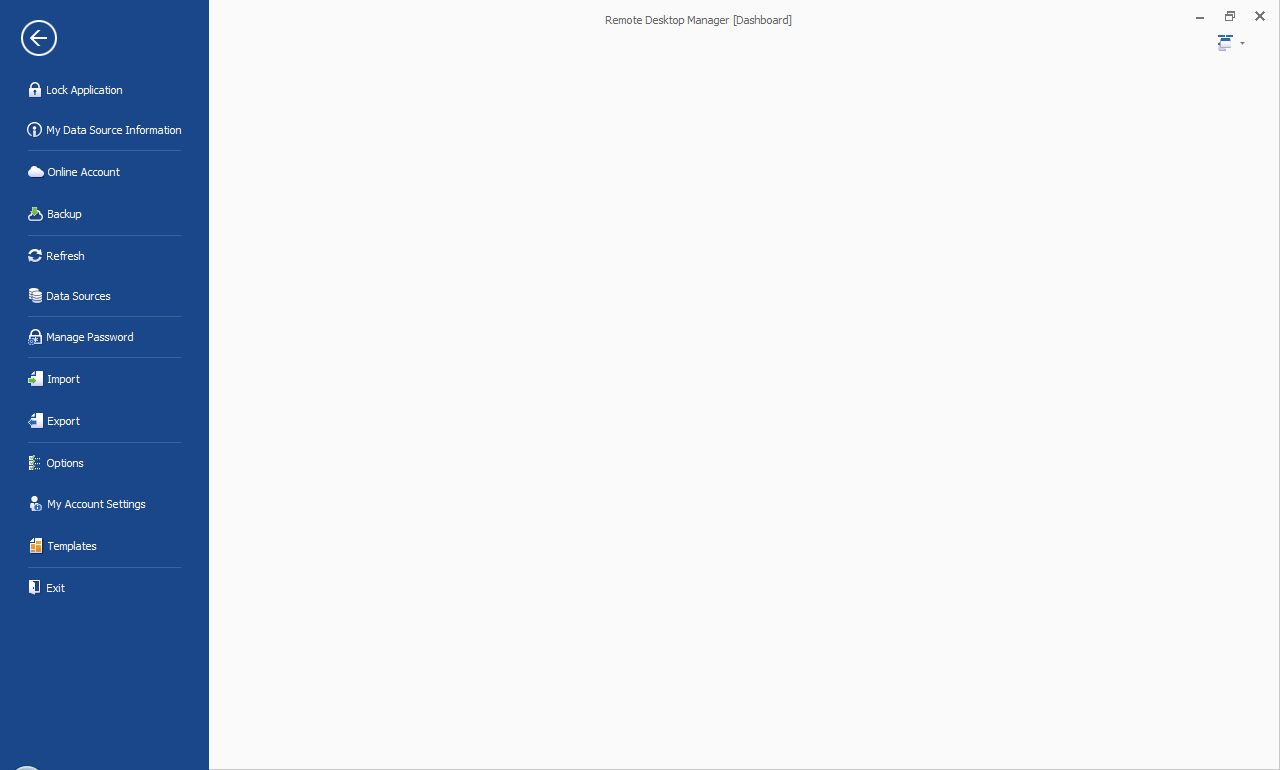
backview.png
I have verified the code directly and I don't see anything special. Just to confirm do you get a message when you click Options?
Do you know if this computer has a dual screen?
David Hervieux
No. If i click options. Nothing happens.
Every other menue point ist available and works normal.
It's a laptop. At this moment there is no second screen active.
What data source type do you use?
David Hervieux
We use 2 SQLite databases.
Workstations
Server (with data source password)
SQL Lite or SQL Server? It's really not recommended to share a SQL Lite database. Could you go in the ribbon Help and execute a Diagnostic?
David Hervieux
I have send a diagnostic report.
At this moment i install on a server an MS SQL Express 2014.
Tooks some time.
After that i hope i can export/import SQLite <> MSSQL Server.
Hi,
I'm really puzzled. I don't see anything special in the diagnostic. Could you try to unzip it in another folder not located in program files. For example in C:\RDM
You don't have to remove the installation and it's just for a test.
Regards
David Hervieux
New infos:
2 databases moved from SQLite to MSSQL Server.
The look & feel is faster. The problem "Options" is still the same on the other admin pc.
Another problem (MY installation at my pc):
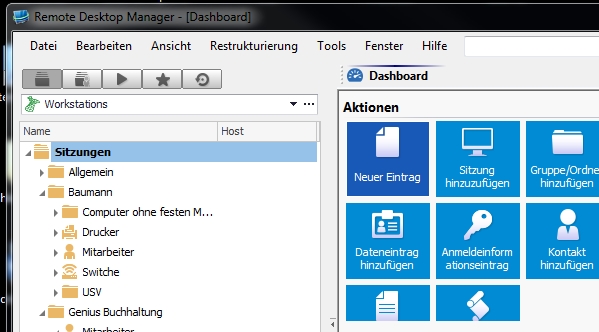
After upgrade to Version 10.5.4.0 my connections tree dissappear.
If i select in my options "classic interface" the connections tree on the left side dissappear. No possibility to get it back with "F7".
If i select in my options "classic interface V7.x" the connections tree is back.
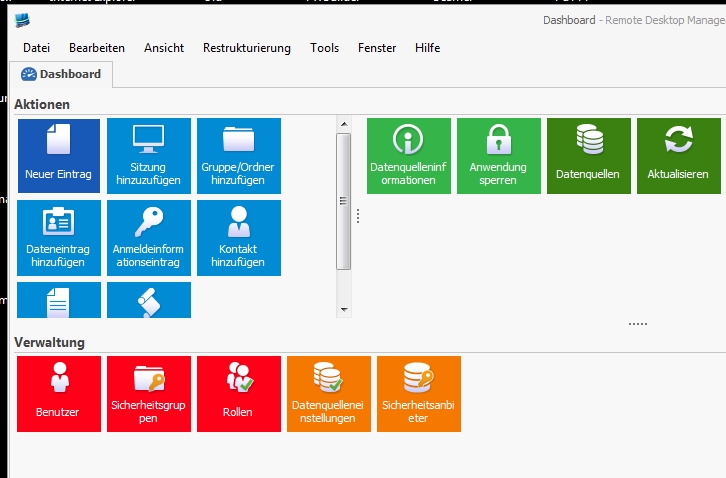
classic_interface_v7x.jpg
classic_interface.jpg
go to view / ansicht - click navigation and your tree should appear
regards
markus
Kind Regards
Markus
======================
This didn't work.
I have this option (F7).
But nothing happend.
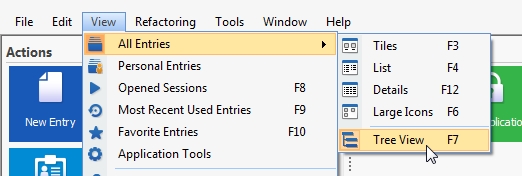
treeview.jpg
Could you try a reset layout in Windows to resolve the user interface problem?
Could you also verify if you get anything in the application log (Help->View Application Log) on the computer that Option does not work?
David Hervieux
Problem solved on my computer! (Tree View is now shown)
Problem pc menue Point "options":
4 times same entry after start of the program:
System.ArgumentException: Font 'CG Times' does not support style 'Regular'.
at System.Drawing.Font.CreateNativeFont()
at System.Drawing.Font.Initialize(FontFamily family, Single emSize, FontStyle style, GraphicsUnit unit, Byte gdiCharSet, Boolean gdiVerticalFont)
at System.Drawing.Font.Initialize(String familyName, Single emSize, FontStyle style, GraphicsUnit unit, Byte gdiCharSet, Boolean gdiVerticalFont)
at System.Drawing.Font..ctor(String familyName, Single emSize)
at Devolutions.RemoteDesktopManager.Controls.FontComboBox.ce70311b91013c596c8412eecc62de716()
at Devolutions.RemoteDesktopManager.Controls.FontComboBox.set_SelectedFontName(String value)
at Devolutions.RemoteDesktopManager.Frames.FreSSHTelnetEntryOptionPanel.c49f0ccb73296dc8b9a91a4b256a04664()
at Devolutions.RemoteDesktopManager.Frames.FreSSHTelnetEntryOptionPanel.DoInitializeComponent()
at Devolutions.RemoteDesktopManager.Frames.FreBase..ctor()
at Devolutions.RemoteDesktopManager.Frames.FreBaseOptionPanel..ctor()
at Devolutions.RemoteDesktopManager.Frames.FreSSHTelnetEntryOptionPanel..ctor()
at Devolutions.RemoteDesktopManager.Forms.FrmOptionList.c6d86f5f3d758f61290f5d859b1f42daf()
at Devolutions.RemoteDesktopManager.Forms.FrmOptionList.c2eb691ee03be73f9909b2c4b04011f54()
at Devolutions.RemoteDesktopManager.Forms.FrmOptionList.DoInitializeComponent()
at Devolutions.RemoteDesktopManager.Forms.FrmBase.c2003f33b05659ffe7ea3546ebd6ce300()
at Devolutions.RemoteDesktopManager.Forms.FrmBase..ctor()
at Devolutions.RemoteDesktopManager.Forms.FrmOptionList..ctor(OptionPanel tabIndex)
at Devolutions.RemoteDesktopManager.Managers.UIManager.CreateOptionForm(OptionPanel index)
at Devolutions.RemoteDesktopManager.Managers.ActionManager.ShowOptions(OptionPanel index)
at Devolutions.RemoteDesktopManager.Managers.MainMenuManager.c61718f25d3e20cb15d214dc8d513dd56(Object c19f185fd70cefc696ba148af1c4faf54, EventArgs cf1018bb83ec7debd818319fd3cb4844e)
at System.Windows.Forms.ToolStripItem.RaiseEvent(Object key, EventArgs e)
at System.Windows.Forms.ToolStripMenuItem.OnClick(EventArgs e)
at System.Windows.Forms.ToolStripItem.HandleClick(EventArgs e)
at System.Windows.Forms.ToolStripItem.FireEventInteractive(EventArgs e, ToolStripItemEventType met)
at System.Windows.Forms.ToolStripItem.FireEvent(EventArgs e, ToolStripItemEventType met)
at System.Windows.Forms.ToolStripItem.PerformClick()
at Devolutions.RemoteDesktopManager.Decorators.RibbonControlDecorator.c87c78fe207115667325ed4a98b055706(Object c19f185fd70cefc696ba148af1c4faf54, BackstageViewItemEventArgs cf1018bb83ec7debd818319fd3cb4844e)
at DevExpress.XtraBars.Ribbon.BackstageViewButtonItem.RaiseItemClick()
at DevExpress.XtraBars.Ribbon.Handler.BackstageViewControlHandler.OnMouseUp(DXMouseEventArgs e)
at DevExpress.XtraBars.Ribbon.Handler.Office2013BackstageViewControlHandler.OnMouseUp(DXMouseEventArgs e)
at DevExpress.XtraBars.Ribbon.BackstageViewControl.OnMouseUp(MouseEventArgs e)
at System.Windows.Forms.Control.WmMouseUp(Message& m, MouseButtons button, Int32 clicks)
at System.Windows.Forms.Control.WndProc(Message& m)
at DevExpress.XtraBars.Ribbon.BackstageViewControl.WndProc(Message& msg)
at System.Windows.Forms.Control.ControlNativeWindow.OnMessage(Message& m)
at System.Windows.Forms.Control.ControlNativeWindow.WndProc(Message& m)
at System.Windows.Forms.NativeWindow.Callback(IntPtr hWnd, Int32 msg, IntPtr wparam, IntPtr lparam)
Oh
It seems that this computer has a font issue. I will work on this to at less skip this error.
David Hervieux
This is in the current beta release.
David Hervieux
Well done. Good job. It's working.
Thanks a lot.