New install of Remote Desktop manager missing database

I just installed the Remote Desktop Manager v1.2 and I get this error:
"A database upgrade is required. Connect to the data source with a user with administrator right to launch the auto upgrade."
"SQL logic error or missing database no such table: Connections"
This is a brand new install. I am a local admin of my Windows 7 machine. Any ideas on how to fix?
All Comments (4)
Hi Tim Board,
Could you try to create a new SQLite data source and see if the error appear with this new data source also.
If there is no error message, please do an export of your sessions from the previous data source in this new one and use this new data source instead of the old one.
Best regards,
Jeff Dagenais
How do I create a new SQLite Data source? I don't have any previous sessions from a previous data source. This is a brand new never used before install.
Hi Tim,
You need to click on File -> Data Source and create a new data source (SQLite or XML).
When this new data source will be created, you need to select it in the drop down menu of the Navigation Pane
If no error appear with this new data source, you can delete the other one in File -> Data Sources.
Best regards,
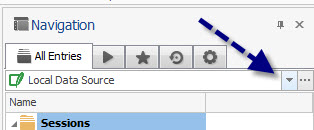
Jeff Dagenais
2015-03-25 10-00-25.jpg
That worked I believe. Thank you.