Batch Edit Setting Credentials to "Inherited"

I imported a ton of remote desktop connections/sessions into RDM but all of them have the credentials set to "Default". I want the credentials to be inherited from the parent folder and have set the folder to have credentials however I cannot figure out how to batch edit each session so that the Credentials are set to "Inherited". Obviously I can go into each session and edit it but that will take a ton of time.
All Comments (12)
Hi,
Do you use the current beta? Inherited is a new feature and I really need to add this.
David Hervieux
Yes I am using the beta, IMO inherit should be default.
You right but it's nearly impossible to change because of the backward compatibility.
David Hervieux
Has this ever been implemented?
--------------------------------------------------------------------------------------------------------------------
I'm always using the latest beta RDM x64 version.
Local data source.
@Ricky,
Indeed, this feature is implemented.
If you want to configure your sessions to be inherited, just select your sessions and go in Edit -> Batch Edit -> Change Saved Credentials.
In that section, it will be possible for you to set your sessions to Inherited.
Best regards,
Jeff Dagenais
Hi,
Sorry to bump this topic.
If i try the above solution, this works well for sessions.
But how can i change the credential inheritance for folders via batch edit when using a nested structure.
When i select all the folders under a particular folder and do batch edit->Change Saved Credentials, only the credentials inheritance on the sessions will be changed, not on the folders.
Is this possible?
Thanks in advance.
@Valid Operations,
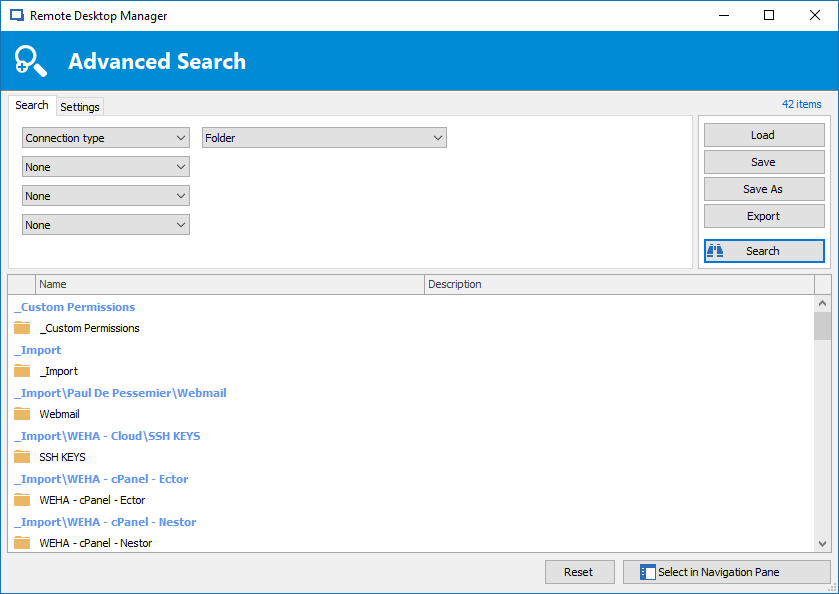
You would need to go in View -> Advanced Search and then, select Connection Type in the first dropdown and Folder in the second dropdown.
After, select the folders that you want to perform the Batch Edit on it and do a right-click -> Edit -> Batch Edit.
This should do the trick.
Best regards,
Jeff Dagenais
Jeff,
Thanks for your quick reply. When i perform the steps you described, only folders with already a security group are returned in the search results.
Folders with security=<none> are not returned to the search results.
Even if i have:
1. Connection type = Group/Folder
2. Security Group / contains = none or <none>
Any suggestions how to return folders without security groups in the search results?
Hello,
This is strange.
Here's what my research looks like. Most of my folders doesn't have any security on it and I can see them.
What version of RDM are you running?
Best regards,
Jeff Dagenais
2018-01-05_08-39-47.png
Hi Jeff,
I've solved the problem other ways. First i set the security group via batch edit on all folders.
From there on i followed the steps you described, and now all the folders and sessions have the correct credential inheritance.
Thanks a lot!
Kind Regards,
Valid Operations
"You would need to go in View -> Advanced Search and then, select Connection Type in the first dropdown and Folder in the second dropdown.
After, select the folders that you want to perform the Batch Edit on it and do a right-click -> Edit -> Batch Edit.
This should do the trick"
This does not work. I did an advance search and then try to batch edit to apply inherited credentials on all the folders. None of the folders save the setting.
Hello,
This method works on my side with the latest version of Remote Desktop Manager, is this the option you chose after selecting your folders? Also, what is your Remote Desktop Manager version? 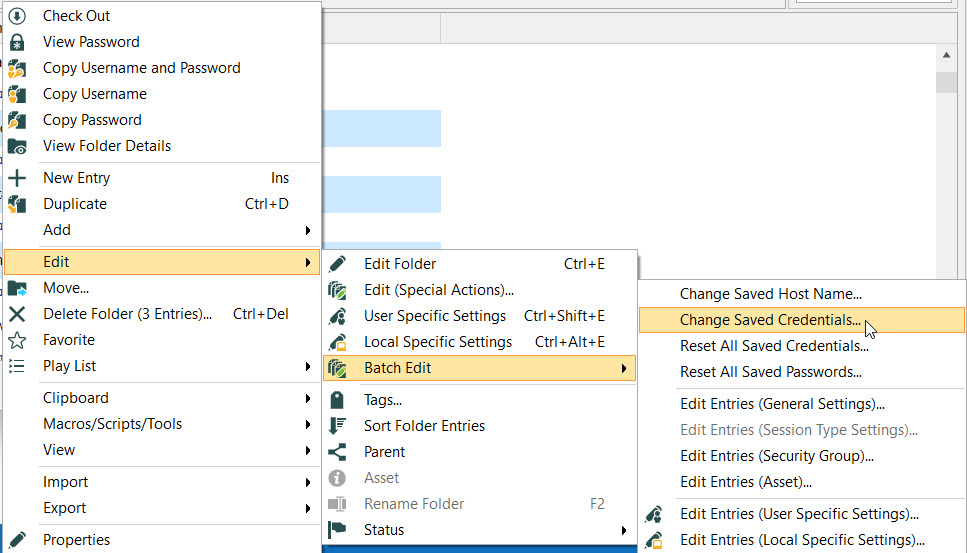
Best Regards,
Etienne Lord
folder.jpg