Putty: "After Login Commands", first word of first command is ignored
Putty: "After Login Commands", first word of first command is ignored

Hi,
I'm on 10.4.0.0 Beta and have an issue with "After Login Commands" on Putty sessions.
In previous versions (I don't know in which version the bug appeared), everything was fine, but now, the first word of the first command is ignored.
Here is an example:
command 1: ./apacherestart.sh
This won't work. When running the session, I've an empty line and an "ENTER". So nothing happen.
If I do this:
command 1: . ./apacherestart.sh
Everything is OK. The command is called (with a space before) and submitted with "ENTER".
Another case : if I have the following commands:
command 1: . switch2svn
command 2: cd repositories/crm/conf/
It works too. That means that only the first command has its problem of first word ignored.
Did I do something wrong please? Or did you already note this issue?
Thanks for your help,
Hugues.
All Comments (13)
Could you send us an exported session without the credentials?
David Hervieux
Here it is.
Thanks for your help.
apache restart.rdm
Hello Hugues,
Could you test your entry using the most recent beta build? We changed how the commands are sent to PuTTY in the beta version and it might have fixed the problem since I'm unable to reproduce your issue using this version of RDM. You can download the beta build here: http://remotedesktopmanager.com/Home/Download#beta
Regards,
Hubert Mireault
Oh sorry, my mistake, I thought you said you had version 10.1.4.0.
I will test a few things and get back to you if I manage to reproduce the issue.
Regards,
Hubert Mireault
After doing some testing, it seems that opening PuTTY as external causes the after login command issue for me. Could you try opening it as embedded or undocked and see if it works?
Our internal way of managing our multiple typing macro shortcuts like {ADD} or {BACKSPACE} doesn't work properly with external applications in the case of PuTTY. We will revert back to the old way of doing things only for external connections, which is simply sending the text to the window. The {ENTER} and {DELAY} commands will work with this, but the others will not.
Regards,
Hubert Mireault
Whatever the chosen "display", it seems that putty is launched in the same way and I've the issue.
Thanks.
Could you see if using the button in the dashboard works to open it embedded?
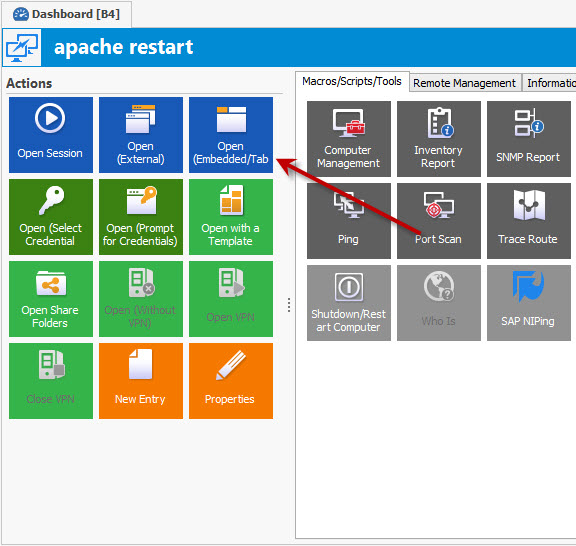
Hubert Mireault
ss.jpg
When I use the button, it's OK, putty is launched in a tab.
First launch had the same issue. Second is OK…
Until a fix is provided, I'll try to do it this way.
I'm waiting for it!
Thanks for your help.
If you make a new PuTTY session and make sure the display is set to Embedded, does it open embedded (without using the open (embedded) button, just the normal Open one)?
The fix for external putty afterlogin commands should be available in the next RDM version.
Regards,
Hubert Mireault
I tried, but even with a session created as Embedded from the creation, Putty is opened as an external app.
Thanks for the fix, I wait for it to check this.
Is PuTTY the only application in which the embedded mode doesn't work using the Open button in the dashboard? Can you reproduce it with an RDP session for example?
Regards,
Hubert Mireault
Sorry, I tried again this morning and I achieved to run the PuTTY session with the embedded mode by using the "Open Session". I think that I just double-clicked before…
Anyway, your fix seems to be OK, I can use "After Login Commands" again without adding a first word on the first command in the new Beta.
Thanks for your response.
Thank you for verifying the fix on your setup Hugues.
Regards,
Hubert Mireault