Built-in SCP... trial?

Hi.
I've configured a session with built-in SCP in RDM Enterprise 1.1.9. 64bit, but when I'm trying to open it, appears a floating window titled "About FolderView.Net" and explainig about a "30-day trial that shows this window but it's never shown in the licensed version", LogicNP Software FolderView.Net 2012.
I hope this is an error at the compilation time of this version, but I prefer to talk you about it :-)
Regards.
Hector Garcia
All Comments (10)
Hi,
We have a licensed version of this but it appear that sometime the build does not include it. I will recompile it and release new build this afternoon.
David Hervieux
Hi Hector Garcia,
I cannot reproduce your issue with RDM Enterprise 10.4.0.0 and RDM Free Edition 1.2.0.0.
Could you try one of those 2 version - http://remotedesktopmanager.com/Home/Download#beta
Best regards,
Jeff Dagenais
Hello Hector,
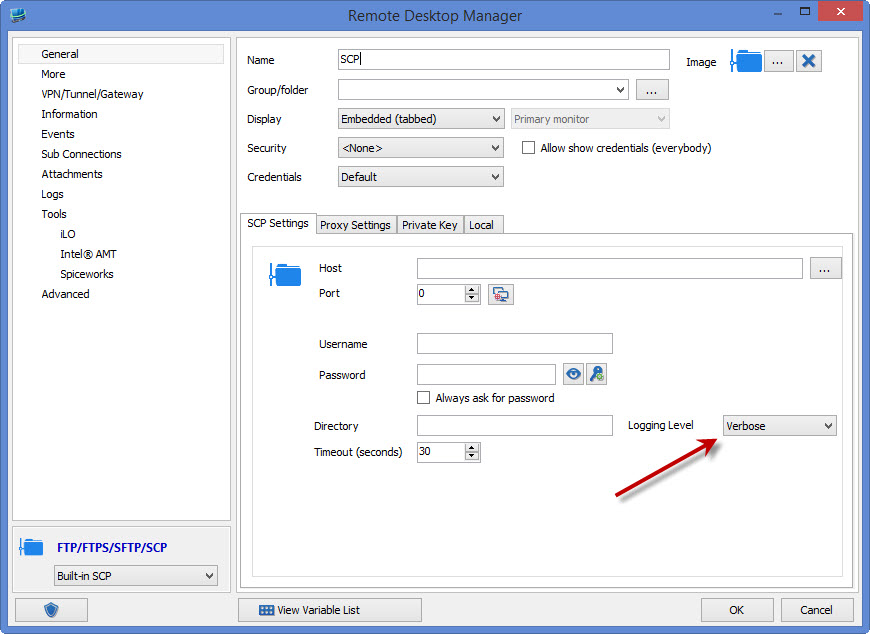
In your SCP entry, what is the value of the logging level? If you're using the verbose logging level, the password will be shown, but using any other logging level, it shouldn't be shown. If you want to be able to not see the password at all in this current version of RDM, you can change the logging level to a different one.
The logging levels are managed by our third party so we cannot change them directly. However, we can intercept the output and remove the password part in the log output. This should be available in the next version of RDM.
Regards,
edited by Hubert Mireault on 3/24/2015
Hubert Mireault
Hello Hector,
It should be located in the entry's settings:
Could you check and see on what level it is set? On my end I can only see the password when it's set to Verbose, but that will be gone in the next RDM version as I said.
If you see the password on another logging level than verbose, I'd like to see the log (without any sensitive information) so that I can see where the problem is, if you can.
Regards,
Hubert Mireault
ss2.jpg
WOW! As it's said in my home, "if it was bigger, it would be eating to you" :-)
It was in Verbose level, I've checked every option and, as you said, password only appears in Verbose level.
Thank you very much for your help.
Regards.
Hector Garcia
I am also having this issue using the 'Built-in FTP' option with logging level set to "Info".
I get the 'About FolderView.Net' pop-up as well as the 'About ShComboBox.Net' pop-up.
This seems to happen every other time I open the session and I get one of the two different pop-ups...
I am using the binary, not the MSI version.
Hi Rick,
What version do you use?
David Hervieux
The latest version; 10.6.4.0 64 bit.
Could you give a try to the latest beta please?
http://remotedesktopmanager.com/Home/Download#beta
David Hervieux
That seems to have resolved the issue. Thanks!