LogOff Folder Menu Item

I'm having trouble with the LogOff option available when right-clicking on a folder. If the first RDP entry in the folder is active and logged in, then I have the LogOff option when right-clicking the folder. However, if the first RDP entry in the folder is not active, that option is unavailable. It doesn't matter how many or which other sessions in the folder are logged in/active or not. Simply if the first listed entry is active, the LogOff option is available and works against any active session in that folder. If the first entry is not active, the option is not available.
Is this a bug? Or what am I doing wrong? (I'm using RDM 10.1.9.0.)
All Comments (5)
Hi,
I think it's a bug. We will take a look at it.
David Hervieux
Thanks David.
Jon,
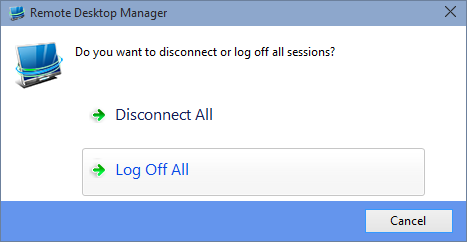
It's a bug, for as a work around you can use the "Close all" and you will be prompted with "Close or LogOff". The fix should be available soon.
Best regards,
Stéfane Lavergne
2015-03-17_7-58-09.png
Resolved, in the next beta release you will have a "LogOff All" when right clicking on a folder.
Best regards,
Stéfane Lavergne
Thank you!