Network port scan

Hi
We have been looking at running a netowrk scan on various subnets to import assets into the RDM console but am finding this takes a while scanning where there are no devices on some ip addresses; ie it hangs for a while then moves onto the next ip address until it finds some traffic.
Is there a way to perhaps send a ping to each ip so that it can simply move to the next until it finds traffic on relevant ports rather than hanging.
Thanks
All Comments (17)
Hi,
It's a good idea. We could add an option to only scan the IP that respond to a ping.
David Hervieux
Thanks
Please advise on how to add this functionality when/if available.
Regards
Anthony
Redblade Support
Hello Anthony,
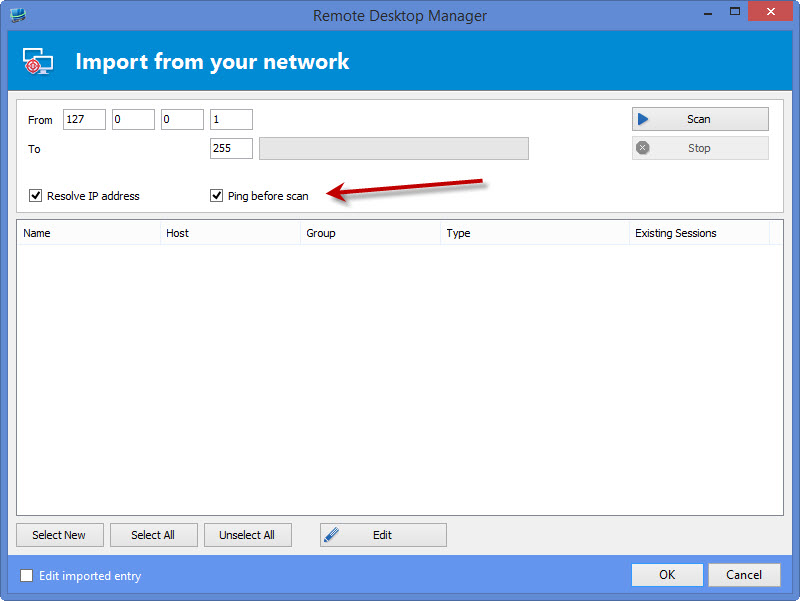
The option will be located in File > Import > Import with Network Scan.
The "ping before scan" option will be checked by default, so you shouldn't have to change anything. This should speed up the import process when you have IPs that are unreachable.
This will be available in the next RDM beta version.
Regards,
Hubert Mireault
pingbeforescan.jpg
Hi
Would would you be able to send an email to support@redblade.co.uk when this is available please?
Thanks
Also would you be able to advise of the requirements to get the inventory report working as we are just getting 'Error Getting WMI Scope'. Would you be able to assist please?
Also I am stuggling to find the button for new post in forum, which is why I have updated in this existing forum.
Thanks
Hi,
We have a topic to troubleshoot the WMI error:
http://help.remotedesktopmanager.com/troubleshooting_wmi.htm?zoom_highlightsub=wmi
David Hervieux
Hi
Have verified WMI services started windows firewall disabled and user rights are ok, i can load computer management from RDM just not inventory report.
Thanks
Sorry another request re the remote features, would it be possible to prompt for a password?
We access multiple domains from the console therefore when I click computer management etc it will fail with access denied, I have added to my local password vault on the server and this has allowed this functionality but this would mean I would need to create local connection details for each connecttion. I have also tried this with batch edit although this fails as this astill attempts to use the local user credentials first.
Any other ideas would be greatly welcomed but I would have thought the prompt may be the easiest option?
Thanks
Anthony
Could you verify if you get an error in Help->View Application Logs?
David Hervieux
Hi
I have tested inventory report with a server in the same domain and ran as that domain's administrator account but the following error has occured:
[16/03/2015 13:04 - 10.1.4.0 - 32-bit] Error Silent: Unauthorized access: Access is denied. (Exception from HRESULT: 0x80070005 (E_ACCESSDENIED))
Thanks
Hello,
Could you make sure that remote WMI is enabled on your server? In addition to that, the UAC in windows can conflict with WMI, could you try disabling it on the server?
Could you try using a WMI explorer and try to navigate to ROOT\CIMV2?
Regards,
edited by Hubert Mireault on 3/16/2015
Hubert Mireault
To confirm UAC is disabled on the remote server and WMI is enabled on the remote server. We ideally need UAC to remain switched on on all servers due to company policy however after disabling temporarily this still proveds the same access denied error
Are you also able to confirm re my previous question. When using computer management anhd any other remote management tasks should this not use the credentials stored in remote desktop manager? It appears that it keeps attempting to use local credentials for the additional feautes aand thefore failing
Thanks
Anthony
Hello Anthony,
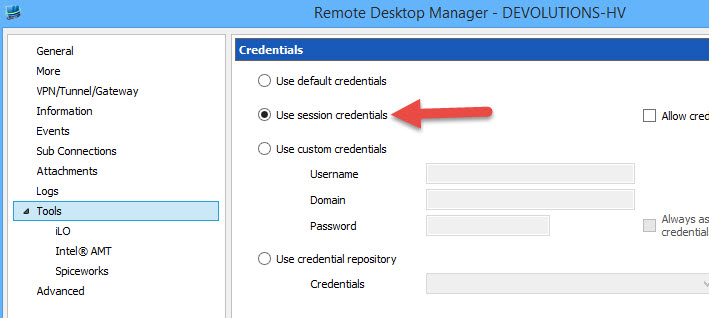
Could you try specifying the credentials you want to use in the tools tab of the entry? If you want to use the session credentials, just select the option.
Regards,
Hubert Mireault
RDM uses the Tools credentials when it's set instead of the local credentials.
David Hervieux
Our company has just purchased your product and we are very pleased with all of it's features. We were previous Visionapp 2010 users.
We too are having a heck of a time with this "error getting wmi scope" issue.
All our servers for the most part are basic loads.
I have gone through the wmi troubleshooter and have command lined our test servers to death with firewall commands. I have turned off firewalls. I have gone into dcom managemente and done all the tweaks. Disabled UAC. used tool credentials both domain and local accounts. restarted services ad nauseum.
We can't communicate!
and i'm pretty sure it will probably be a simple flick of some obscure checkbox somewhere, but please, is there just a step by step how to?
anybody who has had success with this, what did you do exactly step by step?
Thanks!
edited by jvilla@computerrescuesa.com on 5/1/2015
Hi Juan,
Have you tried to check Use session credentials in the Tools section of your session?
Best regards,
Jeff Dagenais
2015-05-01_10-25-32.jpg
Yes I have.
First i followed the steps in your online help: http://help.remotedesktopmanager.com/index.html?troubleshooting_wmi.htm
went to the two links supplied there and tried to do almost all of the steps they outlined.
most servers are domain servers, but i have tried local admin accounts and domain admin accounts for the tool credentials and get the same result.
just feel i'm missing something really simple.