ssh session timeout issue
Hi all,
How can i set all my ssh sessions to be kept alive? form time to time the session dies.On the server side seems to be ok.
Thank you
All Comments (24)
Hi,
Do you use Putty or the native SSH?
David Hervieux
Native SSH
Hi,
I think it's not implemented but I've found a way to add this. I will enter a feature request for that.
David Hervieux
Super,
Many thanks.I really need this...have more than 180 defines connections like this.
thx again.I'll wait for this addon

Disabled
Is this configurable yet? We're using version 12.0.8.0 64-bit.
How do you know if you're using Putty or Native SSH?
Hello Matthew,
You can go in Properties to see if you use Putty or our native SSH. For the timeout I will verify with the team.
Regards
David Hervieux
Disabled
Thanks David, appreciate your help.
With regards to the properties for using Putty or Native SSH, do you mean this......(see attached screenshot).
RDM_Putty-or-SSH.JPG
Indeed it's Putty invoked by RDM. I haven't received the answer yet but I will come back to you soon.
Regards
David Hervieux
Hello,
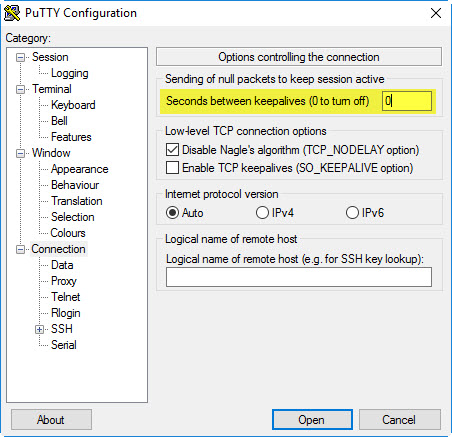
For the PuTTY entry type in RDM you can't directly set the keepalive delay but there is a way to do it. In PuTTY you need to save a session with the keepalive setting you desire:
In my case i used the "Default Settings" session. Then, in RDM, you need to set it to use that session:
This should let you use the keepalive functionality of PuTTY inside RDM.
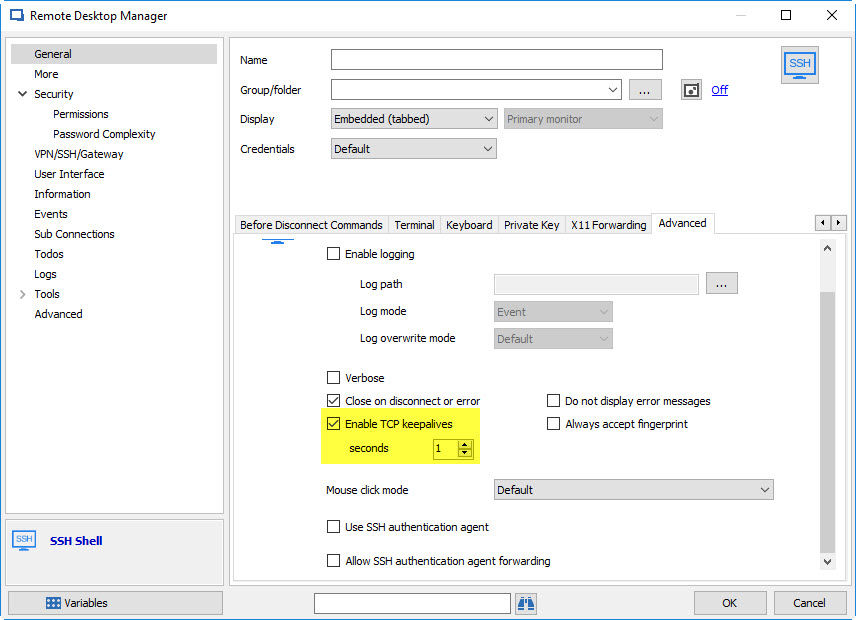
Alternatively you could use the SSH Shell entry type (which is our native implementation based on PuTTY) where the setting is available directly:
I hope these solutions will work in your use-case.
Regards,

Hubert Mireault
2017-05-16 1-55-18 PM.jpg
2017-05-16 1-52-45 PM.jpg
2017-05-16 1-52-01 PM.jpg
Disabled
Hubert,
Thanks very much for all this info, it's a great help.
I know this might be a little sidelined but what differences are there between using your native SSH or using Putty?
Regards
Matt
Hello Matt,
There are two main advantages to using our native implementation rather than PuTTY that both come down to flexibility.
The first is that as opposed to PuTTY, we have the possibility to set every available setting in the entry itself, but for PuTTY we have to call its command line, which has limited parameters.
The second is that if there are feature requests or issues with the terminal, we are able to add or fix those things, whereas with PuTTY we wouldn't be able to since we use the external application.
Regards,
Hubert Mireault
Disabled
That's great Hubert. Thank you once again for the speedy help and thanks to your colleagues also.
Disabled
So I was just looking at how I could batch edit all my connections, changing them from using Putty to using the SSH Shell (Rebex). I can't find where I'd do this. Could you help?
Hi,
this can be done with Batch Actions - you can find here more infos about :)
Best Regards,
Min
Thanks a lot for the link, Min :)
I also want to add for your information that the Rebex entries are not our own implementation so they might suffer from the same issues as PuTTY albeit to a lesser extent. In the more recent versions of RDM our native entry is called "SSH Shell" whereas the rebex entries are all marked with "(Rebex)" in their names. If you're on an older version of RDM, our native implementation might not be available.
Regards,
Hubert Mireault
Disabled
Interestingly, if I use Mins' way with Batch Actions, it seems I can convert my session to your native SSH Shell (without the Rebex in brackets). But individually, the native SSH Shell is not available. See the attached screenshots.
Is it possible you could confirm if the session I converted with Batch Actions is indeed using your native SSH Shell or not? Other than the fact it says "SSH Shell" and doesn't have the "(Rebex)" after it.
As stated above, we're using version 12.0.8.0 64-bit.
Convert_Individually.JPG
Converted_With_Batch_Actions.JPG
Yes, the entries converted by the batch action are indeed the native SSH shell.
Using batch actions are generally better since they are specifically made for certain purposes. They are more thorough with correctly converting data and such.
Regards,
Hubert Mireault
Disabled
Thanks again for your help Hubert.
Disabled
So, now I've converted my hosts to Native SSH and I can change settings within RDM rather than via Putty.
What I'd like to know now is how can I batch edit those settings, specifically the 'Enable TCP keepalives' and 'seconds' field.
I've gone through all the batch edit options I can think of but I don't see how any of the old Putty settings that are now in RDM can be batch edited.
(screenshot attached)
RDM_BatchEdit_keepalives.JPG
Hi,
this can be done via Batch Actions and Custom Powershell Command;
Enter this command and click OK:
$connection.Terminal.EnableTCPKeepalives = $true;
$connection.Terminal.TCPKeepaliveInterval = 15;
$RDM.Save();
..for 15 seconds for example..
Then all selected session has the TCP Keepalives with the specified time activated
Regards,
Min
clip0293.png
@Min, thanks so much, been quite present and helping out the community
you make our mornings a bit easier ;)
Maurice
Many thanks for your nice words, Maurice ;)
Disabled
Min, thanks for your help, worked like a dream.
I might have been told this before, but is there somewhere that documents all these variables you can use?
Hello,
We have a help topic on the subject that you can consult
https://help.remotedesktopmanager.com/powershell_batchactionssamples.htm
We also have an explanation on how to retrieve the field(s) as well. This should help you in the creation of your script(s).
Best regards,
Jeff Dagenais