Passing Username and Password to a PuTTY *NIX Template

I created a template to use in the quick connect. It's opening the system as an embedded tab perfectly. It's passing the username but I'm still being prompted for the password. I don't see a failure message to indicate that it's trying it at all. I'm using a credential that I've defined in the application.
All Comments (8)
Hi,
Does it work if you try it directly in a Putty session?
David Hervieux
Yes. And I've also been doing the same in the Visionapp 2011 for years.
Thank you. I will ask Hubert to verify tomorrow Putty in the Quick Connect.
David Hervieux
Hello Jeck11,
I've been unable to reproduce your problem, the password is always entered properly for me.
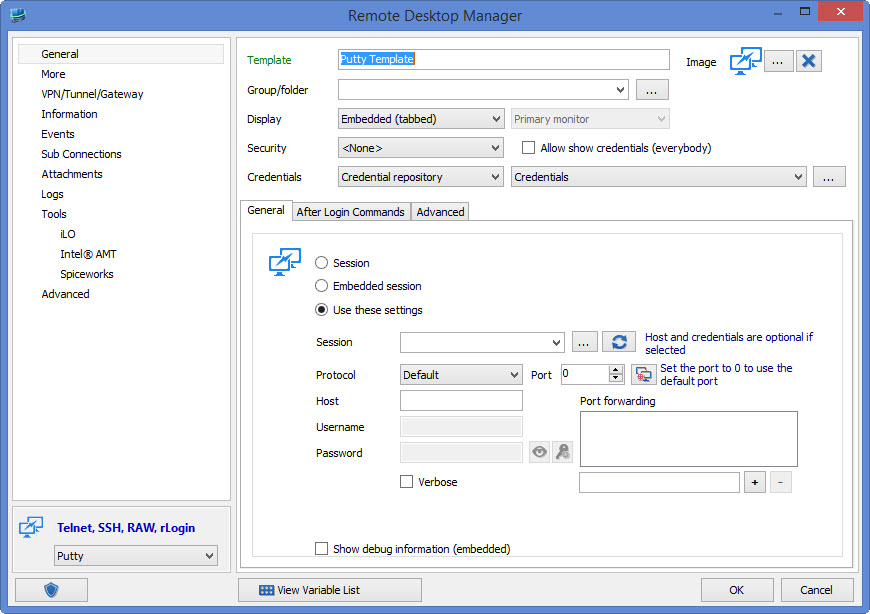
As I've understood, your template is using the credential repository with valid credentials inside, something along those lines:
In the quickconnect bar, I enter the host, and this works for me. Do you use after login commands to specify the password? Is there any other settings you have changed from default for the template?
Regards,
Hubert Mireault
PuttyTemplate.jpg
Hubert - thanks for trying. I'm very new to the software so I'm pretty sure it's on my end. I don't think I've changed much. The tab "After Login Commands" is empty. Do you have a step by step guide I could follow to setup a quick connect for *NIX boxes?
Here's my setup:
edited by Jeck11 on 3/6/2015
You can look here for our help section on our quick connect feature if you need but I think you're set up correctly.
Could you tell me what version of RDM you are using? I noticed your PuTTY template is missing a field (the Session combobox in my screenshot) so your version of RDM must be lower than the current stable version (10.1.9.0). Could you try to use the latest stable version of RDM and see if you can still reproduce the issue? You can download it here.
Regards,
Hubert Mireault
Hubert - Thank you again for the response. I am indeed not running the latest version. I'm on 10.1.0.0. Unfortunately, this version is deployed by my company's internal desktop engineering team and I can not control updates. I've also validated the my setup works on a true installation of the software on a different PC. I'm going to chalk this one up to a failure on their deployment process.
Sorry to have wasted your time.
Don't worry, we're happy to help! We push out updates at a steady pace, so you can always check the version history or the beta version's version history to see if there's been changes to something that might not work as intended in your current version that we fixed.
Regards,
Hubert Mireault