RDM is now waitiing for the VPN to be available

Hello
We use Remote Desktop Manager Server and have a lot of SonicWall NetExtender SSLVPN sessions to manage.
Every time we will connect a SonicWall VPN, this message appears twice. We must therefore press "close" twice every time we open a SSL VPN.
"Remote Desktop Manager is now waiting for the VPN to be available. Please press Close Now when it's ready. The windows will close automatically after time out."
Is the an Option to hide or disable this message?
Thank You.
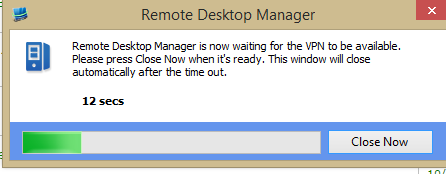
RDM_VPN_Wait.png
All Comments (2)
there are multiple locations to set this timeout:
- File-Options-Types-Others-> VPN default pause
- VPN-Entry-General-Advanced-> After execute wait
Set the option you dont want to -1
regards
Markus
Kind Regards
Markus
======================
Thank You! :D