SFTP - Unable to retrieve information

Using the built-in SFTP client; this error appears whenever a file is uploading, deleted or overwritten. (see screenshot).
10:15:11.220 Info Command: SSH_FXP_STAT (104, '/var/www')
10:15:11.261 Info Response: SSH_FXP_ATTRS (104)
10:15:20.437 Info Batch: Calling PutFiles(string = 'C:\Users\James\Desktop\control.js', string = '.', FtpBatchTransferOptions = 'Recursive', FtpActionOnExistingFiles = 'ThrowException').
10:15:20.439 Info Command: SSH_FXP_STAT (105, '/var/www')
10:15:20.481 Info Response: SSH_FXP_ATTRS (105)
10:15:20.486 Info Command: SSH_FXP_STAT (106, '/var/www/control.js')
10:15:20.527 Info Response: SSH_FXP_ATTRS (106)
10:15:24.231 Info Command: SSH_FXP_OPEN (107, '/var/www/control.js', 26)
10:15:24.272 Info Response: SSH_FXP_HANDLE (107, 0x0)
10:15:24.317 Info Command: SSH_FXP_CLOSE (109, 0x0)
10:15:24.358 Info Response: SSH_FXP_STATUS (109, 0, 'Success')
10:15:24.373 Info Command: SSH_FXP_STAT (110, '/var/www')
10:15:24.414 Info Response: SSH_FXP_ATTRS (110)
> 1 file (4913 bytes) transferred in 4 secs at 1 KB/s
10:15:24.469 Info Command: SSH_FXP_STAT (111, '/var/www')
10:15:24.510 Info Response: SSH_FXP_ATTRS (111)
10:15:24.516 Info Command: SSH_FXP_REALPATH (112, '/var/www/')
10:15:24.558 Info Response: SSH_FXP_NAME (112, 1 item)
10:15:24.563 Info Command: SSH_FXP_STAT (113, '/var/www')
10:15:24.603 Info Response: SSH_FXP_ATTRS (113)
10:15:24.608 Info Command: SSH_FXP_OPENDIR (114, '/var/www')
10:15:24.649 Info Response: SSH_FXP_HANDLE (114, 0x0)
10:15:24.737 Info Command: SSH_FXP_READDIR (115, 0x0)
10:15:24.779 Info Response: SSH_FXP_NAME (115, 6 items)
10:15:24.792 Info Command: SSH_FXP_READDIR (116, 0x0)
10:15:24.833 Info Response: SSH_FXP_STATUS (116, 1, 'End of file')
10:15:24.834 Info Command: SSH_FXP_CLOSE (117, 0x0)
10:15:24.874 Info Response: SSH_FXP_STATUS (117, 0, 'Success')
10:16:08.049 Info Command: SSH_FXP_STAT (118, '/var/www')
10:16:08.109 Info Response: SSH_FXP_ATTRS (118)
edited by theJae on 1/25/2015
edited by theJae on 1/25/2015
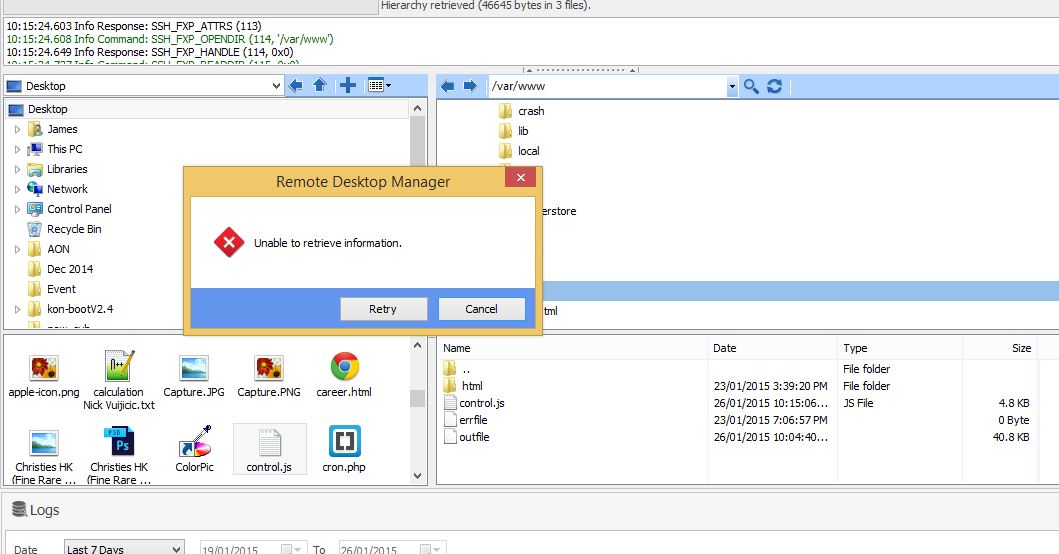
unable to retrieve information.JPG
All Comments (13)
Could you check what you get in Help->View Application Logs?
David Hervieux
Good morning David,
I cleared the logs before trying for 3 times, the error still appears but the "View Application Logs" tab is empty.
PS: My systems specs
Client: Win 8.1 Enterprise (Build 9600)]
SFTP Server: Ubuntu 14.04 LTS (DigitalOcean - Default image deployment).
SFTP Connection: Private key from Repository.
edited by theJae on 1/26/2015
We will try to reproduce it on our side.
David Hervieux
Hello,
We're able to reproduce the problem and will work on a fix. I will keep you updated.
Regards,
Hubert Mireault
Thanks Hubert!
Hello theJae,
Could you confirm for me if the upload/overwrite/delete action still succeeds even if the error message appears?
Regards,
Hubert Mireault
Yes, the upload/overwrite/delete action successfully completes.
Hello,
This problem will be fixed in the next RDM version, which should be available later today. When it's available, could you give it a try and tell us if it fixed your issue?
Regards,
Hubert Mireault
For some reason, my RDM version 10.1.4.0 says "current version is up to date" when pressing on "Check version".
I manually downloaded and installed 10.1.8.0.
I confirm the following is working:
Uploading new file: Ok
Overwriting file: Ok
Deleting file: New bug. After deleting a file, the file directory doesn't always refresh properly. I made a video showing problem and also attached the log file.
http://screencast.com/t/02RVHWIBW4
delete_log.txt
Hello guys, sorry to bump this. Should I create a new bug request for this? Thanks!
Hi,
I know that Hubert has worked on the delete bug. Could you try the version 10.1.9.0?
http://remotedesktopmanager.com/Home/Download
David Hervieux
I confirm this bug still exist in 10.1.9.0
Appreciate your team's hard work! :)
Hello,
We have found the underlying problem and will introduce a fix for it in the next version of RDM.
Regards,
Hubert Mireault