Add-on to manage ASA?
0 vote

Hi, I'm using your software on a daily basis and it's the most useful thing I've ever adopted to manage remote "stuff" :D
Is there any chance to have an add-on for an entry that can launch the ASDM-IDM (a java appliance that manages Cisco ASA)?
Thanks!
Marco
All Comments (37)
Hi,
This has already been asked but we haven't found a way to integrate it. Do you have an idea?
David Hervieux
as a starting point, as suggested here (https://supportforums.cisco.com/thread/2073337) we could execute the remote java binary.
The java binary called is javaws.exe, with the argument "https://<hostname>/admin/public/asdm.jnlp"
No idea on how to pass credentials, anyway :/
We already support Java Web Start in the application. Maybe you could configure an Auto typing macro in the Event tab page. This macro could send the credentials if this application prompt for it.
David Hervieux
Creating a RDM addin that would allow the launch of Cisco's ASDM program from within RDM would be great idea. Very useful.
Have you tried the Java Web Start add-on?
David Hervieux
hi, we solve it by doing following steps:
create entry "command line"
run: javaws "https://<hostname>/admin/public/asdm.jnlp"
on events-tab:
after connection
activate: execute automatically
enter following macro: {WINDOW:ASDM-IDM}{BS}$USERNAME${TAB}$PASSWORD${ENTER}
We store Username & Password in Credential-Entry. You can create with New-Entry, Username/Password
since 8.0.12.0 it works really great, past versions of RDM had Problem with Vars
edited by SMG on 1/14/2013
Kind Regards
Markus
======================
That's great. Thank you very much
David Hervieux
Hi SMG,
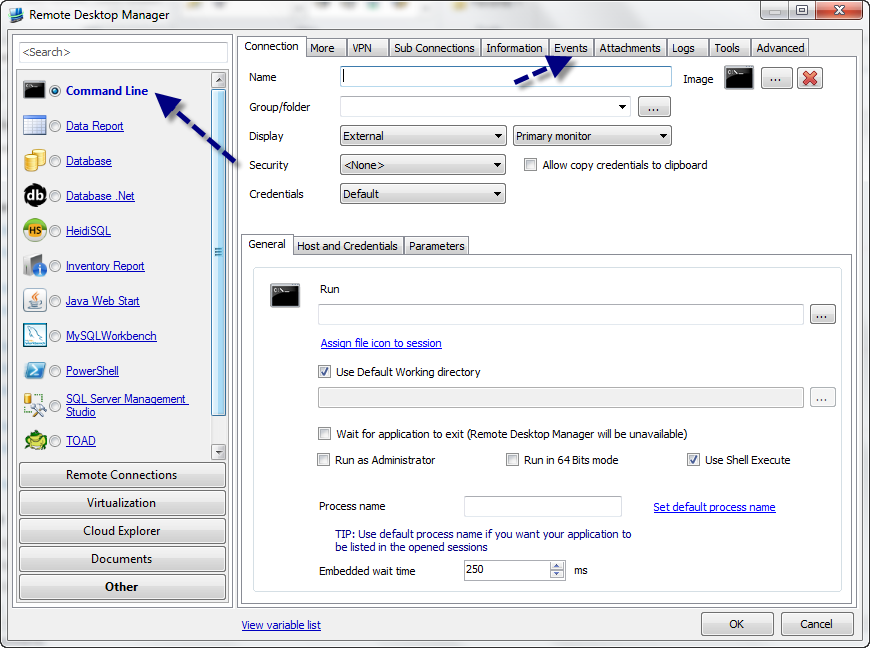
If i'm try to create a new command line entry, i only have three tabs 'General' 'More' 'Advanced' en not the 'event tab'
Or are you using the 'java web start entry' because there all the tabs are available.
i'm using version 8.0.12.0 with the java web start addon installed
edited by dgit on 1/23/2013
edited by dgit on 1/23/2013
edited by dgit on 1/23/2013
Could you post the a print screen please?
David Hervieux
Here is the link to the screendump
Hi,
Thank you for the print screen. You haven't used the right command line. You used the Macro/Script/Tool one and not the one linked to a session.
David Hervieux