RDM Jump scenario

Hi!
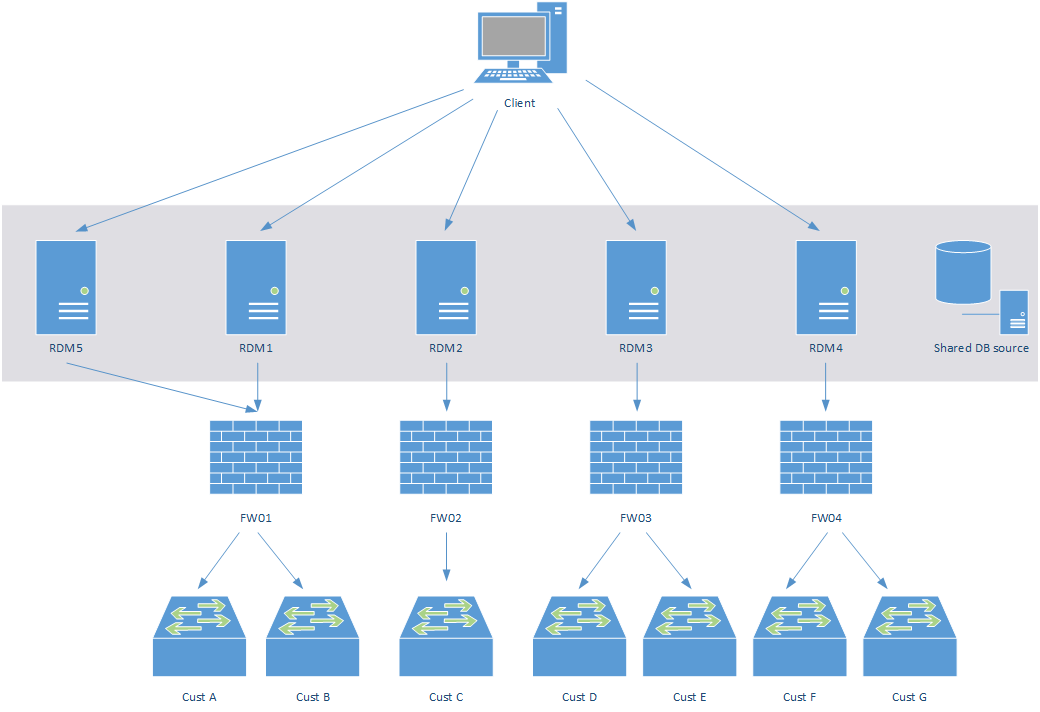
At the moment, we are using the below setup in order to manage our customer environment. Explanation to follow below the image :-)
(The servers in grey are in a different subnet from the client and therefore is seperated by a fw that allows RDP to the RDM host(s))
At the moment we are using at least five different terminal server with RemoteDesktopManager installed. The reason for this is that we have customers with colliding IP networks and some customers have policy that states they need to be managed from a seperate machine. Due to the colliding IP networks, all RDMs have different default gateways that have access to different customers. The same firewalls/gateways are used for monitoring purposes as well. The client needs to run Remote Desktop to one of the RDM servers (Or use RDM as remoteapp, one app for each RDM)
As you can imagine, help desk staff and system admins needs to know which customer is on which RDM server, and we have many servers to update RDM on and to patch the OS on, and each server you have different settings on RDM depending on different config files etc. Painful to manage, as you surely can imagine.
We would like to refine this process and leverage the RDM Jump, and I was imagining a setup like the below. Am I figuring this our correctly?
(The servers in grey are in a different subnet from the client and therefore is seperated by a fw that allows RDP to the RDM host(s))
The jump hosts need to have different gateways in order to access the different customers, but I can have one single RMD Host that has all customers listed in one view. The client then uses RDP to connect to the RDM Host.
Could the RDM application be installed on the client directly, and connect to the jump hosts using RD Gateway?
How would you design this setup to be most efficient and secure?
/Andreas
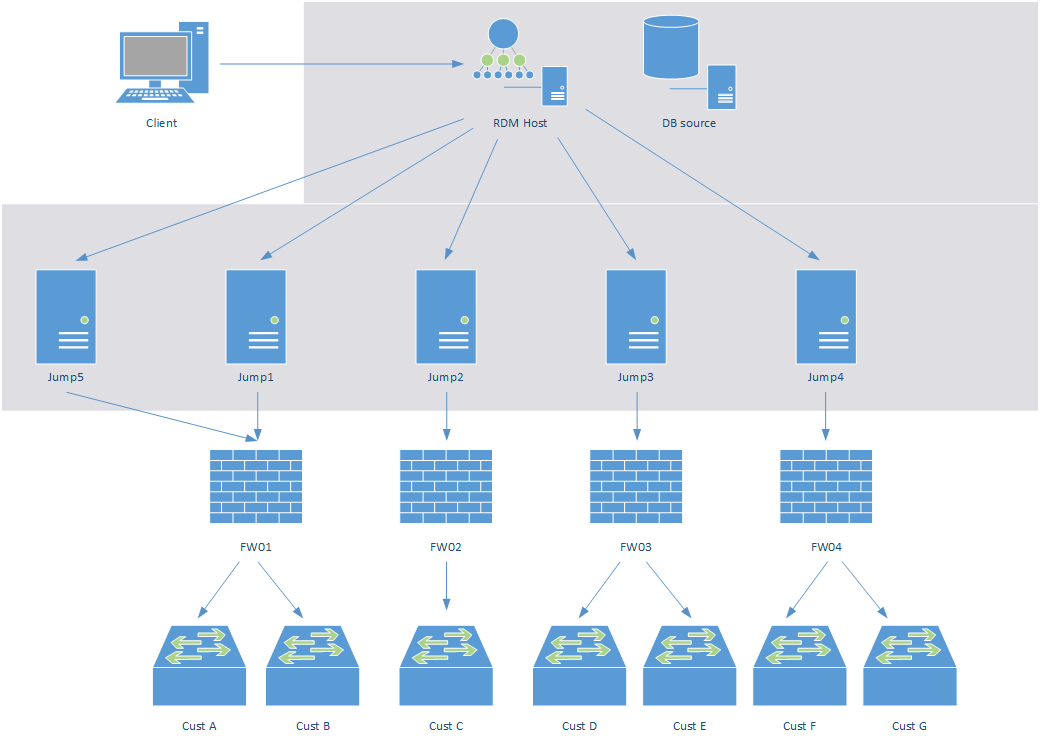
rdm_jump.png
rdm_current.png
All Comments (8)
Also, perhaps it is a good scenario to use the RDM Server here to have the possibility to set permissions for AD groups on everything?
Hello,
Just a quick note to let you know that we have read your post and we'll discuss this during the afternoon. We'll get back to you ASAP.
Best regards,
Maurice
So, the second diagram is correct, assuming the RDM host is terminal services. I do not see the terminal servers in the first diagram so I'm unsure of if you want to move to that type of solution, or if you think that it must go through that.
Each client could connect directly to the Jump Boxes, but I'll leave that out of the equation at this time.
We could have a quick gotomeeting to cover more ground, just PM me with your email address to set this up.
Best regards,
edited by mcote on 1/21/2015
Maurice
Hi, and thanks for looking in to it :)
Regarding the first (and current) scenario, all servers with RDM is a terminal server.
I think a goto meeting sounds good, I'll PM you right away.
/Andreas
Pretty interesting.
When you come to a solution you are satisfied with, please do share.
I would love to see what your final implementation will be and if it works in production as planned.
//Brandur
//Brandur
@Brandur, will do, I will put it in a how-to topic as well.
Maurice
Andreas is away for a while, this will be postponed until February.
Maurice
@Brandur, have you seen http://help.remotedesktopmanager.com/gettingstartedwhatisrdmjump.htm ?
The graphics need many adjustments, but these are the two scenarios that we are putting upfront. I would welcome comments.
Many of us have a good understanding of VPN's and Firewalls, but the usual representation of a brick wall is so far from the reality and I'm looking for a better representation for what they actually perform.
Maurice