Confusion about VMWare Remote Console and issues with configuration
Confusion about VMWare Remote Console and issues with configuration

Good day,
I searched the forum but there is a lot going on on both sites with each new version. The documentation is also not showing the latest information so I want to create a new topic.
Our VMWare environment is running at version 5.5 and we use the latest version of the RDM. My Machine run Windows 10 or Server 2012 R2.
So when I create a new VMWare Remote Console entry I go to the General tab and setup our vcenter connection. Now I have three configuration options, 'Default', 'VMware Player' or 'VMWare VMRC'.
VMWare Player is no option.
With Default it will open a PowerShell, this will connect to the Vcenter, this will invoke a URL what will open a Browser window and this will result in a very limited remote console.
The best would be the VMWare VMRC what I also use from within the vSphere Web Client. Here is the VMWare Download Link: https://my.vmware.com/de/web/vmware/details?downloadGroup=VMRC70&productId=353
But this VMRC does have another executable and another installation path: "C:\Program Files (x86)\VMware\VMware Remote Console\vmrc.exe"
The file RDM is searching for was find under: C:\Program Files (x86)\Common Files\VMware\VMware Remote Console Plug-in 5.5\Internet Explorer
But this one does not work "vMware Player is not installed properly on this system and cannot function. Please reinstall VMware Player".
Is it possible that the VMRC that RDM use is something old from VMWare? I really want to use the tool from the link above because it offers a lot of functions.
I hope you can help me somehow.
Best Regards,
Philip
All Comments (15)
Answering this will take all my wits, and a little time. I so wish I could attend a VMWare university....
Have you seen this?
http://blog.devolutions.net/2014/06/breaking-change-in-vmwares-powercli.html
Maurice
Well, that new VMRC has been published in October 2014, we havent integrated it, so that will be easy.
The old VMRC not working was the reason for changing the default to the powershell console
I will have a look, it may take just a few hours to integrate this one
Maurice
Hello,
The new VMware Remote Console 7.0 in fact requires that the VMware vSphere Web Client be installed.
It doesn't accept a typical command line like previous versions, but rather a URL that uses a web protocol handler
I tried to install it, but I got stuck when it asked for a vCenter SSO Lookup Service URL
I will need more time. Know that we only hold a license for the Essentials subscription level, so I do not think we can test all of this in-house.
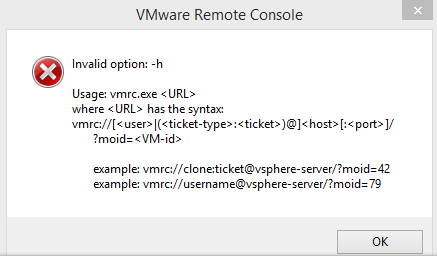
Maurice
vmrc.png
Hello,
sorry our Spam-Filter did not made a good Job the last days and I havent seen the notification. Thanks for looking into this so fast, very appreciated.
I think I can provide you with some important information after a small reasearch on my side.
You are right all seems to start with the web protocol handler, but you can also but this behind the executable and it will also run.
I think it's clear that the host, port and VM-id need to be provided by the customer. Okay we can provide the information that the entry is a VM with a VM name and then it could be possible to resolve the VM-id out of this but this is something for later maybe :D
If I provide nothing or only my username it will ask me for credentials and then it connects.
The other way is a ticket so we don't need to provide a username or password. But I need to explain the Web Client first.
You can connect to the Web Client to call https://<vcenter>:9443 and will provide a login mask. There is a checkbox to pass through the windows authentication (sso). Unfortunately VMware does not use the defaults and thex created their own authentication handler.
Seperatly there is something like a API on the vcenter available from https://<vcenter>/mob/ that requires as well a authentication I think via Basic Auth, again no SSO :(
After the authentication I can open https://<vcenter>/mob/?moid=SessionManager&method=acquireCloneTicket and on that page I need to press "Invoke Method" what will generate a Ticket: cst-VCT-52747def-a8a1-c30a-d5e2-76839fe37abc--tp-C0-2F-27-FD-54-22-89-D4-78-41-55-0B-75-BE-C7-E6-AF-93-AB-CB
This Ticket I can use to call the url again:
vmrc://clone:cst-VCT-52747def-a8a1-c30a-d5e2-76839fe37abc--tp-C0-2F-27-FD-54-22-89-D4-78-41-55-0B-75-BE-C7-E6-AF-93-AB-CB@<vcenter>:443/?moid=vm-16542
This will open the console without any further authentication needed and i think this is the best way we for the integration.
If you need any help please contact me, I will help you as much as I can.
Thanks!
Best regards,
Philip
Also some Links I used:
http://www.virtuallyghetto.com/2014/10/standalone-vmrc-vm-remote-console-re-introduced-in-vsphere-5-5-update-2b.html
http://www.virtuallyghetto.com/2013/02/how-to-access-vsphere-remote-console.html
There is also this API but was not able to figure out if this is the new VMRC or the old one:
https://developercenter.vmware.com/web/sdk/55/vmrc
Hello,
The issue I face is that we're using the VimClient, which in turn uses the PowerCLI.
I have searched far and wide to locate that vmID, it doesn't seem to be exposed in the classes we have and that drives me crazy. I will have another look.
If any of you have information on that, please send that along.
edited by mcote on 1/23/2015
Maurice
I tried to discover the id by PowerShell and there I also cannot find the exact ID. The id I have to use is vm-16542 but I only found VirtualMachine-vm-16542. Maybe that will help you already?
could you please run this and confirm the moref is what I need?
Get-View -ViewType VirtualMachine | Select name,moref
Best regards,
Maurice
Yes, if you remove the "VirtualMachine-" prefix you have the ID that the VMRC is requesting.
My machine from the command you gave me.
LER-XA-DC1 VirtualMachine-vm-16542
hmmm,
my output isVWINDSRV-DC - VirtualMachine-3VWINDSRV-SQL - VirtualMachine-4VSRV-UBU1 - VirtualMachine-5VWINDSRV-RDMS - VirtualMachine-6
does this mean that my vmids are single digits?
Maurice
Hey,
sorry for my absence. I checked our System again and find something!
Result when connected to vcenter is this:
LER-XA-DC1 VirtualMachine-vm-16542
now I connected to the host and I got this from the same VM:
LER-XA-DC1 VirtualMachine-85
If you need me to test something else just let me know.
Best Regards,
Hello,
We've just had confirmation from a member of the PowerCLI team that this is the proper method, it should also be unique across vCenters. There must be something else impacting us.
I launched a call to all of our community to get more people involved in this, hopefully we will have more users testing this out.
Best regards,
Maurice
Hello,
Our friend Peter Cermak informed me that the moref was a complex object and we needed to grab a single field
Does the following work the same on all your machines?Get-View -ViewType VirtualMachine | Select @{Name="Name";Expression={$_.Name}},@{Name="vmID";Expression={$_.moref.Value}}
Thanks
edited by mcote on 2/26/2015
edited by mcote on 2/26/2015
Maurice
Hi!
Yes, here is a short example of the output:
Name vmID
---- ----
LER-EXCH-DB1 vm-10376
SNG-SRV-2008R2 18.03.2015 vm-1039
SNG-DC-1 vm-1049
LER-BES-2 vm-1123
I have recently created a PowerShell function to call the VMRC as I don't like the Open-VMConsoleWindow function. I got it managed to use the Session Manager to create a CloneTicket so that I can also enjoy the functionality of SSO.
Call this to get the session manager and acquire a CloneTicket:
$SessionManager = Get-View -Id SessionManager
$CloneTicket = $SessionManager.AcquireCloneTicket()
The output is something like: cst-VCT-52752068-1b72-e55a-088e-f4c984763223--tp-C0-2F-27-FD-54-22-89-D4-78-41-55-0B-75-BE-C7-E6-BF-B3-BB-BB
To get the Id I use: $ID = (Get-VM -Name $item | Get-View).MoRef.Value
And then I execute this:
. 'C:\Program Files (x86)\VMware\VMware Remote Console\vmrc.exe' "vmrc://clone:$($CloneTicket)@$($global:DefaultVIServer.Name)/?moid=$($ID)"
Maybe this help you as well.
Best Regards,
Philip
I am trying to use the VMRC method. When I open properties for a VM i see 4 VMRC entries.
The first three does not open anything when they are selected, but the last does work. Except that it requires a VM ID, and that means I always must have an ID list ready to use this feature.
What to do?
Thanks, Ole Thomsen