use specific DNS server for DHCP hosted networks

Hi,
I have multiple customers to support with RDM.
Some of these have a DHCP Server running so the IP addresses of the clients are kind of "randomly".
Is there a possibility that RDM asks a DNS server that is somewhere entered in the session details?
My own DNS server doesn't know all the clients I support, the IP addresses are changing but the DNS server of my customer would know it.
Have you got a hint how I can solve this problem other then looking up the IP address manually doing a 'nslookup <clientname> <CustomerDNS>'?
Thanks in advance
Reiner
All Comments (29)
Hi,
I have entered a feature request for that. Thank you
David Hervieux
Hi,
thank you.
Hello,
we are evaluating RDM currently and since I did not found this feature in the application, I wanted to ask, if it is implemented yet.
Thanks in advance
@arthurmayer,
What are you trying to accomplish exactly? Could you elaborate on the subject?
What type of session are you launching?
What version of RDM are you running?
Best regards,
Jeff Dagenais
Using the latest RDM Enterprise 30d Trial 2020.1.20.0 x64 win and 2020.1.8.0 macos (trial)
Trying to accomplish exactly what OP asked 8 years ago.
we manage multiple remote networks/subnets connected via ipsec vpn (vpn is not managed by rdm). each remote subnet has its own dhcp and nameserver with many dhcp workstations. i want specify the dns server for each subnet folder, so i can add remote hosts/sessions by their hostname instead of ip.
in rdm i created a folder/domain for each remote subnet. ideally the dns servers could be specified on the folders, so all sub-object will be resolved by inherited namesrever.
thanks in advance
please let me crosslink this and a similar request: https://forum.devolutions.net/topics/2504/dns-server-lookup-option
Hello,
After verification, there's nothing implemented at this time in RDM to accomplish this.
Sorry about that.
Best regards,
Jeff Dagenais
sadly, thanks for honest reply.
this is an essential feature for us, since it is impossible to map dozens of remote nameservers into our domain (especially because they have colliding zones)
any suggestions on pre-script for a session with hostname in address field, resolve it first with nslookup using remote server, get back the current dhcp ip and connect to the returned ip? i.E. following returns only clean ip address:
(((nslookup workstationXY.remotedomain.tld remote.dns.server.ip 2>null| select-string -pattern "Address:") -split ":")[3]).Trim()
For me as the original poster the problem was solved with Windows 2016 Server because since then the DNS Server suported conditional forwarding.
I now can just enter the FQDN for the host and the normal DNS functionality will do the rest.
Do you really have different customers with the same FQDN domain name?
Kind regards,
Reiner
Hello Reiner,
thanks for coming back to this topic after years :)
sadly yes, we have some customers with duplicate domains, not only workstation hostnames. (not our fault. we are an IT service company, so many customer were changing to us with their previously existing setups, often some sh!t like "ws01.ad.local"), but there is no option to change their domains, since its a big time effort = costs.
On the other side RDM is not actually a "cheap" software (enterprise team) and we do expect some features. this is not the only investment to do in our hard- and software. there are a lot of reoccurring licenses, as backup software, virtualization hypervisors, firewalls, antivirus, etc etc etc.... you know what i mean.
if we just go ahead and buy everything, that could "partially" solve our needs and invest time into changing infrastructures and least but not last calculate all the other investments together, it would bomb away any rentability for our customers and us ourselves out of the water.
I greatly appreciate your response. Technically there are a lot of options. Thanks for that.
But again, your original request was 8 years ago, and staff member (@David Hervieux) said he added it to the feature request list also 8 years ago, and it is not implemented yet. it is an important feature.and there were implemented millions of unimportant (IMHO) features, i am not sure, if i can suggest to our financial department to invest in this software.
manually we got around it for years, this is something what really would add value (also a faster gui experience would get a lot of value, but this is not critical).
to add, this requested feature is not hard to implement. i don't insist on a true native and/or portable solution. a windows included cmd tool like nslookup could be used. or an external tool i.e. dig (like other external tools, as vpn clients, browsers, teamviewer, dameware, etc.), which is included with all linux flavors OTB, macos/macosx, and is also available for windows as installer. there are tons of different VPNs, tons of group folder-objects. let it be a script for pre-session, we don't care, we have a mission to accomplish.
off topic here, but still, add important things, like: website object invalid cert ignore (browser independent, except of HSTS of course). folder-object "foreign/remote subnet" with customizable gateway and dns-server, similar like its done with VPN.
but no, we have millions of features, that are silly (as credit card and payment, let them be in the CRM software, its not depending to a RDM in any way)... sorry, got to deep into my anger of not fulfilled wishes in only two days of trial and evaluation :)
I absolutely love the MD-wiki-like feature for the objects, this is a game changer! also i love the versatileability, design and usability.
Beste Grüsse
Arthur
Hello,
I don't think this will be implemented for this release but I have created another enhancement request. I just did some research and I think it could be added. You might be right and maybe Remote Desktop Manager is not well fitted for your needs. You might not like some features but they were requested by other users. In the meantime you can try the Before Connect events to call a small PowerShell script:
Here is an example where I change the connection name and you could do the same by changing the Url property
Regards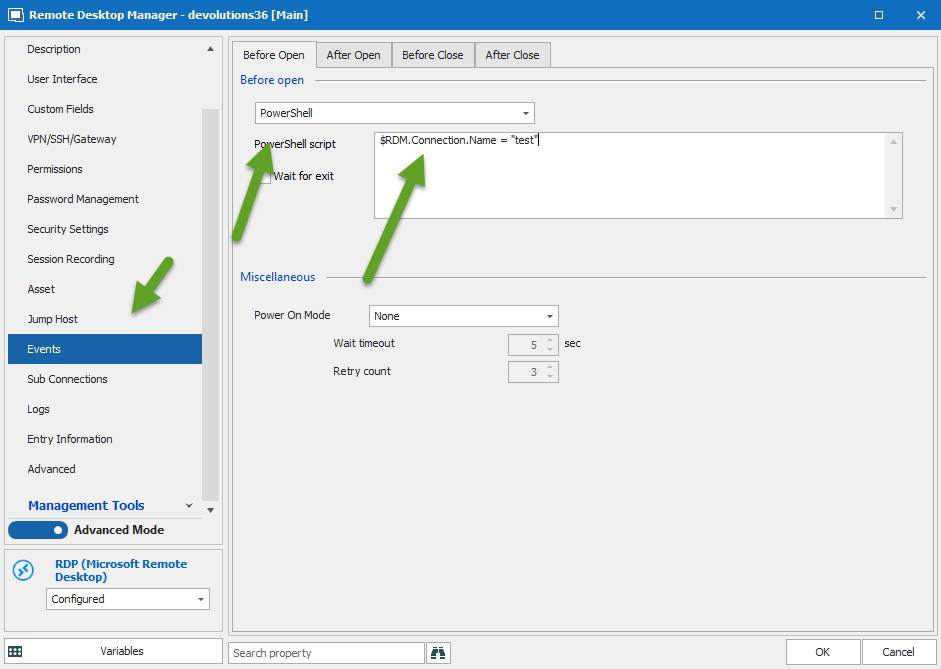
David Hervieux
PowerShell.png
Hello David,
thanks, this actually IS helpful. i will make a script with my previous idea of getting ip via powershell using nslookup, like (pseudo code following)....
$RDM.Connection.Name = (((nslookup workstationXY.remotedomain.tld remote.dns.server.ip 2>null| select-string -pattern "Address:") -split ":")[3]).Trim()
we are evaluating rdm since 3 days now, it fulfills a lot of whishes from our team. but in the short time i am not deep into the API and variables yet. i think, if the API allows such manipulation through scripting, i will come up with a solution next week, and report. maybe even with a plugin, that would be great. any further help and finger pointing is appreciated.
and of course, this is a user request actually since 8 years. would be really cool, to have it integrated into the gui.
Hello David,
do you have an example how to take a customer field from a RDM-Group-Folder instead of "test"?
It would help to get IP-Adresses for the DNS-Servers
Hello,
Sorry to jump in! That being said, would it be possible for you to provide me a screenshot of the field you would like to use?
I will then be able to see if it is possible to return the value of this field with a script and use it as the connection name.
Depending on the field you wish to use, we might have a variable that will allow you to do this:
https://help.remotedesktopmanager.com/settings_variables.html
Best regards,
James Lafleur
Hello James,
If we can save the DNS-Server in a folder custom field like this:
And the Server entry looks like:
Then it could be possible to overwrite the host in the Before Open-Event with something like:
$RDM.Conection.Host = (Resolve-DnsName -Name $RDM.Connection.Host -Type A -Server $DOMAIN_CUSTOM_FIELD1$).IPAddress
But what is the right syntax?
Thank's in advance.
Reiner
Hello Reiner,
to get it work with the $DOMAIN_CUSTOM_FIELD1$ variable you must change the folder type to Domäne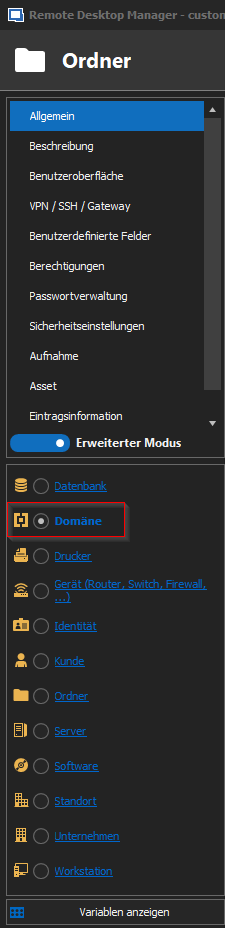
not 100% sure about the syntax but it should be something like this:
$HOST = (Resolve-DnsName -Name $HOST$ -Type A -Server $DOMAIN_CUSTOM_FIELD1$).IPAddress
PS: to check if the variable resolved correctly I configured a "Vor Verbindungsaufbau" Ereignis: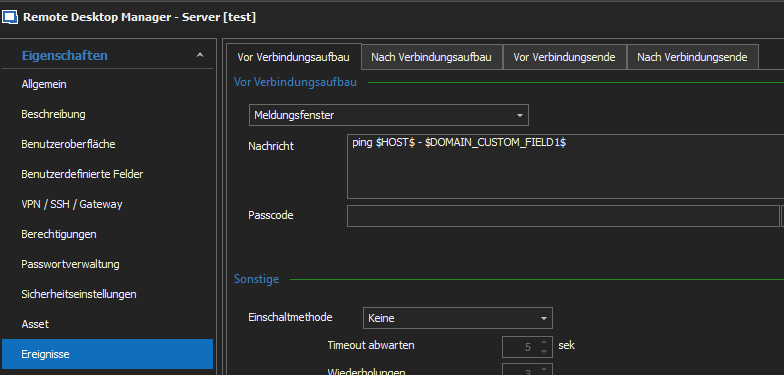
Regards,
Min
Host-Domäne.png
Ordner-Domäne.png
Hi Min, James, David and Arthur,
it works like a charm.
I didn't knew the folder types yet.
Now I have a folder Type Domain - like Min suggested - with a domain name entry and the custom field#1 (named DNS-Server).
In the entry for the connection the Host-Field only contains the shortname of the machine and in the 'Before Open'-Event it looks like:
So, my request from 2012 is solved now!
Additional question:
In the domain folder I recognized the field 'Domaincontroller' but I didn't found a Variable for that.
Than you very much.
Kind regards,
Reiner
Hello Friends,
Min and Reiner, thank you very much! This solution works perfectly.
Best,
Arthur
Hello Reiner,
We are glad to see that this works!
That being said, after going through the list of our variables, it is true that there is not variable that returns the "Domaincontroller" value.
I will contact our Engineering Department on that matter and see what can be done.
Best regards,
James Lafleur
Hello again!
Our Engineering Department just informed me that they will add a variable to return the value of the "Domaincontroller" field of a Folder of the Domain type.
We will inform you once this will be implemented.
For further reference, the ticket number is RDMW-5231.
Best regards,
James Lafleur
Thank you.

And I am glad to here from Arthur that his problem is solved too,
so the chance that he uses RDM still in a couple of years is growing.

It is a very good tool to handle many different connection types.

Kind regards,
Reiner
Hello,
The domain_controller variable will be available with version 2020.2.8.0.
Regards
Jonathan Del Signore
@Reiner, thank you very much for the participation and helpfully coming back tho this issue!
After this issue is solved with the power of the community and showing possibilities of RDM by scripting (solved an essential need for us), i will definitely suggest the app for licensing it in our team.
Also thanks to all who participated in that solution!
I really hope, that it will find its way into the default feature list into the app soon. like "folder type - remote dns, or folder type -remote subnet (with ip-scanning).
for now, i am happy :)
@Devolutions team: offer @Reiner and @Min at least a beer, or a 12month free license. Those guys are awesome, they helped you to solve an 8 year old issue/request!
Kind regars,
Arthur
Hi Arthur,
thank you.
Forums work is just for helping other's. And I do not know another forum with so many and quick devolper's response.
But if you come for some reason to the very north of germany a beer would be great.
On the other hand if you do not know were to buy the Remote Desktop Manager, you can find my company KUCUK in the reseller list.
Kind regards,
Reiner
Hello Arthur,
thank you for your kind words! 😎 Glad to hear that this works now flawless!
As Reiner wrote:
Forums work is just for helping other's. And I do not know another forum with so many and quick devolper's response.
I agree to 100% 😉 - the Devolutions team and the community are just awesome!
I wish everyone a nice weekend!
Regards,
Min
Hello Arthur,
Our Engineering Department just informed me that the feature you requested will be available in the next version of RDM.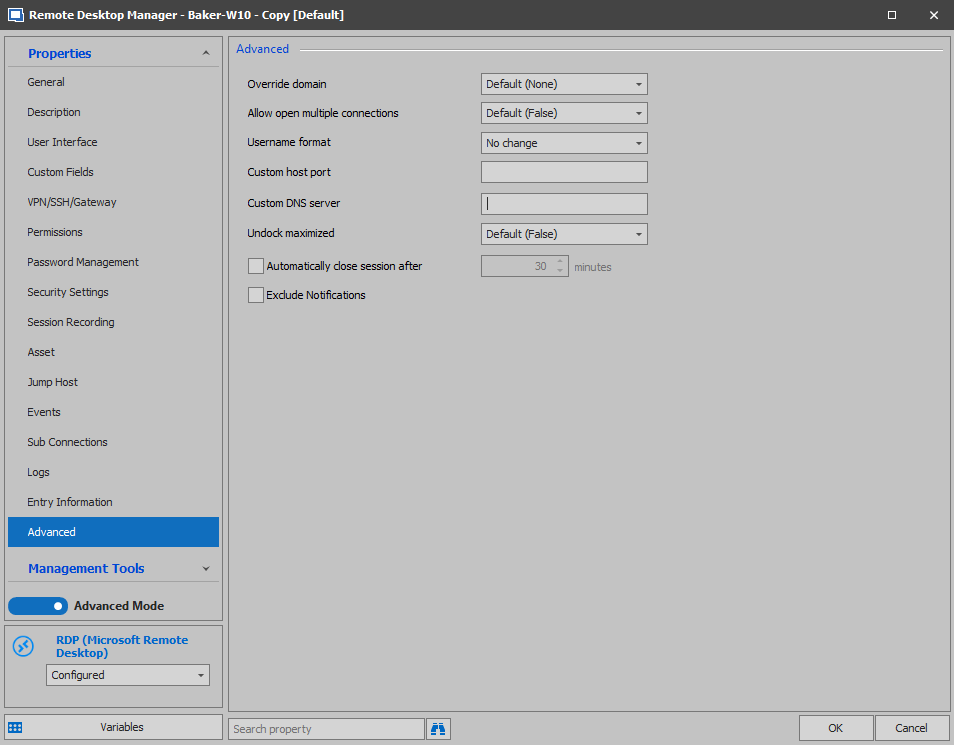
Best regards,
James Lafleur
CustomDNSServer.png
Hello James,
that's great news after so many years. I'm a litle bit touched right now.
In the Screenshot it looks like a rroperty windows of a connection entry.
Will it be possible to configure the custom DNS Server in the above folder?
Cause normally you have to inherit the custom DNS Server when the customer with a Domain has more than 1 Client ;-)
Kind regards,
Reiner
Hello Reiner,
Glad to see that you are happy to see this feature in RDM!
I forgot to mention that, as requested, it will be possible to add a variable in the field, for example, $domain_controller$, this variable will allow you to fetch the "custom DNS Server" from the Folder.
Best regards,
James Lafleur
Hello Reiner,
The custom DNS server field will be added to folder entries (for types that support variables) in version 2020.2.13.0.
The variable $CUSTOM_DNS_SERVER$ will also be included in this version.
Regards
Jonathan Del Signore