Command-Tab messes up keyboard in remote RDP session
When I use Command-Tab to switch back to another Mac App and then again to switch back to Windows, it acts as Command was stuck as the Windows key, i.e. pressing D or one the arrow keys now behaves as Windows-D or Windows + arrow keys.
All Comments (55)
Thank you for your feedback.
I was easily able to reproduce the issue and am now working on a fix.
I will post back once the problem is fix.
Jonathan Lafontaine
Thanks, Jonathan. It's not super-critical, but it's nice to get it fixed!
/Jesper
Hi Jesper,
This issue is fixed and included in the 1.1.11.0 release.
Jonathan Lafontaine
Hi Jonathan,
I am currently running version 1.1.11.0 and am still seeing the sticky Command key issue when Command-Tab between applications.
Dana
Aldom,
I use version 1.1.12.0 - undocked rdp
If I press CMD+TAB the windows start menu is open - If I come back to the rdp window I can use all keys without problems. In the past I have the same problem that a CTRL or other key is fix pressed in rdp window.
@Jesper: is this a normal control ? In the rdp settings in tab "local resources" I can configure "Windows key passthrough" - mean this "Mac OS X Control Keys" ?
Bye
Jochen
Yes, Jochen, it is a normal control. And Aldom is right, I also see the sticky issue still. It sometimes sticks the SHIFT key after Cmd-Tab, and sometimes the Windows (Cmd) key.
I was able to reproduce the sticky SHIFT key if I use cmd-shift-tab to switch window.
Is this your scenario Jesper?
I cannot steadily reproduce the cmd key sticking but it does seem worse using undocked sessions.
I will further investigate this issue to try and find the problem.
Jonathan Lafontaine
I may have been using Cmd-Shift-Tab, although I only remember using Cmd-Tab, but that you found it is fantastic. And just to confirm: I am only using undocked sessions, not really a big docked session fan... :-)
Hi,
We just released a new version that should fix your issue
You can download it here http://mac.remotedesktopmanager.com/Home/Download
Give it a try and tell me what you think
Benoît Sansregret
Hi
Just upgraded to newest version, and I still have the CMD-key sticking when CMD-TAB to a RDP session.
When in a session you need to press CMD (it acts as the Windows key) again to reset, otherwise it still sticks.
Hi,
Thank you for your comment.
We will try to find what is still messing with the windows/cmd key
Benoît Sansregret

Is there any progression in fixing this irritating problem?
I have to press shift control option and command keys to let RDM think the keys are not pressed anymore.
I use the latest version of RDM for MAC.
Stil using your product and paying for it.... But this bug still not fixed!
It irritates me very much, I don't understand why it is still not fixed. (or am I the only one).
I have this issue on every version, just installed the latest update without any change in this sticky key behavior.
Please reply.
Hi,
I'm sorry you didn't get any reply the last time you posted. This is not acceptable.
I will make sure we have a solution for you as soon as possible.
Benoît Sansregret
Thanks, I can't wait for the fix...
Additional information: after the key is stuck once and repairing it after pushing all the shift, ctrl, alt, cmd keys, the "c" "h" "v" keys aren't working anymore, the strange thing is caps of these letters are working fine.
Hi Martijn,
We have a fix for you that will be available in the next release.
I know you have been really patient with us and I want to offer you a development version containing the fix.
You can download it here https://www.dropbox.com/s/ewbylxw1d1fwmfn/Devolutions.RemoteDesktopManager.Mac.3.5.3.1464975461.dmg?dl=0
Tell me if it fixes your issue.
Benoît Sansregret
I installed the version you uploaded and will report back...
Thank you for the quick action :)
During testing I think the sticky keys issue is a better with this version... but....
This version takes 100+ percent of a CPU core... My mac is going to take-off....
Hi Martjin,
We identified other situation where the cmd key was stuck and we are fixing it right now.
Unfortunately, we are not able to reproduce your performance issues.
Is it happening every time you connect?
Benoît Sansregret
After upgrading to macOS sierra I cant test RDM anymore... Are you guys going to support macOS sierra?
If I remembered correctly CPU load is rising from the beginning after starting RDM, even without an active Remote Desktop (but im not sure of that).
Hi Martijn,
We released a version that fixes all of the issues we had with CMD-Tab.
Unfortunately, it doesn't support macOS Sierra.
If you roll-back from Sierra you can download it here DownloadDmg v3.5.4.1
We also found a possible cause for the performance issue and we are working on a fix.
We will support macOS Sierra as soon as possible but we are dependant of the changes Apple and other third parties we use.
Therefore, we cannot guarantee that you will be up and running at all time during the Sierra Beta
Best regards,
Benoît Sansregret
I am running 3.5.4.2 and have the same issue.
When i use the ctrl + arrow keys to switch desktops it seems to keep the key stuck.
Randomly pressing ctrl / alt / caps / shift seems to clear the problem.
It is extremely frustrating!
Hi Ross Dineen,
I seem unable to reproduce you're issue. Is your session embedded or undocked? Are you in fullscreen?
When you do switch desktop with the ctrl + arrow key, the ctrl seems to stay stuck and you could press the "c" key and it would do a copy instead of writing the "c" character?
Maybe it has to do with specific session settings.
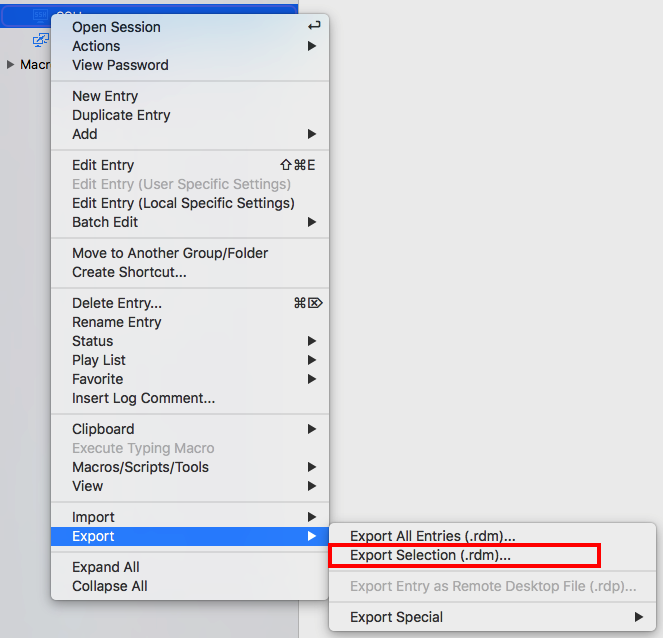
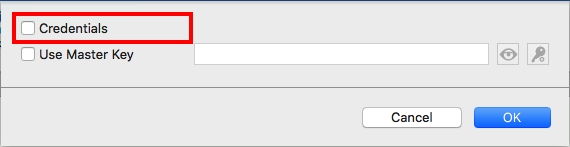
Could you export a session where you reproduce the issue and send it to me. When exporting, leave the Credentials checkbox uncheck, your password will therefor not be exported:
You can open the resulting .rdm file with TextEdit and remove any other sensitive information you wouldn't want to share.
You can send this to me via private message or to the following email address: xfortin@devolutions.net.
Best regards,
Xavier Fortin
ExportWithoutCredentials.png
ExportSelection.png
Hi Xavier,
I'm experiencing the same problem with 3.5.4.2 - using the Touchpad to move between Desktops on the Mac and always when coming back to the RDM's Windows Session I've to press CMD, Option, Shift to restore the Keyboard to normal. If I can be of any help in this issue, simply let me know, what you need rom me.
Cordially
Christian
Best Regards
Christian
Just sent you the RDM File of one of my server entries that have this problem.
I just tried the following: When switching between the diferent Desktops on my Mac by using CMD-TAB it works fine when switching back to RDM. When using the Touchpad or the Control-Arrow to move between Desktops, the Keyboard messes in the Windows RDP. It also messes up when using my Shortcut CMD-Shift-Y to produce a screenshot of the RDP Window and then going back to the RDP.
Hope this helps.
Best Regards
Christian
Hi Christian,
Thank you for the RDM File. We'll look it up and try to figure this out.
Best regards,
Xavier Fortin
Hi Christian,
When you switch between you different desktop, is the Dashboard app among those? I've been unable to reproduce your issue with one exception. When I use Ctrl + Arrows keys to go to the Dashboard and come back to my RDP session, it does mess up my keyboard.
Best regards,
Xavier Fortin
Nope, I'm always switching with 3 fingers on the Touchpad frome one Desktop to another. Go to the Dashboard only in very rare cases.
Let me know, if you need anything else.
Best Regards
Christian
Any News in this case? I'm using 3.5.4.3 inbetween and the issue still occurs regularly when I switch back to a Windows RDP Session.
Best Regards
Christian
We're still looking into the issue.
We'll post back when we find a fix.
Best regards,
Xavier Fortin
Hi,
We've been able to reproduce a somewhat similar issue. We've reworked the way we handle the changing of key flags. Would you be willing to test it and tell me if it fixes your issue?
Here is said version: https://www.dropbox.com/s/2agu5luql3wpqwp/Devolutions.RemoteDesktopManager.Mac.3.5.4.3.dmg?dl=0
Best regards,
Xavier Fortin
Tested it for about half an hour against two windows 2012 R2 Servers and did not encounter the issue, when switching back and forth to other applications. So, yes, it seem to help. Thank you!
Best Regards
Christian
Damn, the issue came back. It does not occur so often as before the 3.5.4.3 but during some hours of work it comes 5 to 6 times after switching back to the RDP Session.
Best Regards
Christian
Hi Christian,
I tried to reproduce your issue but couldn't this time.
Do you remember the key sequence you were using when the bug occurred?
Anything that might help me replicate your results come to mind?
Best Regards
Jonathan Lafontaine
RDP Session to a Windows 2012 R2 Server. I do frequently create Screenshots (with option-shift-X or command-shift-x), change to the left screen (with 3 fingers gesture on the MacBooks Pad, Insert the Screenshot into a windows Virtual Machine (running in VMware Fusion), change to the rigt Screen (with 3 fingers gesture again), then click in to the RDP Session and continue to work. Inbetween I check by pressing the "d" key on the Keyboard, if all Windows in the RDP Session minimize, then the Windows Key is stuck and that's mostly the problem. Then I press the right shift, the right option and the righ command key and the escape Key and everything is normal again.
Best Regards
Christian
Thank you for the detailed explanation, I was able to reproduce the issue.
Me ox Xavier will update this thread once a fix was found.
Jonathan Lafontaine
Yeah, great!
Best Regards
Christian
Hi,
We found a fix to your issue. Here's the fixed version: https://www.dropbox.com/s/1zeloaelt2zy5ja/Devolutions.RemoteDesktopManager.Mac.3.5.4.3.dmg?dl=0
Could you try it and tell us if it resolve your issue.
Best regards,
Xavier Fortin
Thanks for the fast response and hopefully a quick fix!
Tuesday I can test the new version, I hope this version also fix the issue with the default screenshot shortcuts Shift+CMD+4 (screenshot portion of the screen to file) and Shift+CMD+3 (screenshot active screen to file).
Damn. Today the Auto Update installed 3.6.0.0 and the Problem is back. How for Hell did this happen???? With the version before it worked so fine.....
Best Regards
Christian
With 3.6.0.0 it is worse than ever before, RDM is not usable for me. I go back to the 3.5.4.3 from your Dropbox. Please test this issue before releasing updates to the AutoUpdater in the Future to save me from wasting my time.
Best Regards
Christian
Hi Christian,
Could you be more specific as to what doesn't work anymore? I've tested previously mentioned issue (switching desktop with the arrow keys) and everything seems right on my side.
Could you tell me exactly what you're doing?
Best regards,
Xavier Fortin
Same as before: I am swiping with 3 fingers on the Touchpad of my MacBook between different desks. RDM runs on Deck 5, on Deck 4 there is VMware Fusion with a Windows 7 Installation running MindManager for Windows. I take a screenshot of parts of the RDM Windows, swipe to the left, insert the Screenshot Graphoc into Mindmanager, swipe to the right, do anything on the RDP Session. When pressing the "D" Key all Windows within the RDP Session are minimized, so ALT ist stuck.
Best Regards
Christian
Hi Christian,
We've found the issue. This thread encompassed multiple issues with keys. We've missed this one while testing for the 3.6.0.0 release.
It should be fixed in upcoming release.
We're sorry for any inconveniences.
Best regards,
Xavier Fortin
Thank you for your feedback, so I can try the next Release that will be announced by Auto Upgrade - 3.6.1.0 ?
Best Regards
Christian
Yes, it will be in the next release proposed by the Auto Updater.
Best regards,
Xavier Fortin
Hi Xavier,
I did answer yes to the Auto Updater today, got 3.6.0.1, opened some RDP Session at a customer and started to work. After first Screen Switching the Problem was there again. I tested again 3-4 times, then went bak to 3.5.4.3 and the problem is away so I can work.
No good news.
Best Regards
Christian
Hi Christian,
Sorry for that. The version 3.6.0.1 only brought a hotfix for another issue. I'll tell you when a version with the fix to your issue comes out.
Again, sorry for any inconveniences.
Best regards,
Xavier Fortin
OK, I'll wait until I hear from you that "my" Version ist ready. In the Moment the 3.5.4.3 works fine for me and everything is good.
Best Regards
Christian
Hi Christian,
The last version has the fix for your issue. Tell if you have any other issues.
Best regards,
Xavier Fortin
I still seem to have this issue with 4.0.1.0 and 3.6.1.0, when I use Ctrl+LeftArrow or RightArrow to switch desktops. The Ctrl key gets stuck in side the RDP session and can't be untoggled without disconnecting & reconnecting the session.
I've tried v3.5.4.3 in this thread and it seems to work fine!
Thanks
Actually I'm wrong, it happens in 3.5.4.3 occasionally too, but it seems much less likely to happen.
With 4.0.1.0 it happens with almost every time with the first desktop switch.
We might have found an issue similar to this. I'll tell you when the next version is out so you can test and tell me if it fixes your issue.
Best regards,
Xavier Fortin
We weren't sure we found your particular issue, but the version 4.1.0.0 is out and contains a fix for a similar issue.
Could you try it and tell us if it helped?
Best regards,
Xavier Fortin
Hi,
I've updated and no locks yet! Fingers crossed that's it. Thanks very much!