OpenVPN hangs

First, let me say I love Remote Desktop Manager!
I have shown it to everyone I work with and consider it a very important tool.
I'm using OpenVPN and I'm able to connect, but after connecting Remote Desktop Manager is unusable and I just get the mouse pointer just spins indicating it is busy or waiting.
After waiting and waiting (I've waited up to 15 minutes) I try to close Remote Desktop Manager and I get a message that Remote Desktop Manager is not responding and I have to kill the process.
Thanks again for such a great product and I appreciate any help.
All Comments (18)
What is the version number of Remote Desktop Manager that you are using?
Please check the application logs to see if there is anything there. (Help -> View Application Log...)
OpenVPN is a third party plugin. We will try to help you.
Stéfane Lavergne
Thanks for the quick reply.
RDM version 7.1.0.0
There is nothing at all in the application log.
I repeated the process just now and created a desktop video to show what I am seeing.
You can see the video here:
http://www.youtube.com/watch?v=Uck_39p7fOE
So RDM is frozen but was the OpenVPN connection successful opened?
Would it be possible to send us the VPN settings for testing purpose to support@devolutions.net.
Thanks
Stéfane Lavergne
That is correct.
I can RDP, etc over OpenVPN after the connect.
I will send the openVPN settings right away.
Thank you for the prompt support.
Hi,
Just to close the thread. After re-installaling OpenVPN and RDM, everything started to work fine.
David Hervieux
Hello,
we have RDM 7.5 Enterprise and the same thing happens on all the tech computers.
Ovpn connexion connects correctly but RDM is frozen solid afterward.
So far reinstall has not fixed the problem.
We use it on 5 computer via a SQL database.
Thanks
Dominic
Just a quick question. What version of the add-on do you use?
David Hervieux
Latest version of the addon downloaded from here :
http://remotedesktopmanager.com/remotedesktopmanager/Home/AddOn
Remote desktop manager enterprise latest version (7.6)
Open vpn latest version also.
Any help would be appreciated because this is really getting annoying as a big part of our customers use openvpn.
Ty
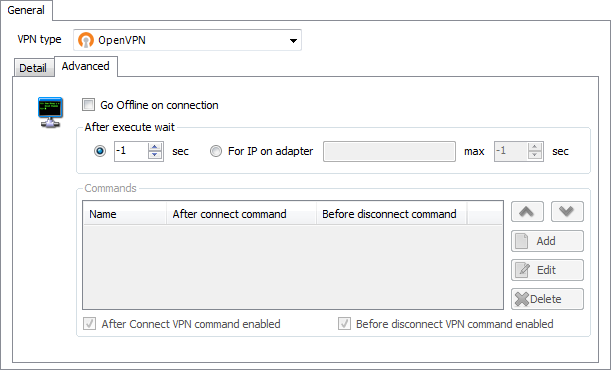
What do you have anything set in the "Advanced" tab?
Stéfane Lavergne
Advanced.png
Btw, this is happening on every computer we tried it.
I would be curious to know if anybody is able to use this add-on on a recent build of rdm.
No, nothing is set there.
but you have a connection to your sql server within the vpn connection, isn't it?
best regards
Tobias
Not too sure of what you mean there.
The database of RDM is of course on our SQL datasource.
Other than that, at this point i'm only trying to create a vpn session in RDM, it isn't on the property of a rdp connection or anything.
Just new entry, vpn, open vpn.
I can see the open vpn tunnel connecting correctly and it is functional, its just that RDM freezes solid while launching the VPN and doesn't come back after.
Thanks for any help you can offer.
Thanks for everyone who helped.
It seems that if in advanced settings I change the "after execute" setting from Wait -1 Sec to Wait for IP adapter 2 Secs it works.
I'll do more testing to be sure but its looking good.
Thanks again,
Tobias you might be onto something.
Since you are using a SQL datasource once the VPN is connected all traffic gets redirect throw that VPN hence making the SQL server connection fail. Can you please try setting the “Go Offline on connection” on the “Advanced” tab.
Stéfane Lavergne
Just a quick related question :
I successfully created the connection in the same group,
now is there any way to tell the rdp entries to use this connection or do I have to recreate it in the properties of every server ?
I know i can batch edit but I would like to have it separate as I can see the status of the VPN separate from the server this way.
Ty
Stéfane yes I think that the traffic to the SQL server could be blocked.
edited by schiesslt on 9/4/2012
best regards
Tobias
Hi,
You can create a VPN entry (Edit->New Entry). In your RDP sesions, select Use Existing VPN and link it to your newly created VPN entry.
David Hervieux