Website Auto-Type / Auto-for "Chrome" not working

Hi, the following features are not working on the Chrome Tab:

All Comments (26)
It says in the screenshot "Form login (IE or embedded mode only)".
I use these features in Chrome, but the session is "Display: Embedded (tabbed)".
If the session is "External", it won't work(as far as I'm aware).
I assume there are technical reasons for this.
//Brandur
//Brandur
Hello Brandur, thanks for your reply.
As you can see, I'm using the embedded mode.
But the function is still missing.
Normally i use the IE for the http/https websites, but some websites are build on self signed certificates so i need to use chrome to skip the certificate check.
Hi,
Brandur is right. We can't directly communicate with Chrome in external mode. However it should be working fine if you install the Chrome web browser extension:
http://remotedesktopmanager.com/Home/ExternalAddOns
David Hervieux
Hi again,
Could you try embedded IE just for a test?
David Hervieux
The embedded IE is working fine.
@edit: the Firefox embedded isnt working too
edited by stein-it on 1/6/2015
Is it a public url that we could test? If not could you send us the View Source? We know that we have an issue with the Frame in Chrome.
David Hervieux
Its public, but not everyone should know the url, so you could try it with:
https://www.veeam.com/account-downloads.html
edited by stein-it on 1/6/2015
Hi.
Could you try with these ID
For https://www.veeam.com/account-downloads.html :
For the other website :
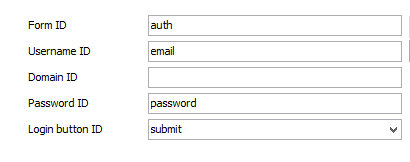
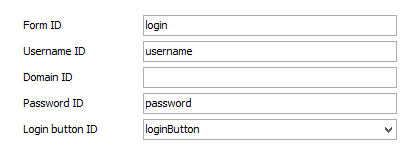
Olivier Désalliers
SteinIt.PNG
veeamID.PNG
To my bad, it isn't working.
Could you export your session without the real password and sent in private message?
David Hervieux
Hi,
The auto-fill for your session works in my case. Did you try to click on the key in the menu?
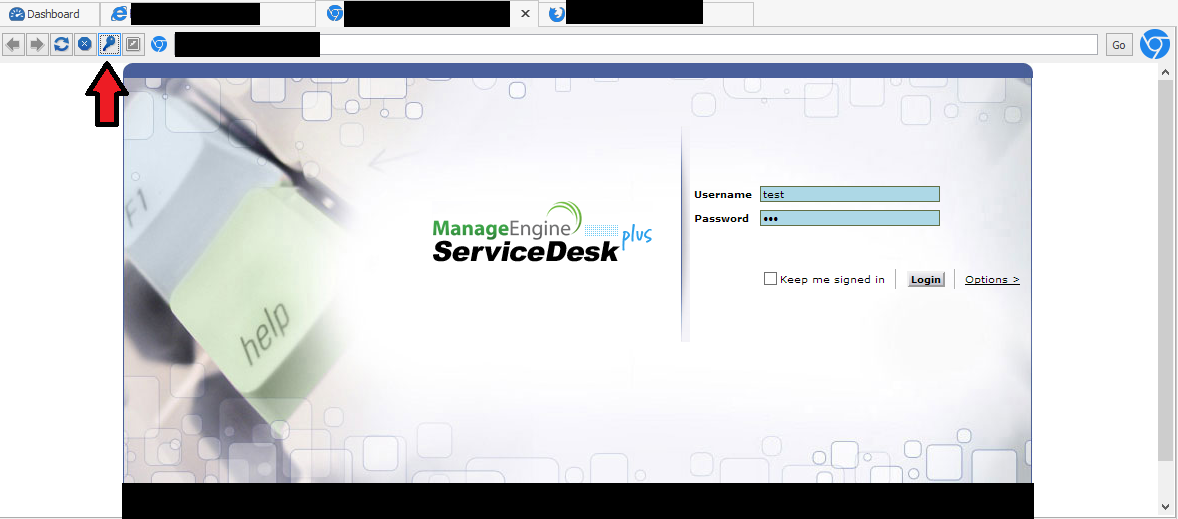
Olivier Désalliers
SteinItChromeAutoFill.PNG
Hi Oliver,
to my bad it doesnt work.
To my system: Win 8.1 x64 latest updates
on a fresh installed VM it seems to work..
will test it after i installed all important updates
Okay new updates so far..
the VM is installed with all needed programs for the daily business, the login for chrome is working on it.
on my personal computer the issue still persists, i've tested it from a other login and it worked.
however, maybe i need to reset the application settings to default?
i guess i will test it later
i've deleted the "%userprofile%\AppData\Local\Devolutions\" subfolder, that i can create a whole new dataset, but the problem persists.
anyone got an idea how this problem can be debugged? maybe its possible to see which setting blocks the process?
hope anybody can help!
Do you use RDM bit?
David Hervieux
I think David meant: Are you using RDM 32 or 64bit?
//Brandur
//Brandur
RDM 32bit
edited by stein-it on 1/9/2015
Hi,
We use a third party for embedded chrome and it seems that they have an update. We will integrate it and perhaps this could resolve the issue. This will be in the next minor update (next week).
David Hervieux
I actually think I had a similar problem with a site a while back(can't really remember). But I was(as usual) in a haste and never came around to debugging any further.
Could you attach a txt file that contains the output of the following two commands:
"systeminfo" and "set"
Please replace the info which you are NOT comfortable sharing, with some gibberish :)
EDIT: Maybe ignore my post, until David has had a chance to update/fix the issue!
//Brandur
edited by Brandur on 1/9/2015
//Brandur
I looked at the info. And I can't see anything out of the ordinary!
The only reason I asked, is because of sometime one stares oneself blind(not seeing something obvious).
I do sometimes at least ;)
It's a weird issue and hopefully the next minor RDM update will solve it(fingers crossed).
//Brandur
//Brandur
Anything new about this?
It seems not to be fixed in the current version.
We did the update of the third party. However I does not seem to resolve your issue. It's hard to fix since we are unable to reproduce it. Let me know if you find why it works on some of your machine and not or your other one.
Regards
David Hervieux
As i've written before: on a other user account on the same machine its working.
so could you provide me information on which locations your RDM stores data?
Registry / AppData / ProgramData / .... and so on.. i'm going to clear all of these locations.
We store the data in %LocalAppData\Devolutions\RemoteDesktopManager
David Hervieux
I've deleted already this location, the result was just, that all my configuration was lost, but the problem persists...
Could you try to install RDM not in program files? For example in C:\RDM
Do you execute it with the Run As Administrator?
David Hervieux