SQL Error

Hey guys
I've here a problem with RemoteDesktopManager. We have AD integrated User and one User have troubles creating new entries in RDM. He is getting some SQL errors but not an all objects. It's super strange. The User has the same permission like all the other users who are working fine. Can you help me? Guess there is something with the SQL DB.
That's the error the User got, when he wanna creat a new object:
[06.01.2015 11:43:21 - 10.0.4.0]ERROR System.Data.SqlClient.SqlException (0x80131904): The INSERT permission was denied on the object 'Connections', database 'RDM-DATA', schema 'dbo'.
at System.Data.SqlClient.SqlConnection.OnError(SqlException exception, Boolean breakConnection, Action`1 wrapCloseInAction)
at System.Data.SqlClient.SqlInternalConnection.OnError(SqlException exception, Boolean breakConnection, Action`1 wrapCloseInAction)
at System.Data.SqlClient.TdsParser.ThrowExceptionAndWarning(TdsParserStateObject stateObj, Boolean callerHasConnectionLock, Boolean asyncClose)
at System.Data.SqlClient.TdsParser.TryRun(RunBehavior runBehavior, SqlCommand cmdHandler, SqlDataReader dataStream, BulkCopySimpleResultSet bulkCopyHandler, TdsParserStateObject stateObj, Boolean& dataReady)
at System.Data.SqlClient.SqlCommand.FinishExecuteReader(SqlDataReader ds, RunBehavior runBehavior, String resetOptionsString)
at System.Data.SqlClient.SqlCommand.RunExecuteReaderTds(CommandBehavior cmdBehavior, RunBehavior runBehavior, Boolean returnStream, Boolean async, Int32 timeout, Task& task, Boolean asyncWrite, SqlDataReader ds)
at System.Data.SqlClient.SqlCommand.RunExecuteReader(CommandBehavior cmdBehavior, RunBehavior runBehavior, Boolean returnStream, String method, TaskCompletionSource`1 completion, Int32 timeout, Task& task, Boolean asyncWrite)
at System.Data.SqlClient.SqlCommand.InternalExecuteNonQuery(TaskCompletionSource`1 completion, String methodName, Boolean sendToPipe, Int32 timeout, Boolean asyncWrite)
at System.Data.SqlClient.SqlCommand.ExecuteNonQuery()
at Devolutions.RemoteDesktopManager.Business.DataSources.DatabaseConnectionDataSource.ExecuteNonQuery(String sql, IDbTransaction dbTransaction, IDbDataParameter[] parameters)
at Devolutions.RemoteDesktopManager.Business.DataSources.DatabaseConnectionDataSource.InsertConnection(Connection connection, IDbTransaction dbTransaction, ISecurityProvider securityProvider)
at Devolutions.RemoteDesktopManager.Business.DataSources.DatabaseConnectionDataSource.SaveConnections(IEnumerable`1 connections, IDbTransaction dbTransaction, ISecurityProvider securityProvider)
at Devolutions.RemoteDesktopManager.Business.DataSources.DatabaseConnectionDataSource.SaveConnection(Connection connection)
ClientConnectionId:b77f9cfe-c103-468d-918d-843e60a1dea9
****************************** SqlError ******************************
Message:The INSERT permission was denied on the object 'Connections', database 'RDM-DATA', schema 'dbo'.
[06.01.2015 11:43:21]ERROR SILENT System.Data.SqlClient.SqlException (0x80131904): The INSERT permission was denied on the object 'Connections', database 'RDM-DATA', schema 'dbo'.
at System.Data.SqlClient.SqlConnection.OnError(SqlException exception, Boolean breakConnection, Action`1 wrapCloseInAction)
at System.Data.SqlClient.SqlInternalConnection.OnError(SqlException exception, Boolean breakConnection, Action`1 wrapCloseInAction)
at System.Data.SqlClient.TdsParser.ThrowExceptionAndWarning(TdsParserStateObject stateObj, Boolean callerHasConnectionLock, Boolean asyncClose)
at System.Data.SqlClient.TdsParser.TryRun(RunBehavior runBehavior, SqlCommand cmdHandler, SqlDataReader dataStream, BulkCopySimpleResultSet bulkCopyHandler, TdsParserStateObject stateObj, Boolean& dataReady)
at System.Data.SqlClient.SqlCommand.FinishExecuteReader(SqlDataReader ds, RunBehavior runBehavior, String resetOptionsString)
at System.Data.SqlClient.SqlCommand.RunExecuteReaderTds(CommandBehavior cmdBehavior, RunBehavior runBehavior, Boolean returnStream, Boolean async, Int32 timeout, Task& task, Boolean asyncWrite, SqlDataReader ds)
at System.Data.SqlClient.SqlCommand.RunExecuteReader(CommandBehavior cmdBehavior, RunBehavior runBehavior, Boolean returnStream, String method, TaskCompletionSource`1 completion, Int32 timeout, Task& task, Boolean asyncWrite)
at System.Data.SqlClient.SqlCommand.InternalExecuteNonQuery(TaskCompletionSource`1 completion, String methodName, Boolean sendToPipe, Int32 timeout, Boolean asyncWrite)
at System.Data.SqlClient.SqlCommand.ExecuteNonQuery()
at Devolutions.RemoteDesktopManager.Business.DataSources.DatabaseConnectionDataSource.ExecuteNonQuery(String sql, IDbTransaction dbTransaction, IDbDataParameter[] parameters)
at Devolutions.RemoteDesktopManager.Business.DataSources.DatabaseConnectionDataSource.InsertConnection(Connection connection, IDbTransaction dbTransaction, ISecurityProvider securityProvider)
at Devolutions.RemoteDesktopManager.Business.DataSources.DatabaseConnectionDataSource.SaveConnections(IEnumerable`1 connections, IDbTransaction dbTransaction, ISecurityProvider securityProvider)
at Devolutions.RemoteDesktopManager.Business.DataSources.DatabaseConnectionDataSource.SaveConnection(Connection connection)
ClientConnectionId:b77f9cfe-c103-468d-918d-843e60a1dea9
All Comments (5)
Hello
This is against SQL Server?
Are the permissions granted through roles?
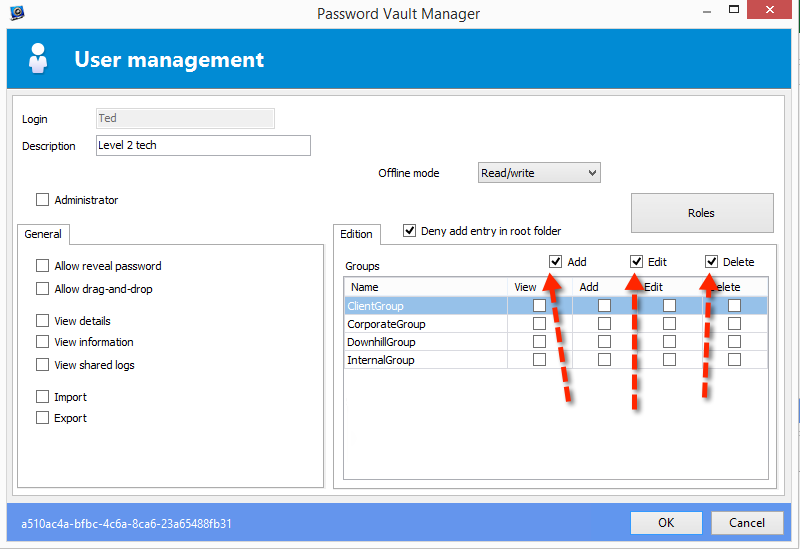
I would suspect that simply checking the ADD permission in the user permission screen would fix the error.
Under SQL Server, the roles are sufficient to grant permissions to security groups, but the underlying tables are protected by GRANT or DENY statement that we emit depending on the basic permissions (the ones above the grid).
As to why it works for other users, maybe they've been given access to the DB using the SQL Mgmt tools?
Best regards,
Maurice
Hey Maurice
That was the point:
Under SQL Server, the roles are sufficient to grant permissions to security groups, but the underlying tables are protected by GRANT or DENY statement that we emit depending on the basic permissions (the ones above the grid).
Everything was on DENY on that user. No idea why. I have corrected that and now it works.
Thank you for your help.
Hello,
I understand that you fixed it by using SQL, the proper fix for future users is to toggle these in the user permissions screen. This will execute the GRANT commands for you
Best regards,
Maurice
2015-01-07_10-48-05.png
It was correctly set on the User Account on the UI. That's the part who I have checked first.
The grants are run when you save the user screen. We would have to see if that GRANT command had failed and for what reason.
Can you create a new user and toggle these boxes a few times. Then go in the logs to see if anything appears.
Best regards,
Maurice