How to hide empty Folders

Hi,
a colleague asked me how to hide empty folders. In some cases he is going to arrange in a folder strutcture which is different from the sessions folder structure. That results in a Session Folder Structure with only sessions and no credential entries. Folders without credentials are not shown in credentials tree.
But it also results in folders with only credentials entries inside. And this folders ARE shown in session tree (but they are empty and confusing)
So, is there a way to hide "Credential only"-Folders in the Session Tree?
best regards
Seb.
All Comments (4)
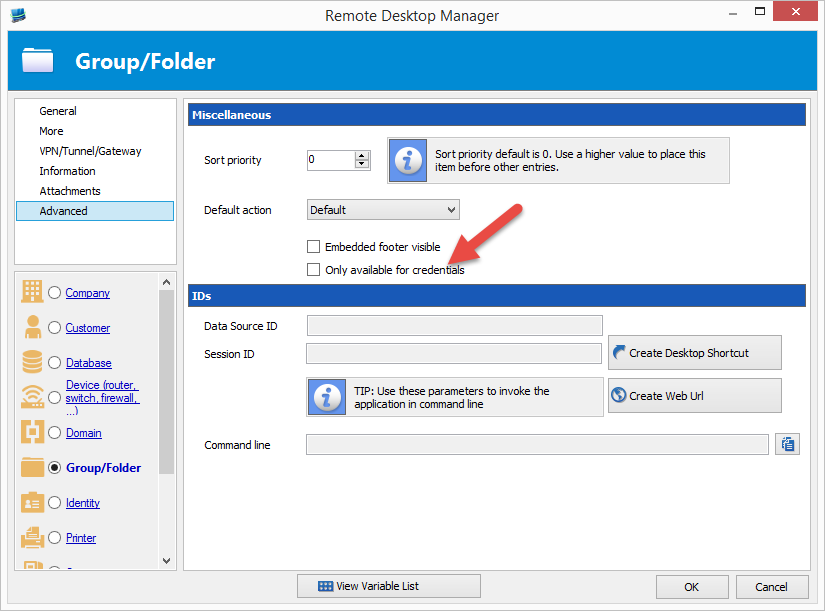
Yes it's possible with the Advanced setting Only show for credentials
David Hervieux
folder.png
Hello
I'm sorry to reopen this old thread, but I received a similar question of a colleague.
We use for each customer the same directory structure. All possible types of entries and categories are present. To maintain the structure, the customers root structure cannot be changed. This implies that a customer has often an empty folder or empty sub-folders.
Is their an option to hide these empty folders (and folders that only contain empty sub-folders)?
The option mentioned in this thread seems to be disappeared.
With kind regards,
Nick
Hello Nick,
Thank you for contacting us on that matter!
At the moment, there are no options that would allow you to hide your empty folders. That being said, if you would like to see this feature in RDM, I would recommend creating a feature request on our forum using this link: https://forum.devolutions.net/forums/17/remote-desktop-manager--feature-request
Best regards,
James Lafleur
Hello James
Thank you for the information. I will create a feature request.
With kind regards,
Nick