Running Powershell scripts with alternative cred

Hi,
This may be covered elsewhere, but I am having issues. Currently, my team puts servers into the RDM Standard tool manually. When we do, we use Session specific credentials and set the username to %username%-ADM. This is our server level credentials. RDM is ran with our standard, non-domain admin, credentials.
Today, I am playing around with some of the scripting tools, and wanted to make a Powershell script that ill grab the memory counters off our servers as we get alerts in on them. The cmdlet I want to run is "Get-Counter '\Memory\Available MBytes' -ComputerName $Machine_Name$". However, when this runs, I get the following error :
Enter-PSSession : Connecting to remote server failed with the following error m
essage : Access is denied. For more information, see the about_Remote_Troublesh
ooting Help topic.
At line:1 char:20
+ & { enter-pssession <<<< -computername wexchcas18; if ($?) { Get-Counte
r '\Memory\Available MBytes' -ComputerName $Machine_Name$ } }
+ CategoryInfo : InvalidArgument: (wexchcas18:String) [Enter
-PSSession], PSRemotingTransportException
+ FullyQualifiedErrorId : CreateRemoteRunspaceFailed
It appears to fail as it is trying to create the remote PS Session. I believe this is because the account I am signed into RDM with does not have any admin level rights on our servers. To validate, I ran Powershell with my ADM account and ran Enter-PSSession -Computername WEXCHCAS18 and was able to get in with no problems.
Is there a way to make Powershell scripts run with alternate credentials (or at least run the Enter-PsSession cmdlet with alternative credentatials)? Once the session is made, I can make the scripts ask the user for credentials if need be. I just cannot find a way to force it to run correctly.
Thanks for your time
All Comments (2)
Please try the following:
Modify the CmdLet to use the $HOST$ variable.
Get-Counter '\Memory\Available MBytes' -ComputerName $HOST$
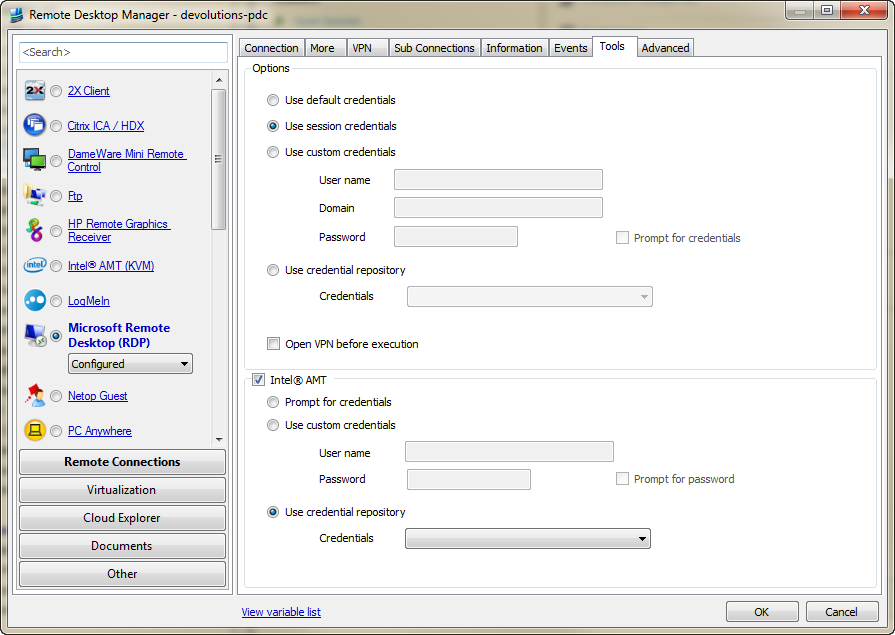
On the Tools tab of the session make sure you chose "Use session credentials" (see attached image)
edited by stefane on 6/4/2012
Stéfane Lavergne
Tools.png
Perfect! Works exactly how I wanted it. Thanks