Issue With PPT Linked Excel Table (When Using RD)

I am a first time poster to this forum and am looking for some help with something that has been driving me crazy. I'll do my best to explain.
Setting:
Issue:
I greatly appreciate any help in advance. I'd really like to continue using Remote Desktop to access my computer at work instead of bringing home my ThinkPad. When I use Remote Desktop, I'm able to use the 27" screen on my iMac and the full keyboard, which make my life much easier. The issue described above, however, is one that I need to rectify or find a way to work around it. Thank you.
Office Example.JPG
Home Example.JPG
All Comments (6)
Do you see this same behaviour when you open Remote Desktop in external mode?
David Hervieux
I have not tried external mode yet. I'll give it a try when I get home tonight. Thank you for the idea.
Please pardon my lack of Remote Desktop skills. How do I open Remote Desktop in external mode? I have searched for other blogs on how to do this and am unable to get it to work. I have a Remote Desktop icon on my Desktop, and that is what I use to access my computer at work. I do not know how to open this link in external mode.
Hi,
You can change the display property inside your session.
Please have a look at http://help.remotedesktopmanager.com/settings_general_displaymode.htm
Best regards,
Jeff Dagenais
Thank you for the help. I realized that I just had a remote desktop connection link. I needed to download Remote Desktop Manager. Doing so now and am going to try External Mode to see if this helps. Remote Desktop works very well, except for this one issue with Excel tables linked in PowerPoint.
Ok, I've finally been able to try External Mode. The result is the same as before when I was just using the Remote Desktop link that IT sent me. This time, I downloaded Remote Desktop Manager, dragged in the RDU link, and opened it in External Mode.
Outcome when I'm sitting at my computer:
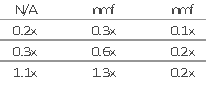
Outcome using Remote Desktop Manager in External Mode:
Does anyone have another suggestion to remedy the issue? It only occurs while logged in remotely. If I'm sitting at my computer at the office or if I have my laptop with me at home (logged in through the VPN), the linking of Excel tables looks fine in PowerPoint.
Thank you for everyone's help.
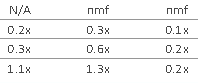
Screen Shot 2015-02-16 at 5.37.20 PM.png
Screen Shot 2015-02-16 at 5.37.30 PM.png