Non Admin Marked As Admin

The database is on a SQL server.
I create new users using Integrated security.
When I log in as one of these user it shows them as Administrator /DbOwner under Help _ About
In the Users and Security Management, the user is not checked as Administrator.
I thought I purchased two copies of Team.
Running Enterprise Edition 10.0.4.0
I want to use security group to limit what entries users can see. Or is this only an option in Team(active Directory)?
Not sure what screenshots would be of value. I thought this would be simple to setup, so I may be missing something basic.
All Comments (8)
Hi,
Could you try to delete the user and re-log it or assign him the Administrator right? You should be able to limit the visibility with the SQL Server data source.
David Hervieux
Tried that, did not work.
When I create my users and check the "Integrated security" box, does the "Create SQL Server Login and User" need to be check as well?
The DB user I have is only a DBOwner of the database and not s server admin.
Now for testing, I went and created a new data-source. Basic setup
Here is the layout
https://dl.dropboxusercontent.com/u/1459048/17891/Server_Layout.png
My users list (Bugs is my common user, the other is my admin user)
https://dl.dropboxusercontent.com/u/1459048/17891/UserList.png
Bbunny permission set. (Bugs is my common user, the other is my admin user)
https://dl.dropboxusercontent.com/u/1459048/17891/bbunny-Permisions.png
BBunny Help, About
https://dl.dropboxusercontent.com/u/1459048/17891/bbunny-Help-About.png
BBunny is a normal AD user, no admin access. Even with this setup Bugs is allowed to see and change everything.
I went as far as to disable the Administrator access for the sql_user... that just made things really bad.
I went through the video at https://www.youtube.com/watch?v=AyCFn2zESZA Wasn't much help.
Could you please open File -> My Data Source Information then click the envelope icon to send us the report. Please add "attn: Stefane" in the message body.
This should help in diagnosing the issue.
Regards,
Stéfane Lavergne
Was sent off yesterday. May have a different email address assigned to it.
Hard to find time to work on this project. (Reason for this updates late posting)
Thanks
It looks like the "My Data Source Information" you sent me is from the "RemoteDesktopManager_sql_user". In this case, since the user is part of the sysadmin role, RDM gives him Admin rights by default and it can't be revoke.
In Help -> About you get the windows user not the data source login.
"My data source information" will give you this. In this case you are logged in as RemoteDesktopManager_sql_user and the app is running as bbunny.
What does you Data source configuration look like for bbunny? You must not specify any login information, but rather check "Integrated security"
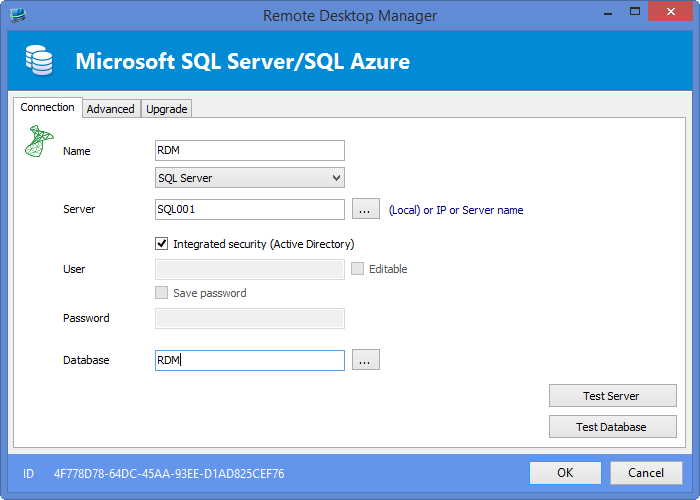
Stéfane Lavergne
12-15-2014 8-30-55 AM.png
12-15-2014 8-16-57 AM.png
If on your machine you want to test other accounts you need to use runas /netonly
Documentation can be found here:http://help.remotedesktopmanager.com/index.html?tipsandtricks_runas_rdm.htm
Regards,
Stéfane Lavergne
Changing the settings for the data source looks to have resolved it.
Most applications I work with do not rely on SQL as the authentication mechanism.
Thanks
Thank you for the update.
Regards,
Stéfane Lavergne