RDM 10.0.0.4 fails RDP login to win2003

Hello,
I'm currently testing RDM if it would be usable for us. I tried the Keepass integration. It works fine with win2008R2. Howerver, with windows 2003 server it does not work.
It copies successfully the username but fails to enter the password and thus login into the server. I tried most of the suggestions on this forum but to no avail.
Could you try to reproduce it and fix it?
Thank you,
All Comments (22)
Does it work if you hard code the username and password directly in the RDP session? Could it be possible that your Windows policy does not allow the automatic login?
David Hervieux
Hello dhervieux,
I have checked what you have suggested. Storing domain\passwd & local password does not work either, suggests that keepass plugin is working. To me it looks like after the logon banner you enter only user id but not passwd.
I have checked also the Windows policy and security. Did not find anything suspicious.
See here the interactive logons:
http://tukanos.rajce.idnes.cz/b/#Interactive_logon_rules_in_domain.jpg
and user rights assignment settings:
http://tukanos.rajce.idnes.cz/b/#security_settings_on_server.jpg
I have also tried to find more information on the MSDN etc.
The only thing I could find is related - http://support.microsoft.com/kb/324737
(we do have a login banner, but I use macro on remotedesktopmanager to press enter and continue - maybe that is an issue)
At the bottom there is this message, maybe it does apply in this case too?:
This registry change does not work if the Logon Banner value is defined on the server either by a Group Policy object (GPO) or by a local policy. When the policy is changed so that it does not affect the server, the autologon feature works as expected.
You might have the "Always prompt for password" setting checked in the server's Terminal Services Configuration settings. Under "Connections", right click the "RDP-Tcp" (by default) connection and select "Properties". The setting is on the "Logon Settings" tab. Here's a picture on one of my servers:
edited by robbinsd on 12/11/2014
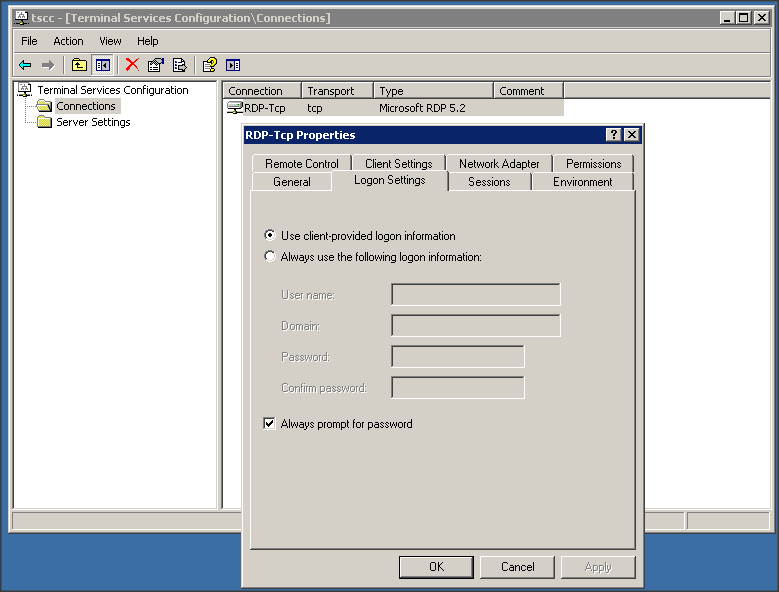
Snap 2014-12-11 at 15.33.57.png
I did have it checked. However, un-checking it did not help. It still does not fill the password. The server is windows 2003 R2 SP2 and I think the major problem is that the RDP 5.2 has the login inside the RDP session, but I don't know how to get the password filled.
Just for a test could you try to open it in External mode?
David Hervieux
I'm using only External mode. The other modes do not work.
They produce this error message:
Hi,
Could you try to turn on the network authentication level and retry the embedded mode?
http://help.remotedesktopmanager.com/troubleshooting_automaticlogon.htm?zoom_highlightsub=nla
David Hervieux
Hi,
It does not work either for the embedded mode. I found this page before and it did not work so I sticked with the external mode.
I have now upgraded to 10.1.0.0 and the problem remains. If I try to copy the password from the repository it copies itself correctly.
Hi,
I might know what could be the problem. It could be your Firewall or anti-Virus. Could you try to exclude RDM from the watched application? This could explain why it does not work in embedded. In external mode it's mstsc and it must already be excluded.
David Hervieux
Hi,
I'll do that today. I have one more question. The OS I'm launching the remotedesktopmanager from is a x64 win7 is there any difference in functionality when I launch RemoteDesktopManager.exe or RemoteDesktopManager64.exe? Of course, I undestand one is 32bit and second is 64bit. My question is more geared towards the RDP and keepass plugin.
Hi,
There is no difference between the two versions. The only thing is that some components are not available in 32 bit. This means that we have to launch the 32 bit version. However for RDP it will use the 64 bit RDP and you will be able to open more connections.
David Hervieux
Hi,
Thank you for clearing it out. For now I'm using 32bit RDM as I thought there could be less issues.
I have tried to disable all I could think of but to no avail. Do you have any more tips or something more I could disable or check?
Here is the screenshot of what I have disabled:
Could you try to ping the host from RDM?
David Hervieux
Yes, ping works correctly.
It works from inside RDM or from the command line?
David Hervieux
I have tested it from within RDM. The command line would be pointless to try as it would not test anything.
I'm really puzzle. Could you test the port scan (3389) to see if it connect. You could also try to download RDCMan and test the connection as well. We use the same ActiveX to control RDP.
David Hervieux
It started to work!!! Ufff, that was really something.
I have finally managed to locate the problem. I have performed the tasks you have suggested. The connection was ok. The issue was that the default RDP port 3389 was blocked. When I tried it outside the RDM it worked fine. I have found out that there is a application which is configured to block the 3389 outside the mstsc.exe. When I have removed the blocking everything started to work as charm.
After fixing (removing the RDM from blacklist) the issue the portscan:
Everything started to work. Thank you David for helping. I hope this will help also some other folk. In External mode it still does not work only the embedded works for win2003 and for making sure everything is fine also with the newest version I tried also the RDM 10.1.1.0 and everything works fine there too.
Take care,
I have performed additional tests and found out that indeed, if you have that checkbox checked it won't work. If it is unchecked that it works as it should. Thank youDennis Robbins.
Hi Dennis,
Thank you for the follow up. Indeed this could help more people.
David Hervieux
I'm glad that my information was useful, if not the ultimate solution for this problem.
Thanks for the props. I'm sure it is a relief to finally have this problem solved!