remote powershell tool connection authentication

I am trying to create a remote powershell tool session however I am having some authentication problems. The user account that my remote powershell script needs is not the one I login to my local computer/RDM. The servers that need to execute has a seperate login name and password. Each time I run the script I get an access denied. If I run my command outside of RDM and specify the -credentials parameter it will prompt me for the password and then will execute the command properly.
I am adding this tool to an existing RDP session which has the password configured and it will connect to the desktop normally.
New-PSSession : [AL001HPFC5DBS1] Connecting to remote server AL001HPFC5DBS1 failed with the following error message : Access is denied. For more information, see the
about_Remote_Troubleshooting Help topic.
At line:5 char:18
+ $rdm_pssession = New-PSSession -ComputerName "AL001HPFC5DBS1"
+ ~~~~~~~~~~~~~~~~~~~~~~~~~~~~~~~~~~~~~~~~~~~~
+ CategoryInfo : OpenError: (System.Manageme....RemoteRunspace:RemoteRunspace) [New-PSSession], PSRemotingTransportException
+ FullyQualifiedErrorId : AccessDenied,PSSessionOpenFailed
Invoke-Command : Cannot validate argument on parameter 'Session'. The argument is null or empty. Supply an argument that is not null or empty and then try the command again.
At line:6 char:26
+ Invoke-Command -Session $rdm_pssession -ScriptBlock { Get-WmiObject Win32_servi ...
+ ~~~~~~~~~~~~~~
+ CategoryInfo : InvalidData: (:) [Invoke-Command], ParameterBindingValidationException
+ FullyQualifiedErrorId : ParameterArgumentValidationError,Microsoft.PowerShell.Commands.InvokeCommandCommand
Enter-PSSession : Cannot validate argument on parameter 'Session'. The argument is null or empty. Supply an argument that is not null or empty and then try the command again.
At line:7 char:27
+ Enter-PSSession -Session $rdm_pssession;
+ ~~~~~~~~~~~~~~
+ CategoryInfo : InvalidData: (:) [Enter-PSSession], ParameterBindingValidationException
+ FullyQualifiedErrorId : ParameterArgumentValidationError,Microsoft.PowerShell.Commands.EnterPSSessionCommand
All Comments (2)
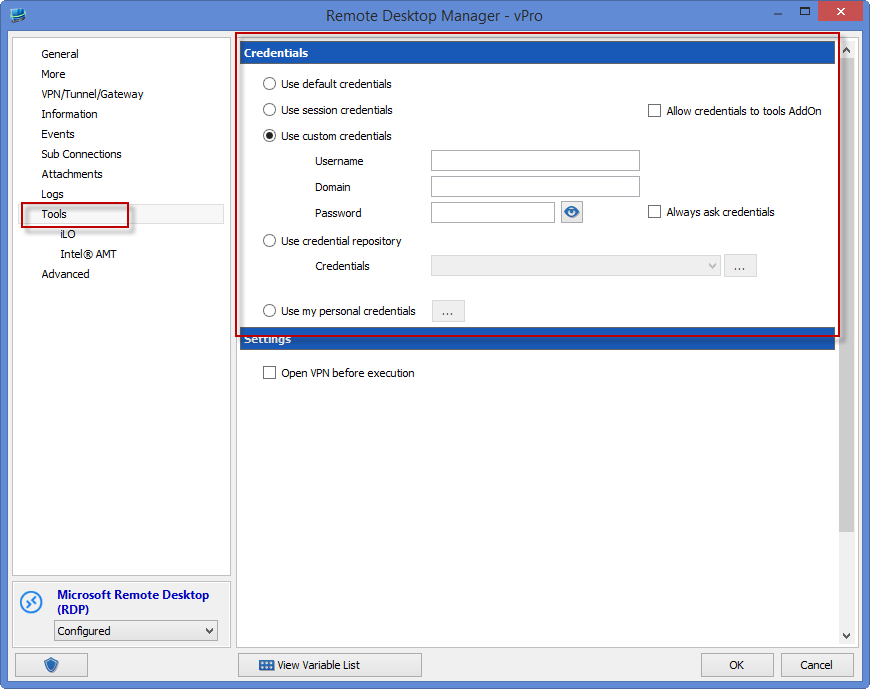
Have you specified the tools credentials for the session?
Setting it to "Use session credentials" should do the trick.
Regards,
Stéfane Lavergne
11-11-2014 10-06-44 AM.png
bah, I always forget that the tools have a separate area for credentials. Thanks works great!