Logging - Private or shared connection?

Hello!
I just looked through the logging and noticed that I am not able to see if a connection is private or shared. How to know?
Best regards,
Andreas
All Comments (9)
It's not indicated. I will enter a feature request for that.
David Hervieux
Thank you David!
I also found out that if I am offline and view i.e. credential entries and afterwards go online again - shared credentials are logged as viewed but private not.
Hello,
In the message column in the logs, it will be writen if the entry in question was private.
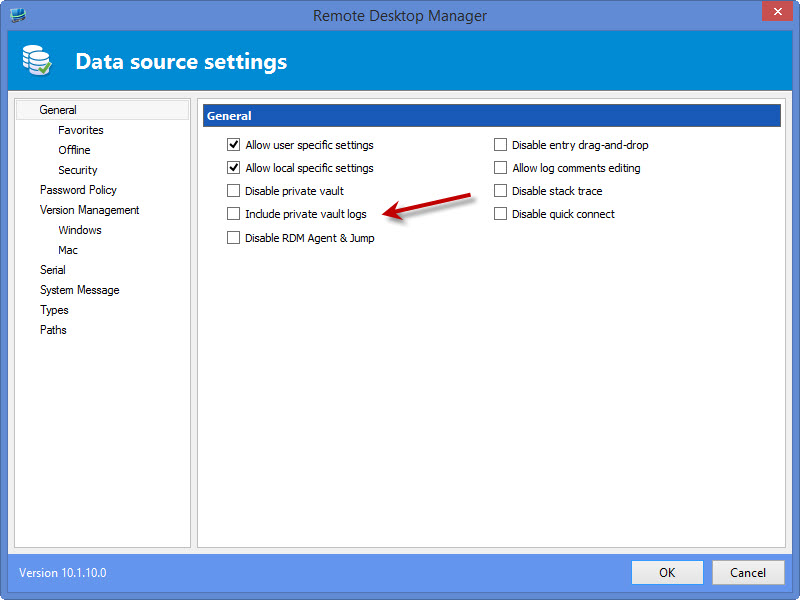
Regarding the other problem, there was an issue with logging from the private vault. There will be an option in the datasource settings to allow private vault logs that will be disabled by default. If you enable it, it will save the logs from the private vault. This should fix your problem.
The changes will be available in the upcoming release.
Regards,
Hubert Mireault
Thanks for this information.
One more point with logging in the offline mode. I know it is not easy but in my opinion it is also a little security issue:
If I don't want anyone to see that I have viewed a password - I can go to offline mode, view the password(s), go to my LOCALAPPDATA and delete the *.off files in the Devolutions folder - and now there are no traps and nobody will know that I now the passwords.
Is there a way to let you know that the logging was manipulated?
Best regards,
Andreas
Hi Andy,
It's a little bit tricky indeed. I will think about it but it's not simple. I think the only solution would be to disable the view password while you are in offline mode. This is the only way to guarantee the security.
David Hervieux
Yes I know...
Disabling the view password in offline mode for us is not an option. We need it for disaster recovery.
Any idea when the option to allow logging from the private vault will be implemented. I can't find it in 10.1.9.0 though I may be searching in the wrong spot.
Regards,
Jan-Pieter
The option should be available for advanced datasources. In the ribbon, go in the Administration tab > Data Source Settings.
The checkbox is unchecked by default.
Regards,
Hubert Mireault
screen2.jpg
Ah, I was looking in the wrong spot indeed.
Thank you!