Startup parameters

Is it possible to start theRDM executable with a datasource parameter ?
This os a followup on my previous question, the idea is to have a powershellscript that queries a certain Windows variable and based on that variable starts RDM using a specific datasource.
Regards
Alex
All Comments (33)
Command line options:
http://help.remotedesktopmanager.com/index.html?installation_commandlinearguments.htm
PowerShell documentation:
http://help.remotedesktopmanager.com/index.html?powershell_cmdlets.htm
Stéfane Lavergne
I dont see an option to specify the sql database to use ?
Data Source == database
So you would need to create a data source for each database and open RDM with the corresponding data source.
Reading your other post, this would work but not the very secure, since nothing would stop the user from changing the data source once RDM is opened.
Stéfane Lavergne
Ok, but how do i create a datasource for a database ?
Right now we have about 300 entries, how can i easily move objects from one database to another database ?
Regards
Alex
I would use Export/Import as described here:
http://help.remotedesktopmanager.com/index.html?tipsandtricks_data_migration.htm
Regards,
Stéfane Lavergne
We are using version 9 in trial, i noticed that we cannot use the powershell options in trial ?
( Since we are a governmental department buying something takes some time :-)
Alex
My database settings are:
Name: SQL Server
DB: RDM
When i try to start RDM with the /datasource:SQL Server it does not work, with "SQL Server" it doesn't work either
Alex
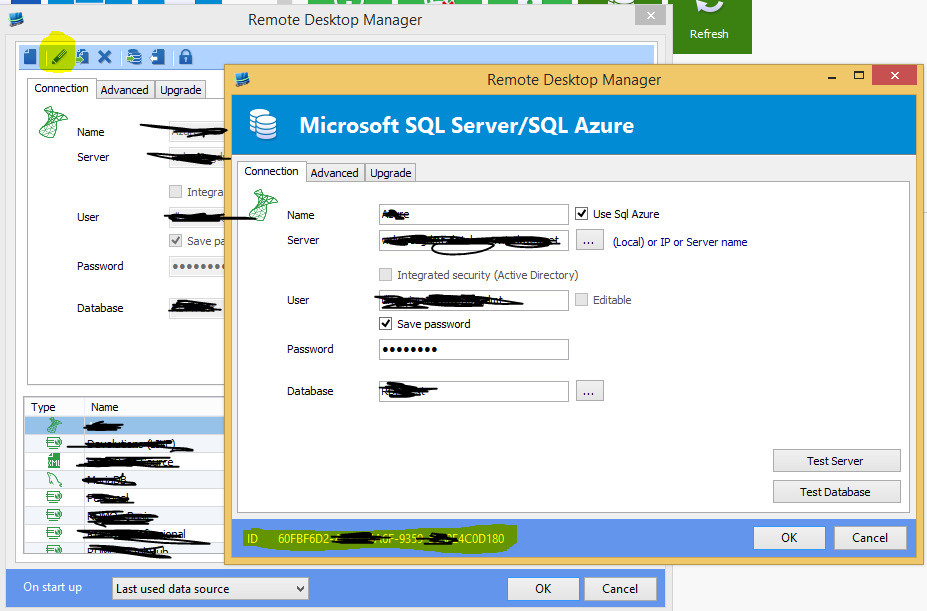
You must pass the data source id
/Datasource:0012415-125451-...
Stéfane Lavergne
Capture[2].PNG
PowerShell should work while in trial. Has the trial period expired?
Stéfane Lavergne
Trying to setup multiple sql databases now, is there a way to export, import the users ?
You have a few options (none are particularly simple or strait forward)
- use PowerShell to script them from one to the other
- copy the tables using SQL statements (GroupInfo, UserGroupInfo, UserInfo)
- create the first database (no sessions), create all your users, backup the database and restore to a new db name hence copying all your user/setup information
You best bet here might be to take a step back and let us know exactly what your are trying to achieve. We might be able to resolve this differently.
Regards,
Stéfane Lavergne
Got powershell to work ( took a long time to start the first time )
Which powershell command to use to export the users ?
Full list of PowerShell CmdLet:
http://help.remotedesktopmanager.com/index.html?powershell_cmdlets.htm
More precisely:
http://help.remotedesktopmanager.com/index.html?get_rdmuser.htm
We don't have an "Export user" CmdLet, you will need to fetch the users using Get-RDMUser, change data source (Set-RDMCurrentDataSource) then use Set-RDMUser to recreate the users on the new data source.
Regards,
Stéfane Lavergne
I was able to use sql to copy the tables over, but then the sql access is not set on the datasource.
Can i set the rights manually on the sql server ?
Thanks
Alex
btw, we still use version 9
Your correct, you've copied over the RDM user information but now you need to configure the SQL user.
Are they all admins in RDM? If so, you will need to run the following script for each user against each database. It creates a user, linked to the existing login and gives it select/insert/delete privileges to then entire database.CREATE USER [user1] FOR LOGIN [user1] WITH DEFAULT_SCHEMA=[dbo]GOGRANT SELECT, INSERT, DELETE, UPDATE TO [user1];GO
If they are not RDM admins then we need to limit database access, let me know so that I can supply a sample script.
Regards,
Stéfane Lavergne
Hi Stefane,
The users are mostly not RDM administrators, they only have view rights.
What we are trying to achieve:
Our systems are divided into "environments", each "environment" has it's own windows active directory, it's own ip subnet.
We access the "environments" using a central vdi system which is running on it's own windows active directory, when we logon to a "environment" we are presented with a vdi desktop and firewall rules which allow us to access the servers in this enviroment.
( yes i know, this means i am sonetimes logged in into dozends of environments. )
There are about 80+ environments.
The requirment we got is that when you logon to an enviroment and start RDM you only see the enviroment you are logged on to.
The only way i sofar found was to use a seperate sql database for each "environment", use a simple script that checks the local ip address of the vdi, based on the local ip address it starts rdm with the correct datasource.
But.....
Creating 80+ databases means i have to administer the users in 80+ databases, which is almost impossible.
I can copy the users with sql statements from one database to another database, but when i am finished with the setup the person who is going to administer this setup is not going to be a happy puppet.
Regards
Alex
Another option would be to rename all entries and put the "enviroment" name in all enties and use a filter when starting up RDM.
Final option would to tll the people who gave us the requirements that what they want is not possible and not manageble
Alex
I would like to do the following:
- Use windowsactive directory groups in SQL for the RDM users ( not admins )
- Use windows active directory groups in RDM ( roles )
- Use security groups in RDM
The plan:
User is member of the AD group "environment-1-SQL", this group has the correct user permissions in SQL
User is member of the AD group " RDM-Windows", this group is in RDM Roles
Under security groups there is a group " Windows"
The folder "Windows" in RDM has security for the security group "Windows"
User starts RDM -> is member of the correct SQL group and gets access ( as user ) to the SQL database ->
user is member of the RDM-Windows AD group ( which is in entered in the "roles" section of RDM ) -> under "roles" the group RDM-Windows has read access to the security group Windows.
Thus the user only sees the Windows folder and cannot change anything.
Would this work ?, and which rights does the user need in SQL ( not admin )
Regards and thanks for all your help
Alex
Alex,
We will have a brain storm session here with the team to try and figure out the best way we could support your infrastructure setup.
I will get back to you soon.
Regards,
Stéfane Lavergne
Hi Stefne
Thanks for your help
Alex
Alex,
I've had a conversation with the guys here. The only real way to make things more manageable for you would be to only have only a single set of users/roles/security-groups but have many connections sets. We have a few ideas on how this might work but we will need to make a proof a concept and test it out. Unfortunately I'm unable to give you an ETA.
Regards,
Stéfane Lavergne
I've added a new feature called "Departments", it's in the latest beta (available here: http://remotedesktopmanager.com/Home/Download#beta)
What are departments? At the moment it's a proof of concept that allows you to have a single database with multiple data sources (views). How does it work?
First create a normal data source and added sessions to it. Departments are "folder paths" so keep that in mind and create you sessions.
Example:
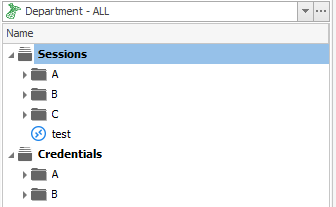
In this example I have 3 departments (A, B & C)
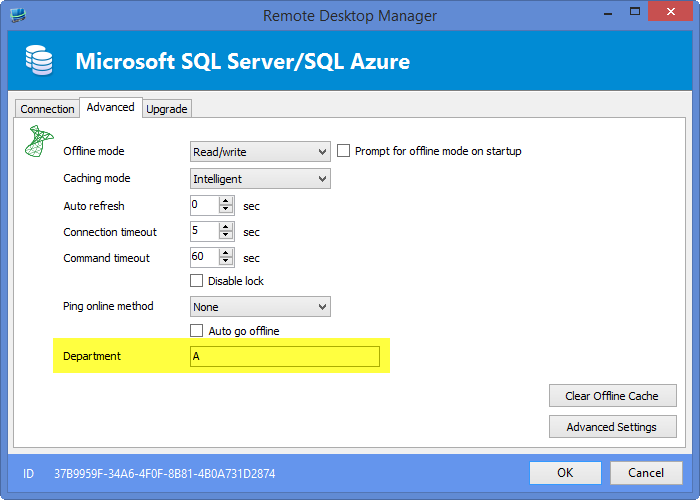
You can now create a new data source (clone the first data source) and set the "Department" in the "Advanced" tab
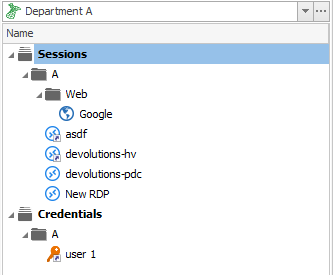
If you now connect using the Department A data source you will only see "A" sessions as follows:
There are some restrictions when using departments. For example if you are in a department data source, you must create sessions within the department and not other departments (we call this cross department). If when on the main data source you can create cross department sessions. Would you be using cross department sessions?
On a performance note, the filter is only applied client side (at the moment) so keep that in mind. If you need 1000 sessions per department and you have 80+ departments the system will be very slow. If we push this concept further we will implement the filter DB side :-)
Let me know what you think,
Stéfane Lavergne
11-27-2014 9-13-55 AM.png
11-27-2014 9-12-26 AM.png
11-27-2014 8-58-41 AM.png
Hi Stefane
Sorry for the late reply, very busy with migrations.
Currently we are busy updating our "golden image" with the latest .net version so we can run the latest RDM
Your new option would be workable, one question though, is it possible to start RDM from the command line and specify the department in the startup options ?
Thanks for all your help
Alex
Currently no we do not have a command line, the department belongs to a data source so it complicates things somewhat.
We would need command line something like /Datasource:{datasource id} /Department:{department} that would load the given data source and force a department filter to it. I would probably need to lock the data source from being switch out (select a different data source) or even edited.
We will discuss internally and get back to you.
Currently your only option would be to deploy the data source to every environment. Prior to starting RDM use Power Shell to set the Department filter then open RDM on the given data source. Not optimal but it will work.
Regards,
Stéfane Lavergne
Sorry, i dont get it.
How do you set the Department filter in powershell ?, it's not the same as the startup filter parameter, right ?
Regards
Alex
No it's not the same as the filter. It requires you start a PowerShell session, load the RDM CmdLet module and call the appropriate commands to modify the data source then open RDM with the data source command line option.
This is far from an optimal solution. I will start the implement of the /Department command line option this morning. I hope to get it down in time to make it into the next build (must be quick 10.1 will be released soon, the pressure is on...)
Stéfane Lavergne
It's done, will be in the next beta build.
Usage: RemoteDesktopManager.exe /DataSource=27C409C6-3186-428D-8B39-001BDCF8AD2F /Department=A
Regards,
Stéfane Lavergne
Perfect !!
We are in the progress of changing to a new golden image for a VDI systems, as soon as we have the new image we can start testing ( we dont have .net 4 in our current image )
I also asked your sales ( Stephanie ) for a new trial key, since i work for the government everything is slow.
Alex
Hi Stefane
Can you let me know when the beta is available ?
Regards
Alex
Stéfane Lavergne
Hi Slorf,
Did you have a chance to test out the department feature?
If so, how is it working for you? We are looking at implementing this in RDMS and greatly appreciate your feeding.
Thank you,
Stéfane Lavergne
Hi Stefane
I quickly tested it and it was working for us.
Right now we are in the progress of upgrading our VDI golden image so we have the newest .net in there and can start using the latest RDM version.
Also our security people have to make a decision about the "departments", basicly they have to decide if we are allowed to to see all the departments, or only the department we are working in.
Above decision depents on the outcome of a discussion we have with the management about how the security people interfere with our daily work.
So based on the outcome of all of these discussions we will have either RDM with or without departments, or with some departments grouped.
Till then we have to live with trial licenses :-(
Alex
Great Alex, thank you for the feedback. If you need a trial extension please let us know. We can work something out for you.
Best regards,
Stéfane Lavergne