Opening new tabs or popups

I'm new to this tool and I am having an issue with setting up URL to access our GroupWise HTTP admin pages. I can get to the page and auto login, but from this page I can view logs which will open another window. This does not work from inside RDM. This is a major issue for my since 9 time out or 10 this is what I need to do when I access this page. I'd rather not have to go back to putting several link on the desktop to do this. Any suggestions?
Thank You!
All Comments (7)
Hello,
I assume you are using embedded sessions, Is the Tabs visible setting set to automatic? Can you try with the Chrome browser?
Maurice
I right clicked a folder and Selected New Entry and then chose Web Browser (http/https) and then added the info for the page. I am already doing with with chrome set as "Web browser Application". I have tried IE and Fire fox as well. I am unable to locate the "Tabs visible" setting to check if it is set to automatic.
Does it look like this?
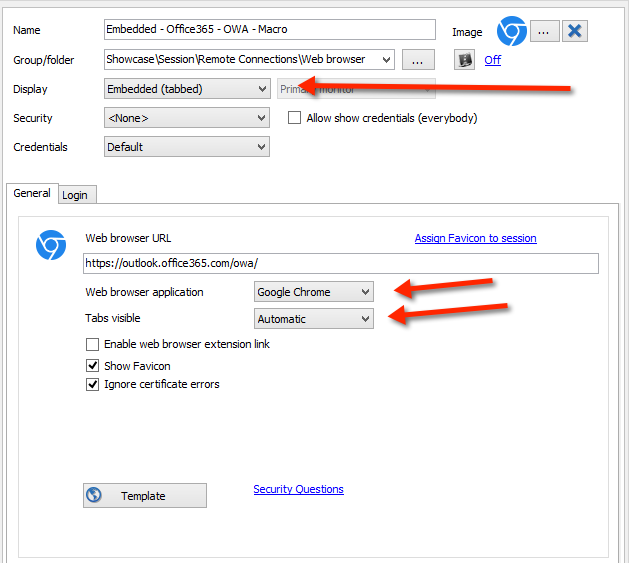
Maurice
web.png
Yes Just like that
ok, so you do have a Tabs visible setting.
I'm afraid this now depends on the source code of the page that triggers a popup being displayed. These embedded browsers do not inherit all of the settings from your main browsers, so even if we added the site to the "Trusted Server" list or lowered security settings it may not do anything.
Would you mind trying with an external browser? You would have to install the matching browser Extension. You also need to check the "Enable web browser extension link" for the extension to be able to get the credentials from that session.
Maurice
It works when Opening it externally
I have created a small test site and when using the Window.Open method it does opens another tab.
I wonder what they use to open a new window. Could you send us the source of the first page?
Thank you
Maurice