Press Enter to select from the Credential List.

Hi
Quite a few of my sessions are setup to prompt for credential upon connect.. The up and down keys can be used to highlight an entry but when pressing return (or enter) instead of selecting the entry it moves down an entry.
Could this be fixed so that pressing enter / return is the same as using the mouse to click the OK option.
Regards
Adam
All Comments (16)
Could you post the credential dialog just to be sure that we fix the right one. This is very simple to fix and it should be included in the next release.
David Hervieux
Sure. Attached a screenshot (with the usernames etc removed)
PromptforCreds.png
Hi,
I can't reproduce it. What version do you use exactly?
David Hervieux
Wait, I've found it.
David Hervieux
Cool - Its version 10.0.4.0 (the latest i think)
Have you tried the latest beta with the fix?
David Hervieux
Yeah, just done a bit more testing now. Pressing enter on the keyboard now selects and passes the credentials though, but it seems to jump down to the row below it and sends that.
Credential1
Credential2
If credential 1 is highlighted and I press enter, it sends over credential2's details.
PS: Thanks very much for the quick turn around and a fantastic product so far.
It strange it's exactly what I've tested. Make sure it send the right credentials. I will verify if I missed something.
David Hervieux
Indeed I was able to reproduce it and NOW it's fixed. Sorry about that.
David Hervieux
Hi David
Just spotted a couple more bugs/idea's:
When opening a session, and the prompt credentials box appears:
If the credential is the first item in the list, and i press enter on the keyboard it sends the username/password of the line below it. Where as clicking OK with the mouse (and not changing which line is selected) sends the correct username/password
Also if I decide to cancel a connection, and press cancel on the prompt for credentials window. It opens up the connection but doesn't pass any credentials to it rather than cancelling the connection. Could this be changed to cancel opening the connection.
Also could another button be added to allow manual entry of a username and password, I know the too has it elsewhere but it would be useful to have a shortcut / option to get to it from this window.
Regards
Adam
PS: Currently running version 10.4.0.0 and can re-create this issue on two different machines.
edited by SimAda00 on 3/24/2015
Hi,
#1 I'm pretty sure this is fixed in RDM beta.
#2 I will try to add cancel the full connection when you press cancel.
#3 You can use the Open select credentials and fill out the credentials in the custom tab page.
David Hervieux
Hi
#1 Its fixed for the other rows, or if i use the up/down keys to select another row. Think there may still be an issue if its the top row, when its selected by default, at the point the window opens and you just press enter.
#2 Cheers
#3 Ah I didn't spot it there. Still think it would be useful to have a button or tab for 'custom' credentials when using a session that is set to display a credential list'. The 'open select credential' and 'Credential list' windows seem to do a very similar job, but I like the ability to scope the credential list down to only showing those in a certain folder.
Hello,
#1. You're right, there was still an issue with the enter button. This will be fixed in the next RDM version.
#2. After looking into it, it's a little tricky but we will work on including this as soon as possible.
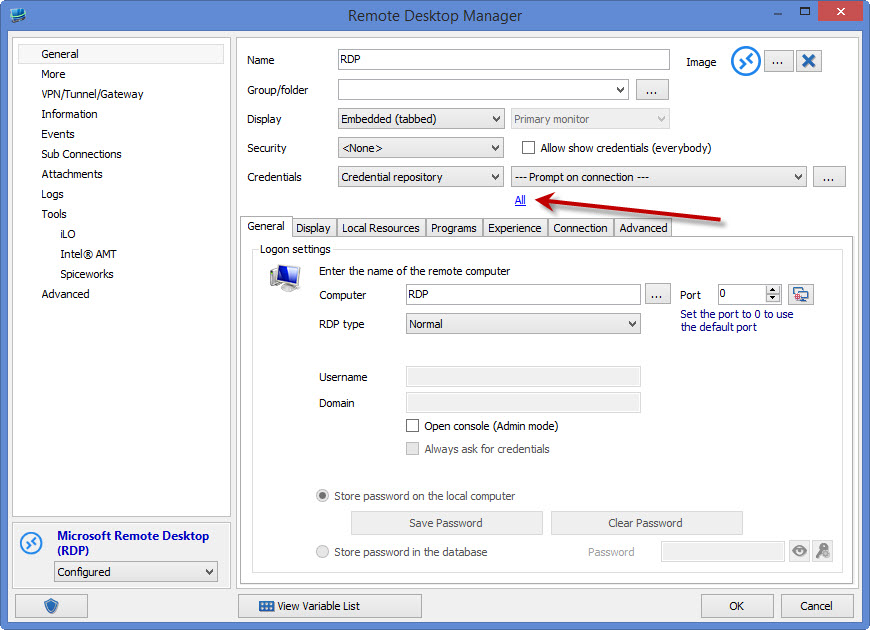
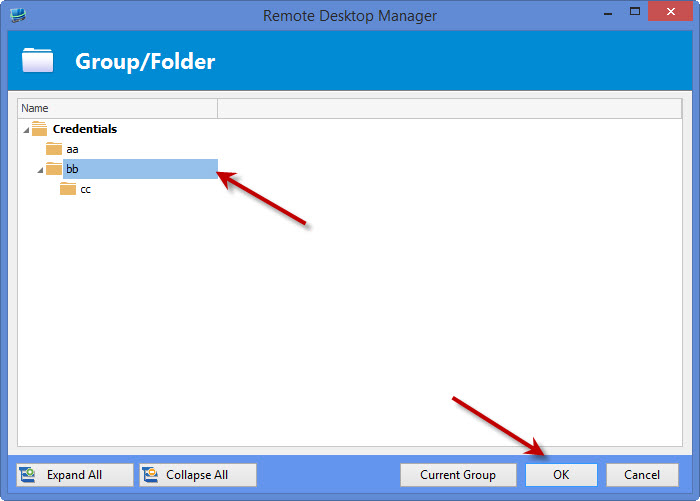
#3. Currently you can select which folder you want to base your credential list from. Click on the "All" button and select your folder:
Is this what you mean, or do you mean having a textbox in which you can enter text to filter the credentials?
Regards,
Hubert Mireault
creds2.jpg
creds1.jpg
Hi
#3 - I use that feature all of the time to restrict what appears in the prompt list as my default credentials option for all sessions. Whilst I didn't think of it having a text box for filtering that would be a nice option too.
I've done a bit more playing around can describe it a bit better with screenshots:
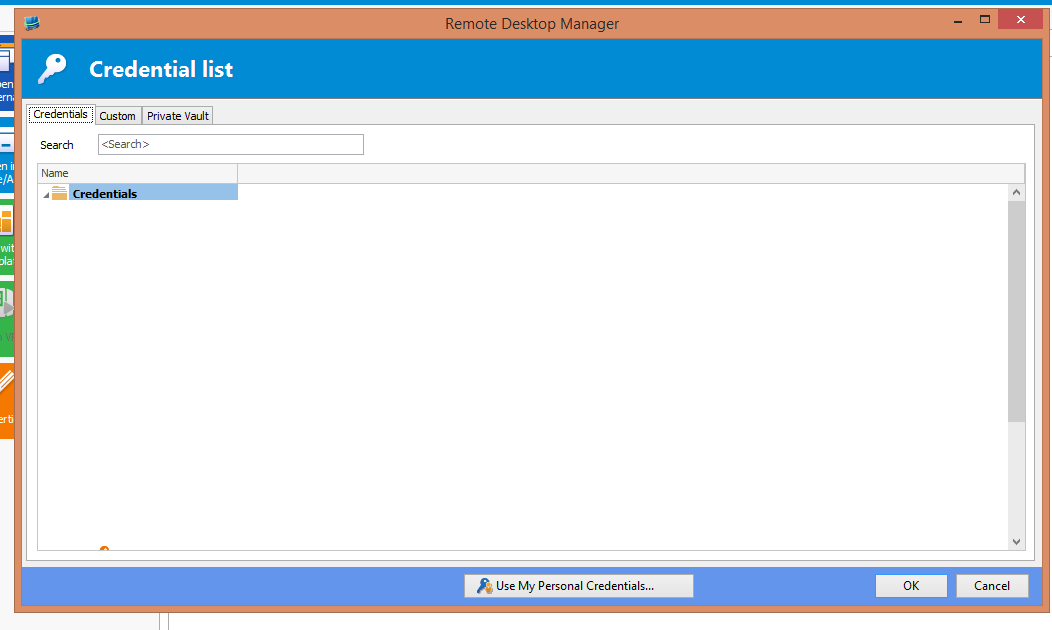
If i right click a session>open with paramters>Open (Select Credential Entry) this screen appears:
This has a tab for custom.
Also this window isn't affected by issue #2
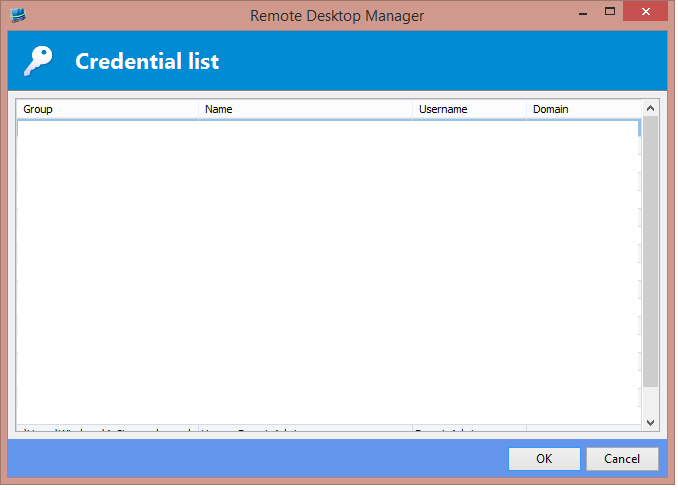
If i have the session credentials set to 'credential repository' - 'prompt on connection' and then open the session this screen appears
This doesn't have a tab for custom, but i think it would be useful. which is what i mean by #3. But a Text box for filtering would be nice too.
It does seem like both of them screens do a very similar job but have slightly different features.
Regards
edited by SimAda00 on 3/30/2015
promptforcreds[1].png
openselectcreds.png
Hello,
I see what you mean, thank you for the screenshots. This is definitely possible and I will keep you updated on when this will be available.
Regards,
Hubert Mireault
Hello,
The screen currently used for prompting (the one without the "Custom" tab, etc) will be replaced by the one which has the custom tab and the filter box. It will not have the private vault tab or the personal credentials though. This should be available in the next RDM update.
Regards,
edited by Hubert Mireault on 4/1/2015
Hubert Mireault