Dynamic SSH Tunnel creation

I am currently evaluating RDM. I'm coming from S-Code VNC Manager which hasn't seen an update in a while, and whose development I feel has stagnated somewhat.
One of the features that it has, which either I cannot see how to configure in RDM, or RDM does not have is regarding SSH Tunnels.
As I understand, in RDM, I can create an SSH session then configure an RDP session to start and stop it as needed. If I want to connect to a server internal to another network, I have to configure the SSH Host setting as the internet routable address (the fqdn of the SSH server, say internal.contoso.com), then set the "Remote Host" setting to the internal fqdn of my target server (say, server.contoso.local).
I then have to configure the RDP session "Computer" setting to use 127.0.0.1, then set the Port to the same as I set for the SSH session.
This means that if I want to connect to multiple servers inside the same network, I need to create an SSH session AND an RDP session for each one, and then make sure that all the port values are unique. If I want to connect to multiple servers on different networks, I need many SSH sessions with unique ports for ALL of them!
That is a lot a configuration, and a lot of ssh session windows open which cause a lot of clutter!
With VNC Manager, this is far less of a headache: I can use the internal fqdn for the target for the RDP session (server.contoso.local). I then configure the SSH Tunnel setting to use the fqdn of the SSH server - internal.contoso.com
When I try to connect, it first establishes the connection to the SSH server in the background (hidden), it then creates the tunnel from my local machine to fqdn as set as the RDP session target on a randomly assigned port, then connects the RDP session using localhost:thatport.
This has several advantages:
1. I do not have to worry about unique port values
2. There are no SSH session tabs that open
3. The actual RDP session is configured to use the targets fqdn so if I go on-site to that network I can simply turn the tunnel off rather than need to either create a new "internal" RDP session with the internal fqdn, or edit the existing one.
Can RDM be configured to do something similar in a way that is less cluttered than the way it seems I have to do it?
It seems to me that the ideal solution would be for a "Dynamic SSH Tunnel" - where with one SSH tunnel session, it can be set to create the tunnel using the fqdn passed to it from the RDP session and select a random port number to use. With the "Connect if unable to ping" option (which is an excellent idea) to decide whether to activate the tunnel, it would mean that no extra configuration would be needed to let you use the same RDP session regardless of whether you were internal or external to the network of the target.
All Comments (4)
Hello,
Can you send us a few screenshots of s-code with the desired config? We have some pieces of the puzzle but we would like to have a better understanding of the workflow in action.
Best regards,
Maurice
Let me explain it.
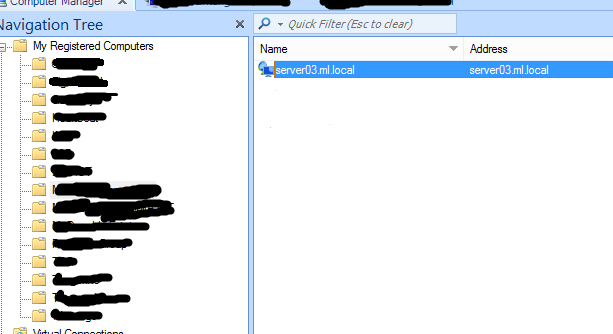
This is the main connection screen. We define each machine we want to connect to.
You can see that the name and address shown here uses an internal, non-internet routable fqdn (ml.local). This is the domain used by the remote network. It represents a windows server named server03.
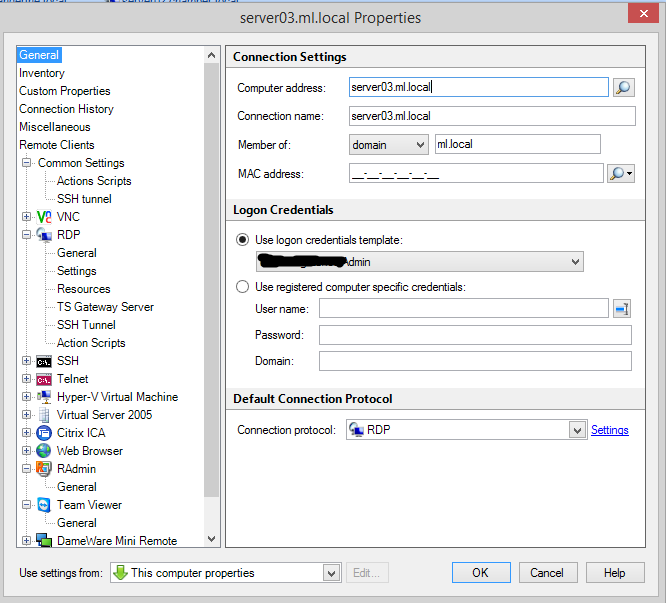
This is the properties window of that machine
You can see the Computer Address is the internal fqdn.
We now configure whichever methods we need to access this machine - RDP, VNC, Telnet etc. In this case it is RDP
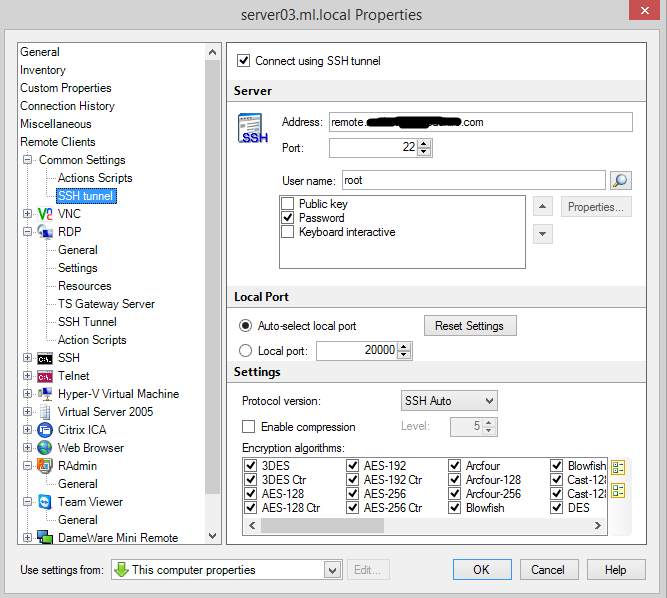
We then configure this machine to say that to access it, we need to go through an SSH tunnel
The Address we set to the internet routable fqdn of the SSH server.
When we initiate the connection to the machine, it will first establish the SSH tunnel from the local machine, through the SSH server, to the fqdn in the Computer Address field. (The SSH server is responsible for performing the DNS lookup of the fqdn since it is establishing the tunnel)
Now no matter which type of remote administration system we use to access this machine, it will create the SSH tunnel with the appropriate destination port and fqdn taken from the Computer Address field.
Because of the "auto-select port" option, it will use any local port number it wants.
I hope this explains it.
The RDM way is that instead of defining a machine then configuring each remote access method for it, a Session is one method and one target together. It makes sense then that each SSH tunnel is a session with a defined local and remote end - but by having to define these, we must make many SSH tunnel sessions - one per remote session. A "dynamic SSH Tunnel session", with the flexibility to pick its own unused local port, then use the fqdn and port from the remote session that called it, would reduce the number of individual SSH tunnel sessions needed per remote network to just one.
edited by DaWolfey on 10/30/2014
3.png
2.png
1.png
Hi,
I've used RDM for a long time now, and I've made myself that same question ever since. What I do is run a plink.exe command line that opens a tunnel with my jump box, and then as DaWolfey stated, set the RDP server address to 127.0.0.1 and a unique, hopefully unused local port number.
It's pretty much of a headache and brings several problems on the long run, like complex to troubleshoot, error prone, too many plink.exe windows open, etc.
I cannot believe that being as complete as RDM is, with so many features and functionalities, there is nothing to deal with that such common situation. I've always thought that I was missing something... am I?
Thanks!
Sebastian
Since I made that post I've got a workaround that is a little better.
It still requires me to create an SSH Tunnel for every individual server, but I don't have to have different sessions depending on whether I am inside or outside of the target network.
Here's what i'm doing:
1. Create an SSH session. Set the host to internal.contoso.com (fqdn of SSH server from outside the network).
Set the remote host to the target servers internal fqdn: server.contoso.local.
Set the Port to a random, unused port. The port generator will help you pick one that is unused in any other session (or so it claims, I have not verified this).
Note this port number.
2. Create your actual remote session (in this case, RDP). We create this as we would if we were inside the network, so:
Set Computer to the internal fqdn: server.contoso.local
Port 0 (if its the default, 3389)
3. Go to VPN/Tunnel/Gateway
Set Open to "Connect if unable to ping/scan". Click the ... and set Custom host to $HOST$
This is telling RDM to only start the SSH Tunnel if the Computer cannot be pinged. Pinging will also fail if you cannot do a DNS lookup for the internal fqdn ($HOST$ will use the value set in Computer for the RDP session, it just saves you from having to change two fields).
4. Go to "More" and under Alternate Host select:
Auto detect(ping)
Tick "Open VPN before"
add 127.0.0.1:SSHport
where SSHport is the Local Port value you set for the SSH Tunnel
You are done.
So what will happen is this:
You click on the RDP session. It first tries to ping the computer. If it responds then you must be local to that server, so it connects directly with no tunnel and you're done.
If the ping fails, then it will start the SSH tunnel.
It will try and ping the computer again, and again it will fail.
Now it will look at the alternate hosts. It will see that the VPN is up and then try to ping 127.0.0.1, which will obviously always work.
It then connects to 127.0.0.1:SSHport with RDP, and you're in via the tunnel!
As I said before, this still requires you to create SSH Tunnels for every target server, and you end up with two tabs open for every one server which is horribly cluttering.
It's odd that in the VPN/Tunnel/Gateway settings of a session, if you set the "Type" to SSH under Configure, it asks you to select an existing session rather than configure something specific just for this session because that option is already covered by setting the Type to Session.
The other Types under Configure allow you to configure something unique for this session, but not SSH...
Perhaps this is simply a bug in the settings tab?