Specify which monitors are used for multimon

Not sure if this is an RDP limitation; I haven't found anything yet that lets me do this.
I have 6 monitors hooked up to my desktop (hey, I had the cards lying around, so what the heck). I am connecting from Win8.1 to 2008R2 Standard. I would like to specify multimon on monitors 2, 3, & 4, but not monitor 1, 5, & 6.
I have been playing around with the rdp files in notepad to no avail trying to get it to work without RDM... so I am not sure if RDP even supports this, so if not, it is certainly understandable that RDM doesn't!
Thanks for any wisdom, or even a definitive "NO" so I quit wasting my time!
All Comments (4)
Hi,
I'm not sure if it's possible even with mstsc. Let me know if you find anything we could look into for embedded RDP in RDM
David Hervieux
Will do! Right now it seems it's 1 or all with MultiMon. Kind of a cheesy workaround, but I am using RDP to all the monitors, then using TV from the 2K8R2 server to go back to the selected monitors on my desktop...
Have a look here: http://social.technet.microsoft.com/wiki/contents/articles/665.how-to-set-the-monitor-for-a-remote-desktop-session-in-a-multi-monitor-setup.aspx
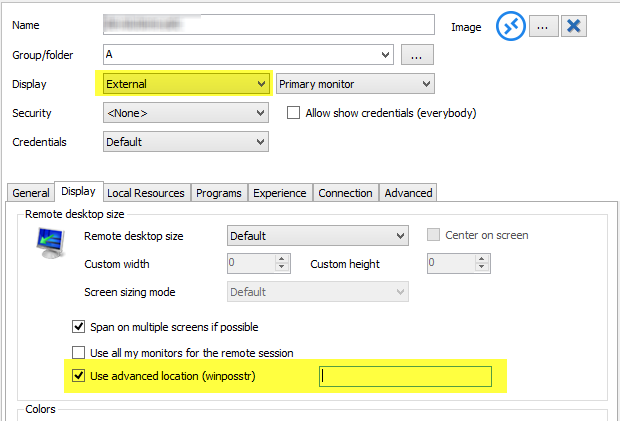
The trick is with : winposstr
You can set a custom winposstr in RDM but only in external mode (see image)
Best regards,
Stéfane Lavergne
10-23-2014 3-01-41 PM.png
Thank you Stafane;
However, this is not exactly what I am searching for. With this, I believe that while it would be possible to set a span covering more than one monitor, you still can't use true multimon for anything but 1 or all of the monitors..
My Monitors are a hodgepodge of different sizes. I might try to get three of the same size together, and see if I can span them to get almost what I am looking for.
Thanks for your effort!