Having issue with PowerShell embedded script.

Hi,
I have issue with PowerShell embedded script in RDM.
This is how the session looks like.
But when I run the script from RDM I get a error since the script is outputted to C:\Users\%username%\AppData\Local\Temp\RDM with some strange letters in the script.
Se picture below.
As seen in the picture above I have in the script the following line:$PSCred = New-Object –TypeName System.Management.Automation.PSCredential –ArgumentList $User, $Pass But in the script that will be outputted the line looks like this:
$PSCred = New-Object –TypeName System.Management.Automation.PSCredential –ArgumentList $User, $Pass
As you might image this will go seriously wrong.
Any ideas how to fix this?
For your info, my PC is running on English US version of OS but with Norwegian regional settings.
Regards,
Ingvar Orn Ingolfsson
System Engineer
Axdata AS - Norway
All Comments (6)
Could you provide us the export of the session with some fake parameters?
David Hervieux
I'm trying to setup the exact same thing and having the same issues with the related release. Has a fix been found or would more information help?
It looks to me that when running something as an embedded script, it does pass though any arguments.
Hi,
Could you provide us the export of the session with some fake parameters?
Do you get the same error exactly or do you get something else. Can you provide us screenshots when you open your session and the content of the file in C:\Users\%username%\AppData\Local\Temp\RDM
Can you also try the latest beta release? (10.4.0.0) http://remotedesktopmanager.com/Home/Download#beta
Best regards,
Olivier Désalliers
Hi
Sorry - should of said that I'm already using 10.4.0.0.
Here are the screenshots of the session and the output when i try and run it. What should be happening is the username and password variables are to be passed as arguments into the script, which are then passed into a powershell credentials object, which is then used to create the powershell session to office 365.
I've also attached as requested the contents of the .ps1 file in 'C:\Users\adam\AppData\Local\Temp\1\RDM' and an export of the session configuration.
Screenshots:
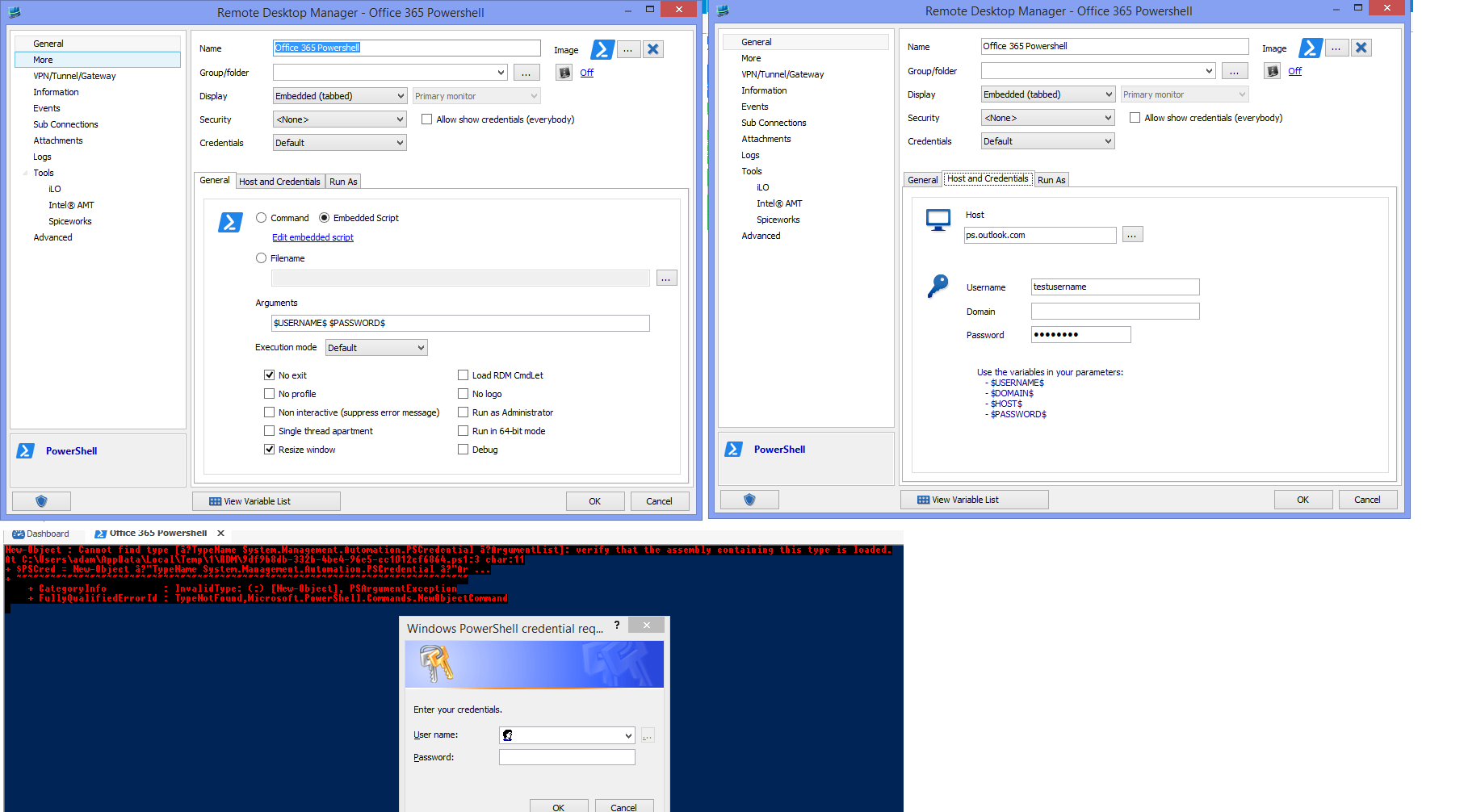
RDM-EmbeddedPSSession.png
Office 365 Powershell.rdm
9df9b8db-332b-4be4-96e5-cc1012cf6864.ps1
Hi,
The problem is the dashes in the line are not the right ones for the encoding:[font='Courier New', monospace]$PSCred = New-Object -TypeName System.Management.Automation.PSCredential -ArgumentList $User, $Pass[/font]
I've done a fix that will be available in the next version that replace the "bad" dashes for the "good" dashes when you open a session.
Meanwhile what you can do is simply replace the dashes by this one: - (the one on your keyboard) and it should work.
I've attached the session with the dashes replaced.
Best regards,
Olivier Désalliers
Office 365 Powershell.rdm
Just tried it and it works now.
I've been beaten by the same sort of thing with " symbols before, its just never something that you really think about.
Thanks for the prompt response and excellent support for a great product. :)
Regards
Adam