RDM Enterprise 10.0.4.0 Hang

Hi,
I just install the 10.0.4.0 version in my environment and we got 2 crashes. RDM was not responding and hung. We got this problem on 3 WS 2012 R2 with lastest updates.
Event:
Log Name: Application
Source: Application Hang
Date: 17-10-14 13:49:14
Event ID: 1002
Task Category: (101)
Level: Error
Keywords: Classic
User: N/A
Computer: WADM222.xxxxxxxxxxx
Description:
The program RemoteDesktopManager.exe version 10.0.4.0 stopped interacting with Windows and was closed. To see if more information about the problem is available, check the problem history in the Action Center control panel.
Process ID: 1370
Start Time: 01cfe9dd470c7a6a
Termination Time: 74
Application Path: C:\Program Files (x86)\Devolutions\Remote Desktop Manager\RemoteDesktopManager.exe
Report Id: 84527b97-55f3-11e4-80c4-005056a018da
Faulting package full name:
Faulting package-relative application ID:
Event Xml:
<Event xmlns="http://schemas.microsoft.com/win/2004/08/events/event">
<System>
<Provider Name="Application Hang" />
<EventID Qualifiers="0">1002</EventID>
<Level>2</Level>
<Task>101</Task>
<Keywords>0x80000000000000</Keywords>
<TimeCreated SystemTime="2014-10-17T11:49:14.000000000Z" />
<EventRecordID>76265</EventRecordID>
<Channel>Application</Channel>
<Computer>WADM222.xxxxxxxx</Computer>
<Security />
</System>
<EventData>
<Data>RemoteDesktopManager.exe</Data>
<Data>10.0.4.0</Data>
<Data>1370</Data>
<Data>01cfe9dd470c7a6a</Data>
<Data>74</Data>
<Data>C:\Program Files (x86)\Devolutions\Remote Desktop Manager\RemoteDesktopManager.exe</Data>
<Data>84527b97-55f3-11e4-80c4-005056a018da</Data>
<Data>
</Data>
<Data>
</Data>
<Binary>55006E006B006E006F0077006E0000000000</Binary>
</EventData>
</Event>
I am trying with the 64bits version to see if the hang happen and I will keep you in touch. Do you know how to avoid this kind problem?
Config: 1398 entries, DB SQL 2012 standard
Regards,
Nicolas V.
All Comments (25)
Do you see anything in the application logs?
David Hervieux
Which one? The Windows one? If yes, I have paste the event text in the previous post.
Sorry the one in RDM: Help->View Application Logs
David Hervieux
This log so...
9H37 was certainly the period I have updated RDM. So nothing concerning the crash...
edited by Nikky on 10/17/2014
DevolutionLogs.csv
Could you give me more details on when those crashes happened? I don't see anything related in the log.
David Hervieux
It will be difficult because we are using RDM intensively. Mainly it occurs for me when I close (by logoff) a remote RPD session.
My colleagues confirm me. 80% (at least) of the cases occur when we logoff a RDP remote session.
edited by Nikky on 10/17/2014
I got the same message with the 64 bits version:
The program RemoteDesktopManager64.exe version 10.0.4.0 stopped interacting with Windows and was closed. To see if more information about the problem is available, check the problem history in the Action Center control panel.
Process ID: 1a50
Start Time: 01cfea007b8e1e32
Termination Time: 52
Application Path: C:\Program Files (x86)\Devolutions\Remote Desktop Manager\RemoteDesktopManager64.exe
Report Id: 8d425135-560a-11e4-80c4-005056a018da
Faulting package full name:
Faulting package-relative application ID:
Nothing in the RDM application log.
The crash occurs just after I closed a RDP session. Steps:
- I click on logoff on the remote computer
- the embedded (tabbed) Windows close
- RDM refresh the screen (it looks like...)
- RDM window become lighted
- RDM hang --- Not responding
- After about 2 minutes, I close RDM by clicking on the upper right X box
- Event is generated in Windows Application Log
Hope this help
edited by Nikky on 10/17/2014
edited by Nikky on 10/17/2014
Just to be sure you don't get this when you click on the X?
David Hervieux
In the sequence, I click on the X after the RDM is not responding state. For your information, One colleague let the RDM in not responding state during 1 week end. (not on the version 10.0.4.0 but with the version 9.0.2....). Maybe they kill the process I didn't check with them.
edited by Nikky on 10/17/2014
It seems that the logoff hang the RDP thread.
David Hervieux
We started to get those error with RDM8. Perhaps you could try to set RDM to use RDP 6 for a test. It's in the File->Options
David Hervieux
For some reasons, we would like to stay with the last version of RDP. One of those reasons is the clipboard functionality which is really better than in older versions.
We will try and let you know but it is a temporary test. I hope you can understand.
Hi, the problem occur with RDP 7.1. We are trying now the 6.
We gave up the older version of RDP. Too much regression. To let you know the volume: the usage log is around 3.000 lines long for 1 week...
Please could you fix a deadline?
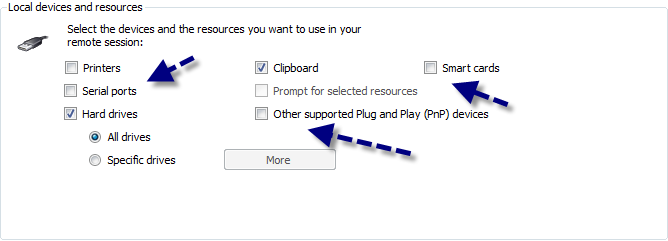
In one specific session that fail, could you try those settings?
David Hervieux
Resources.png
All our RDP sessions have exactly this setting. ...
When you use the logoff from RDM does it happen or it's just when logoff directly from the session?
David Hervieux
I mean the one in the context menu?
David Hervieux
Personally, I never use the RDM context menu to logoff.
Checked with my colleagues, they mainly use the logoff on the remote server.
Could you try it? The problem is that the crash/hang is in the Microsoft ActiveX. So I need to find a pattern or a configuration since I'm unable to reproduce it.
David Hervieux
Ok, we will try to do that... I can imagine it is difficult to create an environment as we have. If it can help, do you think possible to activate a debug mode on the called activex?
It's not unfortunately since we don't have the source code. Could you give more details about your environment? Is it all virtualized?
David Hervieux
99% is virtualized (1.395 servers) with VMware ESX 5.5, 5.1 and some on 4.1. The hardware is VCE.
We are using RDM credential repositoy. Some credential repository entries are connected to Keypass. The others entries, we use User specific settings to set our own passwords.
We have no GPO applied on servers when logoff.
We are around 6 people to use RDM everyday, 20 using it occasionally.
We are also experiencing the RDM application hang - mainly with Windows Server 2012 log offs using the Windows logoff command.
We have blog about that:
http://blog.devolutions.net/2014/12/rdm-hangs-when-logging-off-rdp-sessions.html
David Hervieux