Run a script on multiple Firewalls

I try to create a script and afterwards run this script against several firewalls (via SSH). I read the manual and searched the forums, but I can't find the correct way to do that. Could you please give me a short advice.
When I run the script it also asks me where to run it, when I say in the same tab, it starts some powershell script, but it should just copy some commands like: config system global set strong-crypto enable end into the ssh connection of the ssh connection. This not only for one firewall, but for severals, which should be possible in the actual version?THanks for some tips :-)Best regards.Patrick
All Comments (7)
Hello,
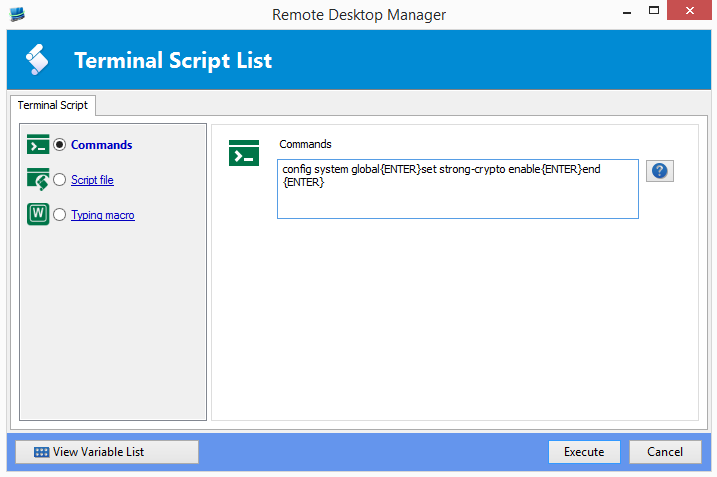
Run all of the sessions using the embedded mode, perform a multi-select in the tree view, then right-click - Execute Script in terminal. This will show a dialog
Enter the command config system global{ENTER}set strong-crypto enable{ENTER}end{ENTER}
Press Execute and reap the benefits of using RDM! ;)
Maurice
2014-10-16_18-01-47.png
Hello Maurice
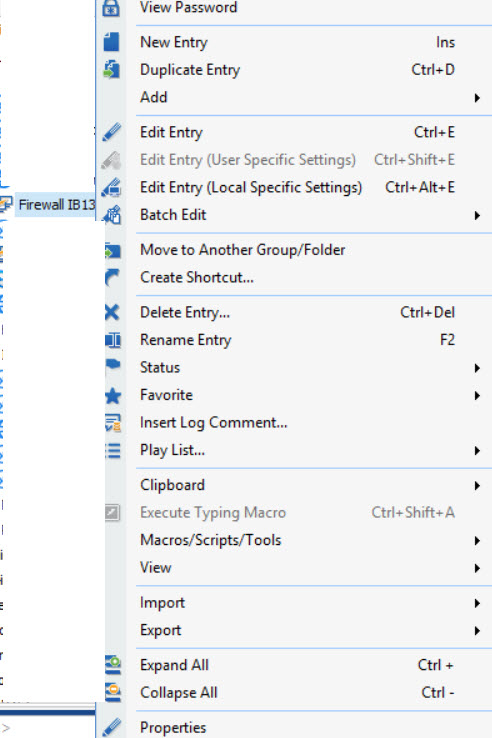
Sounds good, but I don't see the "Execute Script in terminal" when I do a right click:
Is there also a way to have only one entry for a firewall, as we need to logon via website (https) and also via ssh (for cli/script operations).
As soon as this works, is it also possible to put it in a Play List, so I can save my selections of firewalls and let certain scripts run sometime.
Thanks a lot!
Patrick
script.jpg
Hello,
It has to be running.
My favorite way to handle your workflow is to create a Folder for each device but use the "Device" subtype. This will allow you to enter the IP address in the IP field.
Under that folder, you create two sessions, one Web and one SSH Shell. In their respective fields (URL and Host), instead of typing the same IP, you use our $COMPUTER_IP$ variable. This will go up to the folder that matches with the subtype and grab the IP from there.
I would create two playlists, one for the web sessions, and another for the SSH sessions.
Do you need more guidance? I could send you the link to the relevant online help topics.
Maurice
Hi Maurice
These are great tips! Thanks!! Yes please send me the topics, I will read them carefully.
Best regards.
Patrick
Hi Maurice
It worked great now, when the sessions are running. :-) Is there a way to run a script against a Playlist? So The script runs for example on all firewalls via SSH?
Best regards.
Patrick
Hello Maurice
Hope you are fine. Is there a way to run a script against a playlist?
Would be a great thing!
Best regards.
Patrick
Hello,
Not at this time. You could visit our Feature Request forum and ask for it.
Best Regards,
Maurice
