Batch edit of (1000+) RDP Sessions?

I have a RDM environment with more than a 4000 items, more than a 1000 of those are RDP sessions.
I would like to set the 'prompt for comment on close' parameter for all those RDP sessions.
Is there a fast way to accomplish this? I can't seem to filter out the RDP sessions to do a batch edit (?)
All Comments (3)
Hi,
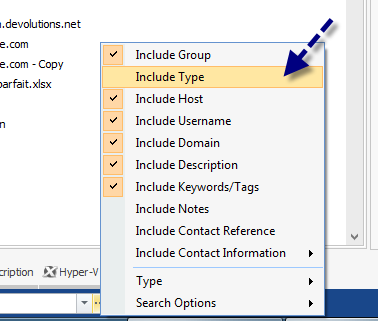
First of all before executing such a big batch edit make sure to backup your database. You can filter the RDP by enabling the Include Type
David Hervieux
IncludeType.png
Hello,
A simple powershell script like http://forum.devolutions.net/topic8555-online-detection--change-all-to-port-scan.aspx
But we need to add a condition : Get-RDM-Session | where {$_.Session.Kind -eq "RDPConfigured"}
and lastly I think that the setter should be like
Set-RDM-Property -ID $Session.id -Path "Events" -Property "CloseCommentPrompt" -Value true
I have to change offices right now, but I'll provide a working version when I reconnect shortly
Maurice
Hello,
Here's a working script$RDMSnapin = Get-PSSnapin -Name *Remote.Desktop* -Registered | sort version -Descending | select -First 1Add-PSSnapin $RDMSnapinGet-RDMCurrentDataSource$RDMSessions = Get-RDM-Session | where {$_.Session.Kind -eq "RDPConfigured"}"Query returned " + $RDMSessions.Count + " sessions"foreach ($Session in $RDMSessions) { Set-RDM-Property -NoRefresh -ID $Session.id -Path "Events" -Property "CloseCommentPrompt" -Value true}
Maurice